

AIMP is a music player designed for mobile devices. It features built-in search and filtering functions, allowing users to quickly find music of interest. Users can also import music files of different formats and add their favorite tracks to playlists for easy listening and sharing. The software also includes an equalizer to help users adjust the sound quality and effects for a more personalized experience. Furthermore, it offers a wealth of customization options, allowing users to customize the playback theme, change playback modes, and even schedule playback to play soothing music at specific times to help them fall asleep more easily.
Click to load YouTube / 点击加载视频
YouTube ↗Features of AIMP:
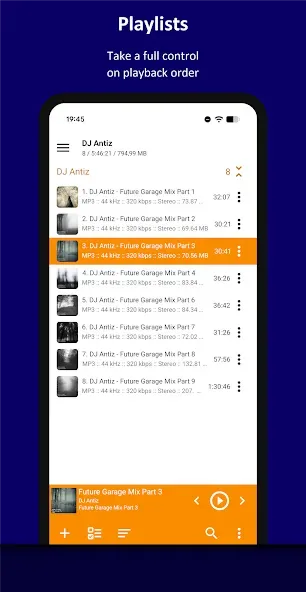
A home for awkward audio formats: AIMP handles familiar formats such as AAC, MP3, FLAC, WAV, and Opus, along with less common files including APE, TTA, S3M, MOD, DFF, and DSF. It also reads M3U, M3U8, XSPF, PLS, and CUE playlists. Files can come from OTG storage, WebDAV cloud storage, or Windows shared folders through supported Samba protocols.Multiple playlists, folder-based smart playlists, custom sorting templates, and filtered search help bring order to a sprawling library. This depth best suits listeners who keep their own music, audiobooks, podcasts, or recordings and want more control than a basic phone player provides.
Bookmarks and controls that earn their place: User bookmarks are particularly valuable. Instead of merely pausing playback, AIMP can save a position for later while leaving you free to play something else. Combined with A-B repeat and speed control, this makes the app useful for audiobooks, transcription work, language practice, and long recordings.Playback tools include a 20-band graphic equalizer, balance and pitch controls, ReplayGain or peak-based volume normalization, cross-fading, stereo and mono downmixing, and a sleep timer. Android Auto support, headset controls, notification controls, and optional track switching with the volume buttons also make AIMP practical away from the main screen.
Deep customization, with MIUI uncertainty: Light, dark, and black themes are included, while custom themes allow much more extensive restyling. Album art, lyrics, internet radio with HTTP Live Streaming, tag editing for several common formats, and ringtone creation round out an unusually substantial toolkit. Playlist presentation could be more visual, though: users looking for album artwork beside each track may find long lists harder to scan.
Functions of AIMP:
An ability to play files from the File Manager applications.
An ability to play files from Windows shared folders (only v2 and v3 of samba protocol are supported).
An ability to play files from WebDAV-based cloud storage.
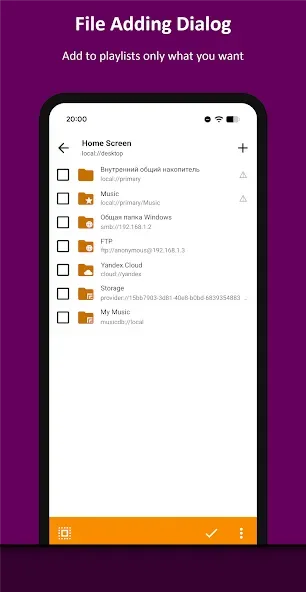
An ability to add to playlist only chosen files / folders.
An ability to delete files physically.
An ability to sort files by template / manually.
An ability to group files by template.
An ability to search files in filtering mode.
An ability to share audio files.
An ability to register playing track as ringtone from player.
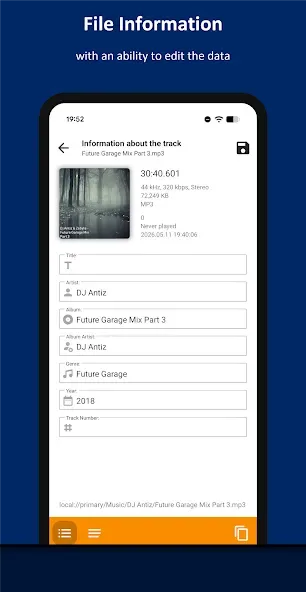
An ability to edit meta of APE, MP3, FLAC, OGG and M4A file formats.
User Reviews of AIMP:
After weeks of searching, I finally found this player, which has all the features I have been looking for. One improvement I could suggest would be to add album arts to tracks in playlists, so finding songs would be much more intuitive and less straining on the eye.
Might honestly be the best music player I've used after the legendary VLC! AIMP is fast, lightweight and doesn't try to overcomplicate things. It plays pretty much everything... One thing I'd really love to see, though: please add more detailed audio information while a song is playing — bitrate, bit depth, sample rate, codec, and whether the output is actually bit-perfect/exclusive to the DAC etc.
I'm using this to listen to online radio when I'm jogging, to me, it's the best audio player. it's clean, no ads, simple and gets the job done all the time. it has a lot of options to satisfy listening experience and I'm very happy to have discovered it many years ago. it's my music player on the PC as well, thank you for this app.
Only issue is Emojis not supporting in search bar. Other than that, this is among the top 2 music players I've ever used. PS: Can the emoji search be added in the future? Edit: I prefix my filenames with emojis to organize track types, but AIMP's search bar doesn't support or index emoji characters. Typing or pasting an emoji yields zero results, making quick category filtering impossible. Please add full Unicode/UTF-8 emoji support to the search engine..
FAQs of AIMP:
How did it all begin?
In short, two factors were at play: 1) I found Winamp—which was buggy at the time—inconvenient to use... plus, my computer wasn't very powerful (it had 128 MB of RAM, and Winamp was quite resource-hungry). It also crashed constantly, making it impossible to listen to music while doing anything else. 2) I was eager to gain programming experience and write something of my own, for myself—so I started...
What is the AIMP MMC Pro player?
AIMP MMC Pro was Artem Izmaylov’s first project—an audio and video player. The initial release of AIMP took place on November 14, 2004. However, the project was discontinued a couple of years later for specific reasons. Versions 5.x and 3.x of AIMP MMC Pro were released.
What is MD5, and what is it used for?
It is a file checksum used to verify the file. A mismatch occurs only if the file was downloaded incorrectly (with errors) or modified (by a person or a virus). Comparing the checksum of your downloaded file with the one listed on the website guarantees a 100% match. You can get a simple MD5 calculator here.
Where can I find the track mixing/fading settings?
Main Menu > Sound Effects Manager > Mixing Parameters tab.
Why doesn't the alarm wake the computer from sleep mode?
Make sure your power plan settings allow the computer to wake up when timers trigger.
Is it possible to run multiple instances of the player?
You simply need to launch AIMP with the `/DEBUG` flag. However, the two instances won't function fully—for example, regarding system integration.
Summary:
AIMP is a very flexible media player. It provides convenience to its users with its multiple functions and features. You are also given the chance to personalize the media player by selecting themes from its already available templates or by creating one of your own.








