neutriNote is a powerful, open-source note-taking tool. Featuring a user-friendly interface and convenient search and filtering capabilities, it helps users capture and organize their thoughts simply and efficiently. With neutriNote, users can quickly browse notes with a single click using the convenient search and filtering features. The app also offers a variety of plugins, allowing you to create a personalized note-taking experience, link notes with web services, deeply configure workflows, and simplify operation steps.
Highlights:
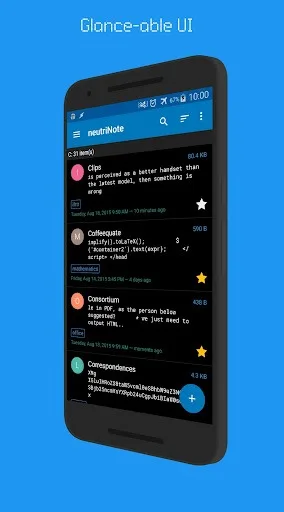
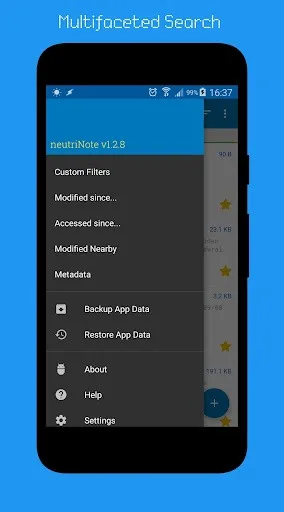
Uncluttered UI: Fine-tuned user interface elements to reduce app switching. Accessible search filters for precise navigation to your note contents with minimum taps.
Customization: Your workflow can be further automated by Tasker, Barcode Scanner, ColorDict, and other add-ons, or by connecting neutriNote's repository to web-based services. Options available to deep configure your note taking process.
Backup: Multiple ways to backup your notes. Freedom to pick a cloud backend that works for you: open source P2P Syncthing, Dropbox, or third party Google Drive, Box, OneDrive components.
Cost: Totally free. No hidden permission (see below). Optional add-ons can be purchased to support its development.
Features:
The application features an uncluttered user interface that prioritizes ease of navigation. Specific design elements are fine-tuned to minimize the need for switching between different applications. This streamlined approach is complemented by accessible search filters, enabling users to locate their notes quickly and efficiently. The emphasis on user experience ensures that navigating through contents requires minimal taps, making it user-friendly.
Customization options are a significant aspect of neutriNote. Users can automate their workflows by integrating the app with other tools such as Tasker, Barcode Scanner, and ColorDict. Additionally, the app allows for deep configuration, enabling users to tailor their note-taking processes according to their preferences. This flexibility in customization makes it suitable for a wide range of use cases.
Backup capabilities are essential for any note-taking application, and neutriNote provides multiple methods to ensure that users’ notes are secure. The application offers the freedom to select a cloud backend that aligns with individual needs. Options include open-source peer-to-peer solutions like Syncthing, as well as popular services such as Dropbox, Google Drive, Box, and OneDrive. This variety ensures that users can choose the backup method that best fits their workflow.
Tips and Tricks:
Utilize the Search Filters
Take advantage of neutriNote's accessible search filters to quickly find specific notes or content within your notes. This feature can help you locate information efficiently and reduce the time spent searching for relevant notes.
Explore Customization Options
Experiment with the customization options in neutriNote to tailor the app to your preferences. Whether you want to automate tasks, connect to external services, or configure advanced settings, exploring customization can enhance your note-taking experience.
Regularly Backup Your Notes
Make use of neutriNote's backup capabilities to safeguard your important notes and ensure they are always accessible. By regularly backing up your notes to a secure cloud backend, you can prevent data loss and protect your information.
FAQs:
Can I deny or revoke certain permissions needed by the app?
Yes, you can deny or revoke permissions such as location access and camera access if you choose to. This can be done either from the app's Settings or via Marshmallow's runtime permissions.
How can I test the latest features of the app?
You can test the latest features of the app by joining the app's beta testing program through the Google Play Store. Simply follow the link provided to become a beta tester and access new updates before they are officially released.
Final Words:
The ability to download neutriNote enables users to take advantage of these features, enhancing their productivity and organization in personal and professional contexts. By providing a platform that supports various forms of content, neutriNote caters to diverse note-taking needs and preferences.