
True Liquid Glass is a personalization app designed specifically for Android devices. The app offers a wide variety of themes to choose from, along with matching wallpapers and icon packs, allowing users to enjoy a stylish and personalized user experience. With its user-friendly interface, True Liquid Glass makes it easy for users to browse different categories and discover themes they love. With a stable network connection, file downloads are usually fast, and the installation process is very simple. You can simply go to the theme settings, find the theme you have downloaded, and apply it to your home screen.
Click to load YouTube / 点击加载视频
YouTube ↗Highlights:
Visual Depth: The application will bring you images with extremely artistic and perfect depth. Bringing you extremely professional interfaces like a luxurious and expensive phone.
Dynamic Lighting: These images also have the most perfect lighting. You will be presented with images with complete layouts and clearly distributed lighting. Bringing you the most beautiful screens for your device.
Motion Response: Coming to this application, you will be presented with extremely attractive, dynamic screens. Unique animations will make your phone more attractive and stylish. It makes you fascinated every time you use it without feeling bored.
Features:
Unique liquid glass icon design for a modern, polished home screen look
High-resolution icons that stay crisp on phones and tablets of any size
Works with popular launchers like Nova, Apex, Smart, and Lawnchair
Matching HD wallpapers to complete the overall theme and layout
Lightweight build with frequent updates to expand app icon coverage
Easy application through your launcher with flexible theme combinations
Tips for Users:
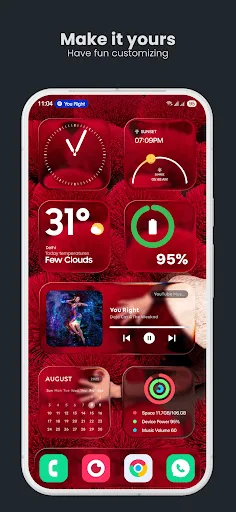
Seamless Customization: The application will bring you a complete set of tools. With this set of tools, you can quickly customize and edit without encountering too many difficulties or obstacles. Helping you to own the most perfect interface.
Real-Time Editing: With this application, you will be able to quickly edit your images and interfaces immediately. Giving you an extremely perfect and synchronized interface.
Independent Control: The application gives you an extremely intuitive controller. With this controller, you can quickly use it without encountering any difficulties or taking too much time to get used to it.
Pros & Cons:
Pros
Highly customizable glass wallpaper effects.
Live Editor works directly on the screen.
Supports images, folders, videos, and presets.
Includes fonts, widgets, themes, and .tlg backups.
Latest version improves layout and depth controls.
Cons
Initial setup may feel crowded.
Some behavior depends on launcher compatibility.
Final Words:
There are a few downsides to keep in mind. Advanced visual effects, live wallpapers, motion features, and video backgrounds may use more battery than a static wallpaper. Setup can also take a little patience, especially if you want a neat layout instead of random floating glass blobs. Standard Android widgets are not built into the app either, so the best results may depend on how well your existing widgets match the glass style.








