

because technology is constantly advancing and reaching new heights, both the internal workings of smartphones and their external appearance are constantly being improved. These days, screens are an essential component of the sector that enables users to carry out their activities and work. We android users are sick of using the android launcher, which does not include any further changes to the functions or additions to the traditional features. As a result, it is uncommon to find screen upgrades. Therefore, we have this niagara launcher, which is widely known and adored for its great custom tools and adaptive features to make the screen, functionalities, grid layouts, personalization, and a lot more accessible for everyone. These tools and features have won widespread recognition and acclaim. Users can now operate with everything in an ergonomically efficient manner, and they may control the entire set of features and gadget functions with just one finger. Bringing simplicity to both its application and management.
Click to load YouTube / 点击加载视频
YouTube ↗Features:
Intuitive Layout: With an intuitive layout, you can easily use it, and we clearly show the search toolbar and display the weather in the locality where you live.
Customizable Aesthetic: You’ll be able to express your aesthetics with customizable icon packs and wallpapers that will be clearly visible to others.
Clean Look: Our app is designed with a minimalist interface and a clean home screen that focuses on the main content you have customized.
Productivity Focus: We help you boost your work productivity by helping you avoid being bothered by other things and making you more comfortable.
Reachability: With mobile devices with large screens, it is very inconvenient to use both hands, so our application is designed so that you can surf applications on your phone more easily.
Convenient Swiping: In addition, touch swipe actions on your phone will automatically navigate and will not require you to perform many complicated operations with both hands.
Notification Syncing: Synchronize all notifications of all applications that you have downloaded on your mobile phone so you can easily manage all notifications of applications.
Adjustable Features: In addition, we also integrate features to customize the appearance of folders or customize the animation and sound for notifications sent to you from your application.
Highlights:
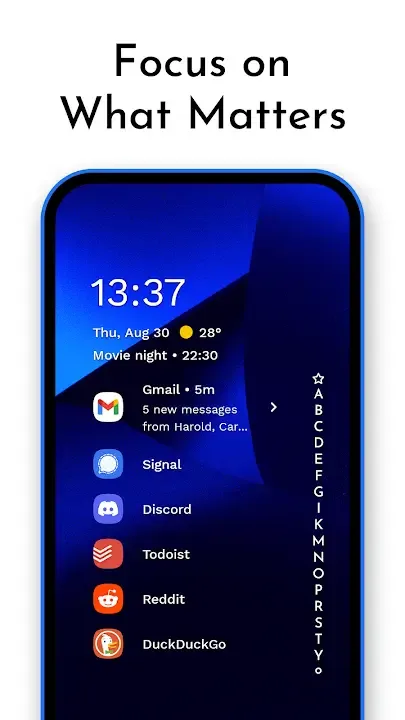
Ergonomic Efficiency: The standout feature is its ergonomic efficiency, allowing users to access everything with one hand, regardless of their device's size.
Adaptive List: Unlike traditional grid layouts, it employs an adaptive list that adjusts to your needs. Relevant information seamlessly appears when needed, whether it's the media player, incoming messages, or calendar events.
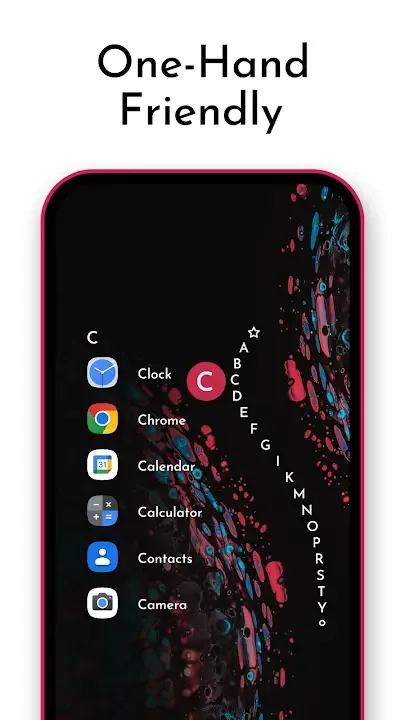
Wave Alphabet Navigation: The unique wave alphabet navigation system enables users to efficiently reach every app without opening an app drawer. This intuitive wave animation not only feels satisfying but also enhances one-handed navigation.
Embedded Notifications: Users can read and respond to notifications directly from the home screen, streamlining communication.
Focus on Minimalism: The streamlined and minimalist design declutters the home screen, reducing distractions and providing a user-friendly experience.
Lightweight & Lightning Fast: A small footprint of just a few megabytes ensures no unnecessary space is wasted on your device.
Personalization: Users can impress friends with its clean look and customize it to suit their preferences. Integrated icon packs, fonts, and wallpapers are available, or users can incorporate their choices.
Active Development & Community Support: It stands out for its active development and supportive community. Users can engage with the community to troubleshoot or voice their opinions, creating a dynamic and responsive ecosystem.
Strengths:
User Interface: The most distinctive feature of Niagara Launcher is its unique and minimalistic interface. The app replaces the standard home screen with a single-page vertical interface that displays a list of your most frequently used apps and notifications. The interface is designed to be easy to use with one hand, and it allows users to access their favorite apps and notifications quickly.The interface also features a search bar at the top that allows users to quickly find and launch apps. Users can also customize the app icons and the wallpaper to suit their preferences.
Notifications: Niagara Launcher has a unique approach to managing notifications. The app organizes notifications by grouping them based on their type, such as messages, emails, or social media notifications. This helps users to quickly identify and prioritize notifications from the most important apps.Users can also swipe left or right on notifications to dismiss them, or swipe up to see more details or actions related to the notification. The app also allows users to snooze notifications, so they can deal with them later.
Performance and Battery Life: Niagara Launcher is designed to be lightweight and efficient, with minimal impact on battery life and performance. The app is optimized to run smoothly even on older devices, and it doesn’t consume a lot of system resources.The app also features a built-in system monitor that displays information about CPU usage, memory usage, and battery life. This allows users to monitor the performance of their device and identify any apps or processes that may be causing issues.
Customization: While Niagara Launcher has a minimalistic interface, it still offers users a significant amount of customization options. Users can customize the app icons, the wallpaper, and the font style and size. The app also supports third-party icon packs, allowing users to further personalize their experience.Users can also customize the app’s behavior, such as disabling the app drawer or hiding specific apps from the list. The app also features a night mode, which changes the interface to a darker color scheme, making it easier to use in low-light conditions.
Privacy and Security: Niagara Launcher prioritizes user privacy and security. The app doesn’t collect any personal data or usage information, and it doesn’t require any unnecessary permissions. Users can also password protect the app to prevent unauthorized access.Niagara Launcher is also compatible with Android’s built-in security features, such as the fingerprint scanner and face unlock. This adds an extra layer of security to the user’s device, preventing unauthorized access to their data.
Benefits:
One-Handed Access: Despite the era of bigger phones, one-handed use of our smartphones is still a strenuous process. To solve this problem, Niagara Launcher Mod APK Android shows all the app types in a vertically scrolling list. And with its ergonomic design, it doesn’t matter how large a phone you have — needing to reach something on your screen will never be a problem. This is a great alternative for anyone tired of leaning to the other side of the display to hit tiny icons.
Smart Notifications: Useing Niagara Launcher Mod APK, you will able to use a beautiful and modern way to stay connected without cluttering the home-screen. Instead of rudimentary icons, notifications fill a corner of your screen, so that you can read and reply to messages or alerts without losing your train of thought.
Minimalist Interface: The clean design of Niagara Launcher Mod APK Latest Version does not include unnecessary icons, widgets and notifications to distract users in an ambient environment. This more streamlined approach eliminates clutter and makes your phone more fun to use.” We are completely free app, there are no ads, no pop-up screens.
Customization Options: We recommend this option until everyone can adjust the phone according to the need. In short, customizing the home screen in various novel ways with specific icons, fonts for the text and modifying the wallpaper in all regards is fairly simple and uncomplicated. And now, you can hide unused or default applications even more than you could before, placing yet more control in your hands over how your smartphone looks and feels. You can design a custom layout that is unique to you and your needs.
Tips for Users:
Take advantage of the ergonomic efficiency feature: As mentioned earlier, Niagara Launcher allows for easy one-handed access to everything on your phone. Make sure to utilize this feature by customizing your layouts to suit your preference and making it even easier to navigate through your apps.
Prioritize your notifications: With Niagara Launcher's continuous and prominently displayed notifications, it's important to prioritize which ones are most important to you. Customize your notification settings to ensure that you only receive the notifications that truly matter, reducing distractions and keeping you focused.
Experiment with different home screen layouts: The customizable nature of Niagara Launcher allows for endless possibilities when it comes to arranging your apps. Take the time to experiment with different layouts and find the one that works best for you. You may discover a layout that enhances your productivity or makes it more visually pleasing for you to use your phone.
Conclusion:
downloading the niagara launcher mod apk will allow you to control, personalize, and configure your device with just the right amount of ergonomic efficiency, allowing you to quickly monitor your device without the need for any commotion that might disturb nature. It is not necessary for you to waste time checking for notifications, searching for apps, or being distracted by things that appear on the screen. Owing to the fact that this location will provide you with everything that is necessary to completely maximize the capability of the device. In this mod, you will be able to get all of the potential unlocked and premium tools of device customization and control for free, while all of the adverts will already have been banned.








