

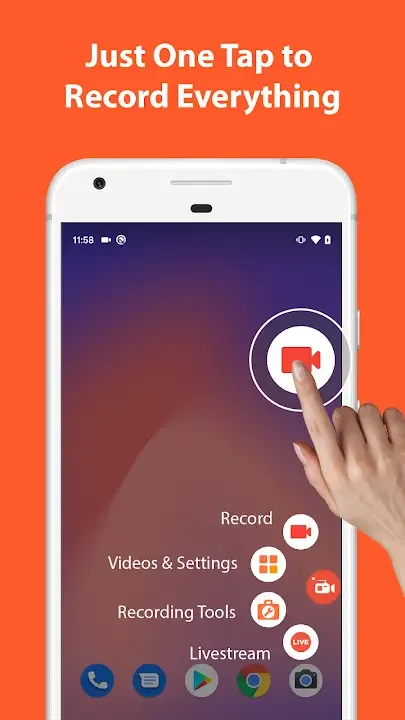
AZ Screen Recorder is an app to record everything that happens on the screen of your Android device without having to have the device rooted. You will, however, need Android 5.0 (Lollipop) or higher, or you can't use the app.AZ Screen Recorder's interface is simple and elegant. When you start it, you'll find four icons in the center of the screen: to start recording, to adjust app settings, to access the folder with your recorded videos, and to exit. From its settings, you can choose the video output quality or see interactions with the screen done during the recording.
KEY FEATURES
Screen recording: this function lets you create beautiful screen record videos.
- Easily start/stop screen record with control buttons.
- Pause/resume screen video recording at any time.
- Screen recorder with audio from the mic.
- Screen recorder with internal audio.
- Show your face in a floating window with facecam.
- Record screen video to GIF.
- Draw on screen while screen recording.
- Shake device to stop screen video recording.
- Transfer screenshot video to computers using Wifi.
Video Editor: this screen video recording app also lets you edit videos.
- Trim videos.
- Remove middle parts of videos.
- Merge videos.
- Add background music.
- Add subtitles.
- Extract frames from videos.
- Crop videos.
- Rotate videos.
- Compress videos to save space for new video records.
Livestream: this screen recording app can also be used as a live streaming app for Youtube or Facebook.
You can broadcast your phone screen to friends, followers, subscribers and other viewers. The following features are provided to help you livestream conveniently:
- Broadcast phone screen together with audio.
- Various video stream resolutions.
- Optionally show your face while live streaming.
Screenshots and Image Editing
AZ Recorder is more than just a screen video recorder app. It can also help you take screenshots and edit images. You can capture screen easily with one tap and use in-app image editing tools to:
- Stitch images: auto detect and combine several images into one.
- Crop images: remove unwanted parts.
- Blur image: pixelate areas you don’t want to show.
- Add text, emojis or draw directly on screenshots.

Highlights:
Users can easily capture the perfect moment with one tap.
The user can also enable or disable the one-tap Trash control to customise their recording settings. Watermark-free video recording is a benefit of this device. This allows users to record films and images without marks, producing clean, professional results. Users can record without time constraints, making it convenient. This amazing feature does not require root access, making it available to more people. The floating window is another highlight of this video recorder. The floating window can be concealed while not in use, allowing for clear recording.
Capture life's most precious memories with ease and convenience.
A standout video editing tool is the video trimmer. This powerful feature lets users trim, chop, and split films into stunning works of art. The video trimmer polishes the final output by deleting extraneous footage and highlighting key moments. Cropping and rotating films offers creativity and customisation. Users can now tilt their films left or rotate them to any angle. This function lets users express their artistic ideas and make stunning videos. The video editing app is compatible with all systems and adaptable for every situation.
Express your personality by adding humour and personal remarks.
Users can easily integrate their movies into social media, presentations, and personal projects by adjusting the ratio and background fit. This adaptability lets users seamlessly switch between mediums, optimising their videos for each channel. The software allows music video creation in addition to these remarkable features. Users can improve their videos and evoke emotions by adding popular music. This tool gives videos another dimension, boosting creativity and interest. The app offers amusing stickers and text to customise videos. These components let users personalise screen captures, making them distinctive.
The app also has Story, Vintage, Lomo, and other attractive filters.
These filters give users many ways to improve their videos' visuals. There is a filter for every taste and artistic vision, from nostalgic to flamboyant. Additionally, the software lets users alter video speed. With the option to speed up or slow down footage, users may manage video tempo and rhythm. This tool gives users more flexibility and creativity to produce videos that match their mood and setting. Finally, the software lets users store drafts for tweaking and refining. This functionality lets users edit and improve their projects at any moment. The software encourages iterative and collaborative video editing, allowing users to realise their goals over several iterations.
SCREEN RECORDING
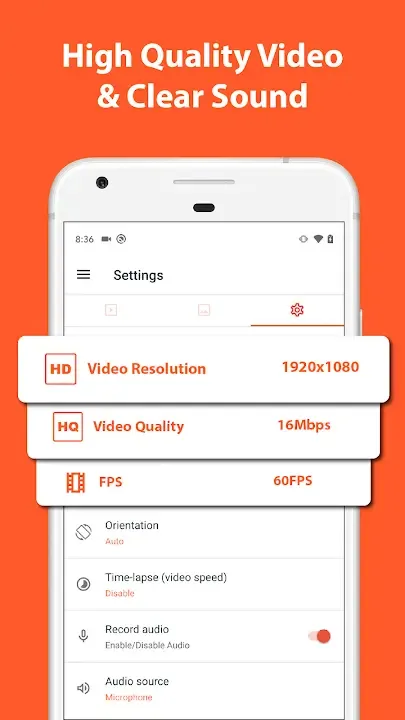
The core feature that the application brings is screen recording. Of course, if it is like other screen recording applications, there is nothing to say. It is superior in video quality as well as other advanced features.
Versatile Control Options: Users can use a series of operations simply and easily without interrupting the video. While recording the screen, you can completely Start/stop or pause/resume to do other arising tasks. This makes recording not too difficult and restrictive for users anymore.
Flexible Audio Choices: Choosing the audio source of the video is also extremely simple and easy. Normally, with different purposes of use, users will have different options. It allows you to record voice on the device or voice from the outside as easily as pie.
Enhanced Creative Features: In addition to the core features above, users love the application because of its advanced creative features. You can completely create an additional Facecam overlay to insert your face into the video record. This is suitable for tutorial videos or teaching videos. Besides, users can also create GIFs from video records and draw on the recording screen easily.
Frequent questions
Is AZ Screen Recorder free?
Yes, AZ Screen Recorder is free. The app has a premium version that you can buy for €3.29, which lets you remove ads. This premium version will also hide the save window after completing a recording.
How long can AZ Screen Recorder record for?
AZ Screen Recorder has no time restrictions, so you can record videos as long as you want. Make sure to keep an eye on your Android's available memory, as it might become full.
Does AZ Screen Recorder record audio and video?
Yes, AZ Screen Recorder records both audio and video of the screen. In the settings, you can choose whether you want to record only the internal audio of your device or record with the microphone.
Does AZ Screen Recorder support 1080p?
Yes, AZ Screen Recorder supports 1080p and all resolutions below 720p. Not only that, but you can also record at any frame rate you want: from 120 FPS to 15 FPS. However, the higher the resolution and the frame rate, the larger the video size will be.
Can I record video calls with AZ Screen Recorder?
No, AZ Screen Recorder doesn't allow you to record video calls. The reason is simple: Google does not allow more than one app to access the microphone, so if your video call app is using the microphone, AZ Screen Recorder won't be able to use it.
Conclusion:
The AZ Screen Recorder application is completely free and contains no ads, you can download and use it without paying any fees. In addition, AZ Screen Recorder also supports many different languages so that you can use the application easily. There’s really no reason to ignore such an app, is there? It would be hard to find a better free app than AZ Screen Recorder. Download the app today to experience its amazing features!








