
OnePro (Dark) Icon Pack is an exceptional theme app. It offers Android users over 3,800 dark-themed icons based on OneUI 7, paired with over 300 exclusive wallpapers for a seamless dark aesthetic. Experience a minimalist and modern icon pack, freely adjusting and arranging the content displayed on your device to create a beautiful interface. The developer promises to continuously expand the icon library with OneUI 7 updates, making it the perfect personalized choice for Samsung users seeking understated luxury and dark color enthusiasts. Download and experience it now!
Click to load YouTube / 点击加载视频
YouTube ↗Features:
Rich icon store
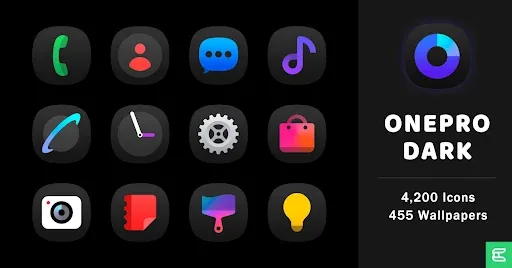
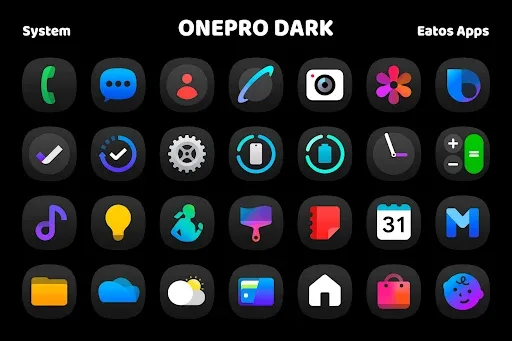
The icon collection in OnePro (Dark) is extremely impressive and rich, meeting the needs of personalizing the interface for Android users. The application provides more than 4,200 icons designed in dark tones, creating an elegant and modern beauty.
Each icon is optimized with a resolution of 192×192 pixels, ensuring sharp, vivid images on all types of screens. These icons are in the One UI style, easily creating uniformity and harmony for the entire device interface.
In addition, the icon pack also supports many popular applications, from basic applications such as Facebook, Instagram, WhatsApp, to other applications with many different uses. This helps you easily change the appearance of most applications on your device.
Diverse wallpaper collection
The wallpaper collection in OnePro (Dark) Icon Pack offers more than 455 high-quality options, helping users easily customize the interface in their own style. The wallpapers in the application are designed to blend harmoniously with the dark icon set, creating a synchronous and sophisticated whole. Each photo has a high resolution, ensuring sharp display on all types of screens, from regular phones to devices with larger resolutions.
Users can choose between many different themes, from abstract, minimalist styles to images with a modern technology feel. The main colors in the wallpaper set often lean towards dark tones, helping the icons stand out more on the home screen. This makes the user experience more impressive, especially for those who love the luxurious dark interface.
In addition to providing ready-made wallpapers, the application also allows users to change flexibly to find the most suitable style. Thanks to this diversity, each interface update brings a new feeling and is not boring.
Support multiple launchers
OnePro (Dark) Icon Pack is designed to be compatible with many launchers, making it easy for users to apply on Android devices. Popular launchers such as Nova Launcher, Hyperion Launcher, Evie Launcher all fully support this icon set. Thanks to that, users can freely customize the interface without difficulty during the setup process.
In addition to familiar launchers, the application also works well on many other launchers. Some options such as Smart Launcher, Lawnchair Launcher, Niagara Launcher also support this icon set, providing a richer personalized experience. The installation is also quite simple, just select the desired launcher, apply the icon set and tweak according to personal preferences.
Customize on One UI with Theme Park
Samsung users can easily apply OnePro (Dark) Icon Pack without installing a third-party launcher. Thanks to the Theme Park tool in the Good Lock suite, customizing icons becomes simpler and more consistent with the One UI interface. Instead of being limited by the default icons, users can replace them with a luxurious dark icon set.
The setup process is not too complicated. After downloading the application, you just need to open Theme Park, create a new theme, then choose the desired icon set. This tool will automatically apply the new icons to the entire interface, including the home screen and the application drawer. This way, you can personalize your device while still maintaining the smooth experience of One UI.
High-quality design
The icon set in OnePro (Dark) Icon Pack is designed with high precision, providing an impressive visual experience. Each icon has a resolution of 192×192 pixels, allowing it to display clearly on all types of screens, from regular phones to devices with higher resolutions. Thanks to the sophisticated design, the icons remain sharp whether they are small or large.
The highlight of this icon set is the design style based on One UI 7, creating synchronization with Samsung’s default interface. The soft rounded corners combined with dark colors make the overall interface more luxurious. In addition, each icon is customized to ensure it fits each application, without feeling disjointed or unbalanced.
FAQs:
Does this app work with all Android launchers?
It supports the most popular launchers, including Nova, Apex, and Smart Launcher.
How often are new icons added?
The app receives regular updates with new icons and improvements.
Can I request custom icons?
The app allows users to request icons for their favorite apps.
Does it come with wallpapers?
Yes, it includes a set of matching dark-themed wallpapers.
Conclusion:
The world of Android customization is vast, but few icon packs manage to capture the essence of modern design while maintaining user-friendly functionality. The OnePro (Dark) Icon Pack APK achieves this with finesse, offering an unparalleled collection of dark icons and wallpapers that can transform any device into a sophisticated masterpiece. Whether you're looking to reduce eye strain, improve battery life, or simply refresh the look of your smartphone, this icon pack delivers on all fronts. Its compatibility with leading launchers, combined with the high quality and breadth of its icon library, makes it a top choice for anyone serious about Android customization.








