

Addrom is a very useful mobile tool designed to help users quickly bypass Google's factory reset protection and reboot their phones. The software comes with a very detailed tutorial, making it easy for users to master its various functions. It can also boost phone speed and intelligently manage storage space for a smoother experience. For those who have forgotten their Google account information, Addrom is an essential tool.
Click to load YouTube / 点击加载视频
YouTube ↗Features:
Unlock the Full Potential of Your Device: Many devices come with pre-installed software and settings that limit your ability to customize and optimize them according to your preferences. AddROM Bypass allows you to bypass these restrictions, personalize your device, install custom ROMs, and explore advanced settings.
Enhance Performance and Speed: By removing unnecessary bloatware and restrictions, AddROM Bypass can significantly improve the performance and speed of your device. It frees up system resources, reduces lag, and allows you to optimize your device for a smoother and more efficient user experience.
Access Exclusive Features: Certain features and settings are often hidden or limited by default on many devices. AddROM Bypass unlocks these hidden features, giving you access to advanced options, additional customization settings, and exclusive functionalities that were previously unavailable.
Custom ROM Installation: With AddROM Bypass, you can easily install custom ROMs on your device. Custom ROMs provide a modified operating system version, allowing you to personalize your device's appearance, performance, and functionality. Unlock new themes, advanced customization options, and exclusive features with custom ROMs.
System Optimization: AddROM Bypass enables you to optimize your device's system settings for improved performance and battery life. You can tweak parameters such as CPU frequency, screen resolution, and background processes to create a tailored experience that suits your needs.
How to Use:
As you already know, your primary device is locked, and you cannot download AddROM. Therefore, you need another Android device to do the job. You can download AddROM FRP bypass APK file from its official website. Once you have downloaded the file, you can follow the instructions for AddROM bypass given below:
Step 1. Make sure that your Locked phone has an active SIM card inside it. Then put it aside and take another Android phone.
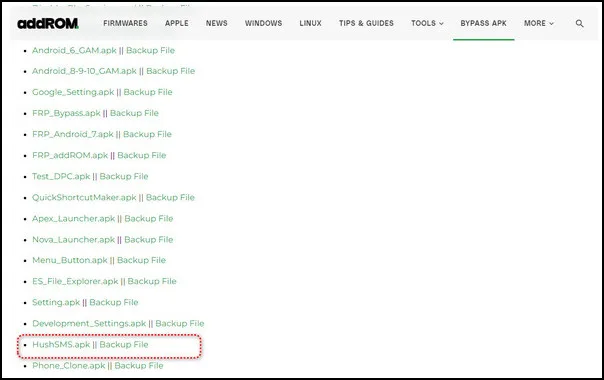
Step 2. Now go to the official website of AddROM, scroll down, and download the HushSMS.apk file. Then navigate to My Files > Downloads and find HushSMS.apk to install it.
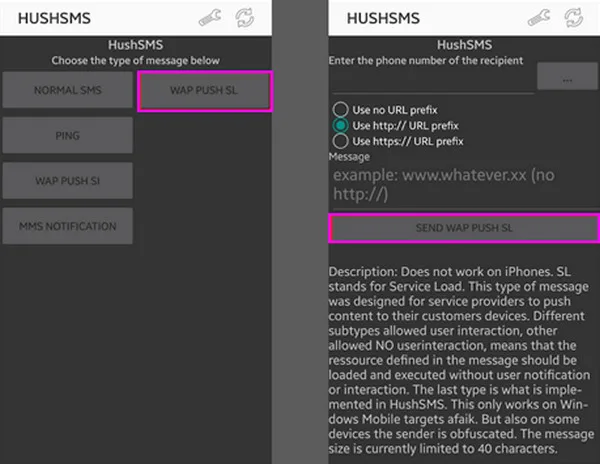
Step 3. Once the app is installed, open it and click WAP PUSH SL. Then enter the phone number of the locked device. In the Message box, type www.youtube.com/@addROMcom and click SEND WAP PUSH SL button.
Step 4. Wait a few seconds; the AddROM YouTube channel will automatically open on your locked phone. Click the Menu icon at the top right corner and select Terms & Privacy Policies.
Step 5. After clicking Terms & Privacy Policies, you will see a browser page. Click the search bar and type addrom.com/bypass. Then scroll down and download the relevant Google Account Manager (GAM) APK.
Step 6. Meanwhile, download the FRP bypass APK file from the same list. Once the downloading is completed, install both apps on your device.
Step 7. Open the FRP bypass APK app and click the Menu icon at the top right corner. Then click the Brower sign-in option, sign in with the Google account you want, and restart your device.
After a restart, you will not face the FRP lock again. It will be successfully removed. However, this method is very complex, and the success rate is not guaranteed.
FAQs:
Is AddROM Bypass free to use?
Yes, AddROM Bypass is free to use. However, be cautious of websites that may charge for downloading the APK. It's recommended to download it from the official website.
Do I need a computer to use AddROM Bypass?
No, AddROM Bypass doesn't require a PC or laptop. You can perform the bypass directly on your Android device.
Is AddROM Bypass safe to use?
While AddROM Bypass is designed to be secure, users should be aware that bypassing security features may have risks. Always download from official sources to ensure safety.
Can AddROM Bypass remove FRP locks from all Android models?
No, AddROM Bypass cannot remove FRP locks from all Android models. It works best with Android versions 5.0 to 8.0 and may not be effective on devices running Android 9.0 and above.
Conclusion:
Addrom APK is not a normal app. You can find it on the Addrom blog, not Google Play Store or Apple App Store. Addrom’s blog has a lot of information to help people use their phones. It shares ROMs, firmware and tips.ROMs are software that runs a phone but can’t be changed. Firmwares are the software inside a device. The blog also shows how to get around locks like FRP, iCloud and MDM. FRP locks a phone if it is reset to factory settings. iCloud and MDM are ways for companies to control phones.








