

Oops AppLock is a free utility available for download online. It protects your app's privacy and security by using the volume buttons instead of a password. Oops AppLock boasts a unique design that allows you to lock and unlock apps with a simple touch. Oops AppLock is dedicated to your service.
Click to load YouTube / 点击加载视频
YouTube ↗Brief Introduction:
Introducing Oops AppLock, the most unique and innovative app locker available! Say goodbye to traditional pin or pattern locks, because this game uses volume key patterns to secure your device. With Oops AppLock, your phone's lock screen will be practically invisible and no one will even notice that your phone is locked. It's not only the safest screen lock available, but also the most fun to use. You can choose from different styles and even customize the background to fool your friends. Download Oops AppLock now and experience the most secure and entertaining way to lock your apps!
Features of Oops AppLock:
- Unique password system: The app uses volume key patterns as a password instead of traditional pin or pattern unlocking methods.
- Invisible screen lock: The app is designed to be completely invisible, making it impossible for others to realize your phone is locked.
- Secure screen lock: With Oops Applock, nobody can unlock your phone without your permission, ensuring maximum security for your apps and data.
- Multiple styles to choose from: The app offers different styles for the lock screen, allowing users to customize their lock experience.
- Easy to use: Oops Applock is incredibly simple to use, making it accessible for users of all levels of tech-savviness.
- Customizable lock screen backgrounds: Users can set different backgrounds for each locked app, adding a fun and personalized touch to the lock screen.
Outstanding Performance:
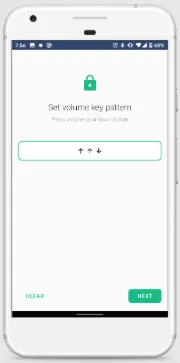
Once Oops! AppLock is installed, its name would be changed to K Note, masquerading it as a note-taking program to deter nosy individuals from accessing your banking apps, gallery, games, and many more. To get started, you first need to create a key pattern by pressing the volume up and down buttons on your device. Then, reenter the pattern to confirm your volume key code.
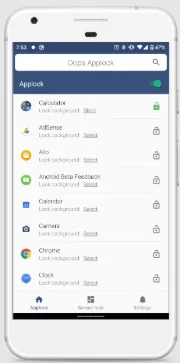
Afterwards, select a security question and type your answer in the text box. This serves as an extra authentication factor if you don’t remember your key pattern. After granting permissions, the program will become a note-taking app, and you need to enter said pattern to access unlocked apps in Applock. Locking a program is easy, just tap the lock icon on the right side of the screen.
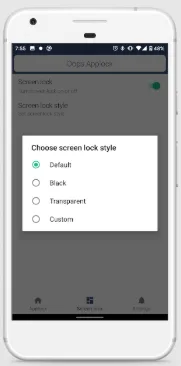
It is also in “Applock” where you can select your preferred background, namely Black,Custom, or Transparent. Choosing Black or Transparent fools an individual into thinking that the app is not working. The Custom option is more fun since you can display a photo of a ghost to scare the living daylights out of your nosy friends and relatives. However, there are instances when the app lock is not working.
Conclusion:
With its unique password system, invisible lock screen, and high level of security, Oops Applock is the perfect app for locking and protecting your apps and data. Its user-friendly interface and customizable features make it a fun and interactive tool to have on your device. Download Oops Applock now to safeguard your privacy and enjoy a personalized lock screen experience.








