
KineMaster - Video Editor is a comprehensive professional video editing app. It offers a vast library of templates and inspiring mix flows, allowing users to quickly create and fine-tune video content. This includes precise editing, multi-track operation, a variety of audio-visual effects, and customizable motion graphics. Premium membership accesses the entire resource library and advanced features, making it ideal for creators of all abilities to efficiently produce high-quality videos and share them directly on social media platforms.
Click to load YouTube / 点击加载视频
YouTube ↗Highlights:
Multi-layer editing allows for complex and professional video compositions.
Real-time preview for instant feedback and adjustments.
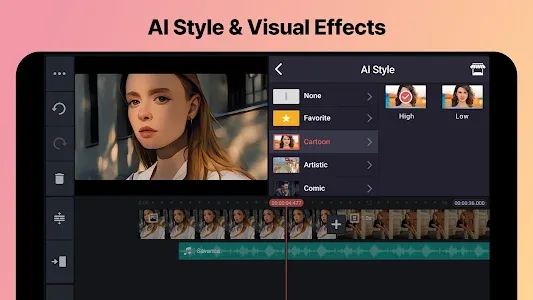
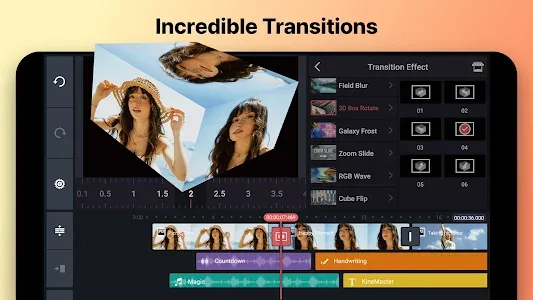
Effects, filters, transitions, sticker packs, animations, speed & sound customizations.
Chroma key (green screen) for advanced background removal and replacement.
Audio control with precise volume adjustments and audio ducking features.
High-resolution export options for stunning video quality.
Keyframe animation for adding dynamic motion to elements in the video.
Speed control to adjust the playback speed of video clips.
Multiple aspect ratio options for optimal video formatting across platforms.
Picture-in-picture mode for creative overlays and video collages.
Voice recording and audio editing capabilities for seamless narration.
Asset Store for additional downloadable effects, music, and more.
Social media integration for direct sharing of edited videos.
Continuous updates and improvements to ensure a cutting-edge editing experience.
Precision editing tools for trimming, splitting, and cropping video clips.
Advanced color adjustment options to enhance the visual appeal of your videos.
Instant preview of edited clips, transitions, and effects for real-time adjustments.
Frame-by-frame editing for precise control over every aspect of your video.
Support for multiple audio tracks, enabling layering of background music, voiceovers, and sound effects.
Features:
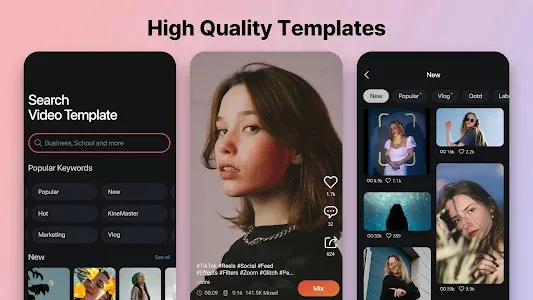
Huge library of templates: Create professional videos in minutes with a wide variety of templates tailored for every type of business.
Mix feed for inspiration: Get inspired by browsing through this app's Mix feed and discover new ideas for your videos.
Precise video editing: Take full control of your video content by easily creating and editing videos with precision.
Membership benefits: Become a this app member and unlock extra benefits that enhance your video editing experience.
Customizable videos: Download a Video Template and personalize it by replacing videos and images with your own. Add creative flourishes from thousands of visual and audio effects to make your video uniquely yours.
Various editing tools: Cut, crop, mask, and zoom videos, images, stickers, and special effects. Apply color filters and adjustments for a different look. Immerse yourself in sound with music, sound effects, and audio effect tools. Add custom motion graphics to almost anything using keyframes.
FAQs:
Is Kinemaster safe to use?
The app version offered on this page is verified by Google Play Protect. Moreover, it has gone through multiple scans for viruses and malware and declared 100% safe to use.
What is the Best MOD of Kinemaster?
Kinemaster has many MODs including GOLD, Black, Diamond, and Pro. We have tested different mods of insta and also collected users' feedback about these mods. After all these measures, we have selected the best one and posted it on our site. Go get it to unleash endless editing joy.
How to Install Kinemaster without Watermark?
The official version of this editing app is offered on the Play store and includes Watermark. Therefore, you have to install the app from this page as out kineMaster comes without a watermark. Moreover, it is scanned again and again to assure 100% security.
Conclusion:
With its user-friendly interface and comprehensive features, KineMaster - Video Editor is the go-to app for anyone looking to create amazing videos. Whether you're a business owner, journalist, educator, or social media influencer, it is your go-to tool for creating professional-quality videos in minutes. With a vast library of templates tailored to every kind of business, you can easily find the perfect one to kickstart your creativity. Customize your videos with thousands of visual and audio effects, add text and animations, and immerse yourself in captivating sound. Get started today and unleash your video editing potential with KineMaster - Video Editor Mod!








