

Introducing Internal Audio Screen Recorder, the ultimate screen recording app that allows you to create high-quality videos with the added bonus of recording internal audio. Whether you're looking to make tutorials, gameplay videos, or capture audio from your favorite apps, this app has got you covered. You can customize your recordings to perfection with options for video quality, audio sources, countdowns, and save locations. Trim and edit your recordings with ease using the built-in trimmers, and enjoy the convenience of the floating button and built-in media player. Share your recordings effortlessly with friends and colleagues. Get started today with Internal Audio Screen Recorder for all your recording needs on Android.
Features:
Countdown and Save Options
Take control of your recordings with the countdown feature, allowing you to prepare before starting. Choose from a range of countdown durations, such as 3, 5, or 10 seconds. Additionally, you have the freedom to save your recordings either in the internal storage or on an SD card, providing you with flexibility and convenience.
Personalize Your Experience
Switch between different themes to suit your preferences. Select from Auto, Dark, or Light themes to ensure a visually pleasing interface during your recording sessions.
Trim and Edit
Refine your recordings with the built-in audio and video trimmers. Easily cut or trim unwanted parts from your recordings, creating polished content that is ready for sharing.
Floating Button and Easy Access
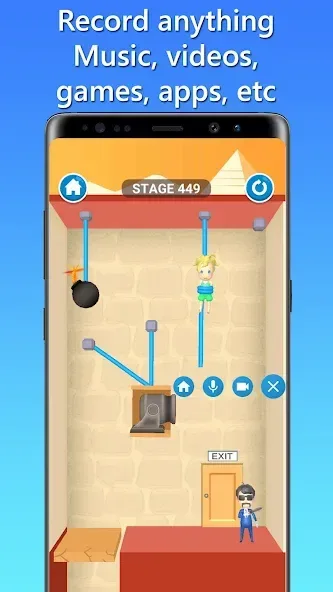
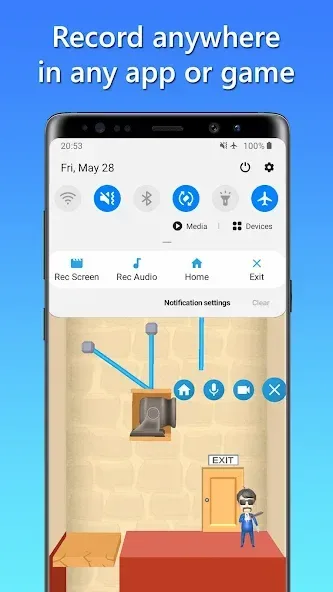
Effortlessly record from any app or game using the convenient floating button. The button remains visible even while you switch between applications. Alternatively, initiate recordings directly from the notification panel for quick and seamless access.
Built-in Media Player
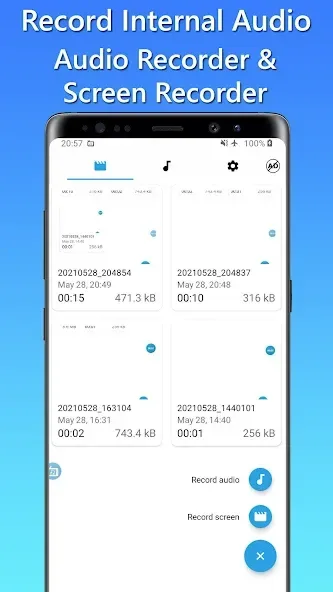
Enjoy the convenience of the built-in media player, allowing you to preview and playback your recorded audio and video files without leaving the app. Easily manage and organize all your recordings within a single interface.
Share and Collaborate
Seamlessly share your recorded audio or video files with friends, colleagues, or on your favorite social media platforms. Use the share feature to distribute your content and engage effortlessly with your audience.
Benefits:
Capture High-Quality Videos: Record your screen and internal audio with exceptional quality.
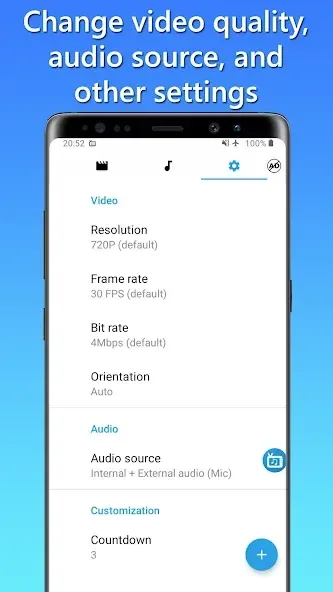
Customization Options: Adjust video quality, resolution, frame rate, bit rate, and orientation to create perfect recordings.
Audio Source Choices: Choose to record internal audio only or both internal and external audio for clear commentary.
Countdown and Save Options: Prepare yourself with countdown feature and save recordings in internal storage or SD card.
Personalization: Switch between different themes to customize your interface.
Trim and Edit: Easily remove unwanted parts from your recordings using the built-in audio and video trimmers.
Tips for Users:
Experiment with different video quality settings to find the perfect balance between video clarity and file size.
Take advantage of the countdown feature to ensure smooth transitions between preparing and recording.
Customize your recording interface by switching between themes for a more personalized experience.
Use the built-in media player to review and edit your recordings before sharing them with others.
Share your content easily by utilizing the share feature to reach a wider audience.
Conclusion:
Internal Audio Screen Recorder is the ultimate screen recording app for Android users. With its powerful features, you can capture high-quality videos with internal audio. Whether you want to create tutorials, gameplay videos, or record from your favorite apps, this app has you covered. Customize your recordings to perfection, choose audio sources, and enjoy the convenience of countdown and save options. Personalize your experience with different themes and easily trim and edit your recordings. The app also offers a floating button for easy access and a built-in media player for previewing and managing your recordings. Share your content seamlessly and engage with your audience. Start capturing your screen and internal audio today with Internal Audio Screen Recorder.








