

Xposed Installer aims to help users unleash the full potential of their mobile devices, allowing them to customize themes and wallpapers to their liking, add more practical functions, and improve device performance. Xposed Installer helps users install the Xposed framework on their devices, enabling customization of system functions and installed modules, giving users more possibilities. Don't miss out on Xposed Installer if you're interested!
Click to load YouTube / 点击加载视频
YouTube ↗Features:
Customization: Change the look of your phone’s interface, like the status bar, navigation bar, and more.
Functionality: Add new features to your phone or apps, like screen recording or pie controls.
No Need for Multiple Apps: Instead of downloading lots of apps to get new features, you can use modules within Xposed.
Easy Updates: When you want to update or change a module, it’s simple and quick.
Safe and Secure: If a module doesn’t work right, you can just deactivate it without harming your phone.
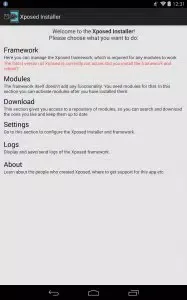
Highlights:
At its core, Xposed Installer acts as a platform for installing and managing Xposed modules. These modules are developed by the community and offer a wide range of functionalities, from simple UI tweaks to complex system modifications. With Xposed, users can enhance their Android experience by adding new features, changing the look and feel, or even improving performance.
One of the key benefits of Xposed Installer is its ease of use. Once installed, users can browse through the available modules on the Xposed Repository or via third-party sources. Installing a module is as simple as tapping a button, and most modules require minimal or no configuration. This makes it accessible even for those with limited technical knowledge.
However, it's worth noting that using Xposed Installer and its modules does come with some risks. As it involves modifying the system-level functionalities, there's always a chance of encountering issues or instability. Therefore, it's advisable to proceed with caution and only install modules from trusted sources.
Despite these risks, Xposed Installer remains a popular choice for many Android users. Its flexibility and extensive customization options make it a powerful tool for those who want to personalize their devices to their liking. Whether you're a casual user looking for simple tweaks or a power user seeking advanced modifications, Xposed Installer has something to offer.
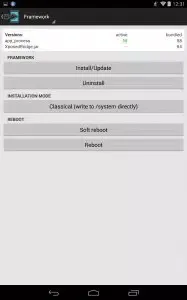
Installation Tutorial:
Download Xposed apk framework.
Install the tool on the Android device.
Run the installed app from the app menu.
Go to “Framework” > click “Install/Update” > grant access for Superuser request (sometimes your screen may be stuck on the way, let a little time to it).
Then the software will run automatically.
After completion of rooting finished, reboot the device.
Go to “Download” and select the module for installing the desired module.
A detail page appears and scrolls down the page till you see “Download” button.
Click “Download “and start downloading the selected module.
Install the module apk file.
If you get a message the module is not working, you must enable the downloaded module file. Click appearing notification. Go to “Module “section and enable and disable the modules via check boxes against the name of the module.
Final words:
Xposed Installer APK is a useful app that can install the latest Xposed framework on your Android phone or tablet, making it possible to customize your device without having to root your device or flash to a custom ROM. To use this, you need to download the Xposed Installer APK on your Android phone or tablet, install it, and run the setup.








