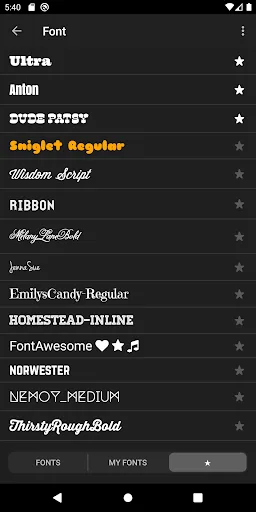
Vont is a powerful video editing application. It offers a vast font library, allowing users to choose from a variety of fonts to suit any theme. With Vont, you can easily edit various videos in just a few simple steps, selecting your favorite effects and fonts to complete the editing. Furthermore, the application provides video text plugins, allowing you to control the movement speed of text within the video at will. You can create your own favorite effects and font libraries for easier searching and use of your preferred options.
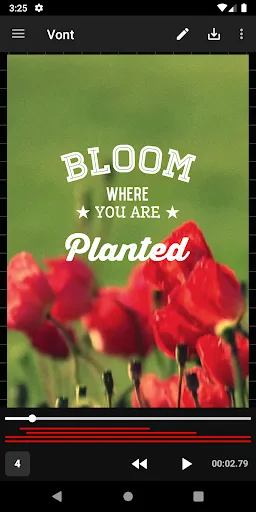
Features of Vont:
More than 200 fonts are available.
You can install other fonts.
Text size is changeable.
Text color is changeable.
Text shodow is changeable.
Text is rotatable.
Text stroke color and width is changeable.
Text background color is changeable.
Letter spacing is changeable
Line spacing is changeable
Highlights of Vont:
Simple to use
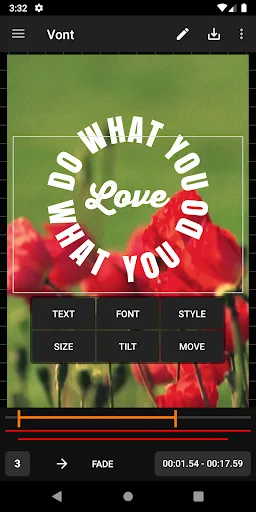
When starting to hear about inserting text into videos, many people think it is a complicated thing. And to do that job requires specialized equipment with high expertise. However, with Vont, adding text to videos is simpler than ever. The first step you need to do after downloading this application is to choose the video you will use. After selecting the video, the application will upload the tape from your phone to the screen to add text. Type out the content you want to insert into the video; then, you will choose a favorite font. Once you have selected the content and font, the next job is to choose the position of the text. Besides you will also choose the size, color, style, and inclination of the text. You can move the text manually or move it with the navigation arrows. The last thing is to choose how long the text you edited appears in the video, then save the work.
Customize everything
It can be said that this application has given users a whole world of customization. The developer has made an effort so that users can perform professional operations. You yourself, as an amateur, can ultimately add text to videos like a professional. Let’s talk about the features that make text editing great. First, you can adjust the size of the text, that’s for sure. Next, you can choose a color from the thousands of colors that the application provides. You can also adjust the level of the shadow and rotate the content you are editing. In addition, bold thickness, letter spacing, and line spacing are adjustable.
Various fonts and colors
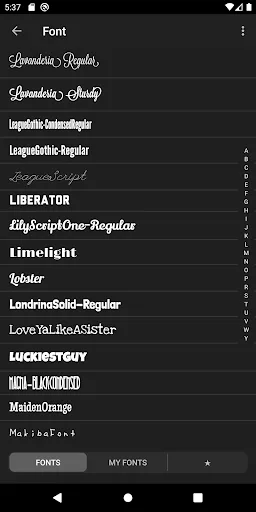
Users may be overwhelmed by the number of fonts and colors the application brings. Specifically, after downloading, you will own more than 200 fonts of all different types. Moreover, users can also download other fonts to use. Some fonts look intense, challenging, and suitable for technology or science themes. Some fonts are very curvaceous for art or travel videos. As for the colors in Vont, it’s too much to count. The number of primary colors is already a lot, while we can still adjust the density. Users have in hand thousands, even hundreds of thousands of colors.
Tips for Users:
VontExtensive Font Options: The system often provides a large number of fonts that you will spend time exploring. Of course, you will filter out the most suitable options to use over time.
Styling Flexibility: To have the most suitable content, adjusting its characteristics is necessary. You will spend a lot of time considering the indicators and helping them blend with the current video.
Enhanced Formatting: The spacing between lines and letters is also a factor to consider. Specifically, you must ensure that the content is not too tight or can overwhelm the content appearing on your video.
Download Fonts: On the corresponding website, you can find suitable fonts after a few searches. This is completely understandable when you want to change the content in a positive direction.
Seamless Integration: Fonts often come with installation features that support many different formats. Therefore, you can use extensions such as ZIP, TTF, or OTF to install directly in the application.
Creative Freedom: Any font will bring users extremely interesting content. Of course, you can also quickly access new designs to upgrade the video to a new level.
Conclusion:
After you choose the file, Vont will automatically display it taking up almost the entire screen of your device and with a transparent background interface. This way, you can give it the size you want and place it in the area you prefer. Then, by tapping on the brush-shaped button located in the interface upper right corner, you will access the wide font list that you can choose from. So, all you have to do is type in the text you need and select the design you like best. Vont is a video editing tool that will offer you a wide font variety that you can easily add to your videos from the comfort of your own Android device.