

GameKeyboard+ is an emulator software designed for game enthusiasts. Simply use it to control the game as if you were using a gamepad. It allows you to customize the key bindings to match your gaming habits, making gameplay more intuitive and enhancing your overall gaming experience. The software also supports creating and saving configuration files, allowing you to switch freely between game modes and other modes, saving you time and effort. Game lovers shouldn't miss GameKeyboard+!
Click to load YouTube / 点击加载视频
YouTube ↗Features of GameKeyboard+:
Re-map Physical Keys: Customize your physical keyboard to work seamlessly with your games. Re-map keys to create a more intuitive gaming experience.
Save Key/Button Mappings: Save your key/button mappings to profiles to easily switch between game configurations.
Full QWERTY Keyboard: Access a full QWERTY keyboard within the app, which can be incredibly useful for in-game text input or navigating menus.
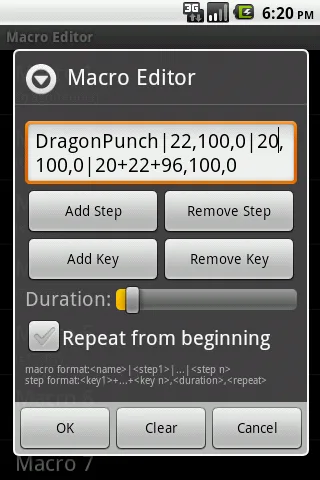
Create Macros: Create macros to perform actions like autofire, combo keys, action sequences, and text input with a single button press, giving you an edge in your games.
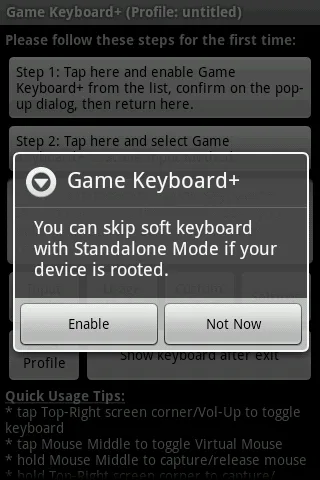
Emulate Touchscreen Actions: Even if your device lacks a touchscreen, GameKeyboard+ can emulate touchscreen actions, making it compatible with Android TV Boxes (requires root).
Emulate Real Analog Joystick: For devices with root access and OS joystick support, you can emulate a real analog joystick, providing a more precise control experience.
Emulate Virtual Mouse: With root access, you can emulate a virtual mouse, allowing for more versatile control options.
Highlights of GameKeyboard+:
Onscreen Gamepad Mastery: Fully functional controller accessible via touchscreen.Supports up to 12 game buttons, directional pad, and analog sticks.Customize button sizes, positions, and mappings.
Key Remapping Magic: Ability to remap physical keys for personalized gaming experience.Say goodbye to poorly placed buttons and inconvenient key.Take control of your gaming experience with simple key remapping features.
Profiling for Perfection: Save profiles with preferred settings for easy switching between games.No more wasting time fine-tuning controls for different games.Have a flawless gaming experience every time with saved profiles.
The QWERTY Keyboard Extraordinaire: Full QWERTY keyboard for typing messages, internet queries, or cheat codes.Moves beyond gaming into productivity with multitasking capabilities.Enhances utility of the app beyond just gaming.
Macro Marvels Unleashed: Built-in macro recording functionality for simplifying processes.Perform complex actions with a single tap, such as autofire or combo keys.Enhances mobile experience for gamers and non-gamers alike.
Final words:
Have you ever wished that you could perform everything with just one tap instead of pressing each key in a long sequence? This is made possible by GameKeyboard +’s built-in macro recording functionality. With a single button, you can release speedy autofire, execute complex combo keys, and easily type text. It streamlines processes and enhances the quality of your mobile experience, so it’s not just for gamers.








