Clockify is a free team time tracking application. This powerful app helps you track project time and analyze productivity, making it easy to manage all pending tasks. With Clockify, you can immediately start creating task lists and recording the time required to complete each task. Thanks to its clean and intuitive user interface, users can start tracking time with just a tap, making it easy for both experienced professionals and beginners to get started. Furthermore, you can track time offline and upload it to your task list all at once when connected to an internet connection.
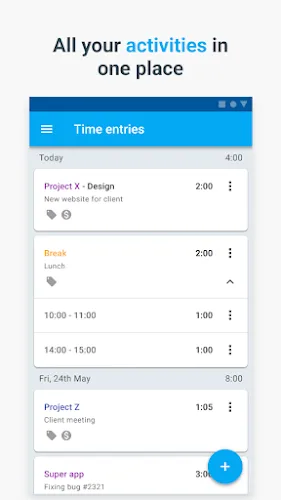
Highlights:
Start timer with just one tap
Add time you forgot to track manually
Track time via status bar or widget
Breakdown of all your tracked time in reports
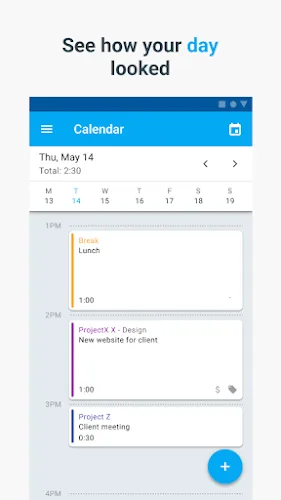
Compare tracked vs scheduled time in Calendar
Request time off and check your balance
Record expenses and add receipts
Track time even if you're offline
All your tracked data is synced and available online
Features:
Available across devices
You can use Clockify on the web, desktop, and mobile – all your tracked data is synced in real time so you can seamlessly switch between devices.
Insanely simple and easy to use
Time tracking in the app is quick and easy - one tap to start the timer and another to stop it.
Completely free
Clockify is the only time tracker that lets you have unlimited everything for free (projects, users, reports).
Offline mode
If you don't have internet connection (and you're logged in), you can still track time and the time will be automatically synced once you're back online
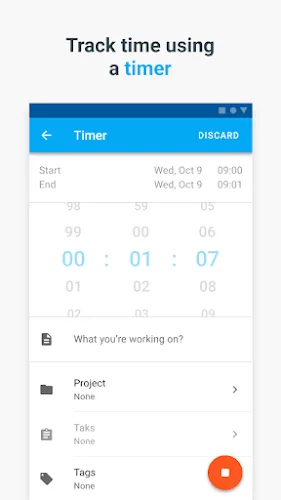
Track time using a timer
Start a timer from your phone when you start working, and stop it once you’re finished. Or, add time manually later.
Default project
Set a default project (fixed project or the most recent one) and it will be automatically selected every time you start a new timer.
Export reports
When you need to see what your team worked on, calculate payroll and profitability, or see what you need to invoice, use the web version to export full reports in PDF, CSV, and Excel.
Manage projects and team
In the web version, you can invite team members, create projects, set project estimates, and compare estimated vs tracked time so you can see how efficient you are.
Benefits:
Easy Time Tracking: Start a timer with just one tap for quick tracking.
Project Management: Organize work by project for better oversight.
Detailed Reports: Access comprehensive reports to analyze productivity.
Team Collaboration: Ideal for team tracking with shared access and permissions.
Customizable Settings: Adjust the app to fit your specific time-tracking needs.
Offline Mode: Track time even when not connected to the internet.
Task Categorization: Categorize tasks for better organization.
Reminders: Set reminders to ensure accurate tracking throughout the day.
Visual Insights: View your time data in charts and graphs for easy analysis.
Multi-Platform Syncing: Sync time data across multiple devices effortlessly.
Changelog:
Fixes:
- Approvals: The submit button visibility fix.
- Clean Tracking: Fixed negative durations and duplicate break entry tables.
- UI Polish: Smoother Undo actions, no more rapid-tap glitches, and auto-scroll for new tags.
- Data Safety: Deleting clients with duplicate project names is now seamless and bug-free.
Conclusion:
Clockify is the ultimate time tracking app for teams, offering a simple and intuitive interface, comprehensive tracking features, and maximum flexibility. With Clockify, you can easily stay on top of your time management and boost your productivity. Download Clockify now and start making the most of your valuable time.