
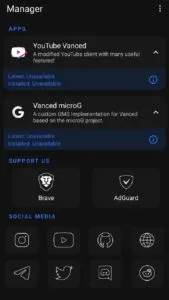
MicroG is an open-source project that enhances your privacy by refraining from data tracking and background activity. Its primary use case is with YouTube Vanced, creating an ad-free version of YouTube for uninterrupted video enjoyment. MicroG requires no root access and works on most Android systems. Furthermore, it offers advanced location services, providing GPS access and location tracking through open-source alternatives. MicroG allows you to add a Google account while maintaining your privacy, offering exceptional control!
Features
An open-source alternative to Google Play Services
Option to enable Google services for extended app compatibility
Use UnifiedNlp's online/offline location services
High battery, memory, and CPU efficiency
No pre-installed software for a clean and smooth user experience
Runs on real devices, test emulators, and virtual mobile infrastructure
Completely free and accessible to all users
Connect your Android device to Google Mobile Services
Lightweight implementation of Google services
Regularly updated and improved by the development team
Advantages and Disadvantages
Advantages
Completely open-source and transparent
Enhanced user privacy and reduced tracking
A complete set of replacement libraries
Compatible with many Play Store apps
Disadvantages
Setup can be difficult for inexperienced users.
Occasionally, compatibility issues may occur with some apps.
Limited official support and documentation
Usage
- Download the MicroG APK
Get the latest version of the MicroG APK from trusted sources such as APKRabi. This ensures you get the safest and most compatible version.
- Enable Unknown Sources
Go to Settings > Security and enable the "Install apps from unknown sources" option. This ensures the APK file can be installed correctly.
- Install the APK file
Locate the downloaded file on your device and tap to install. The entire process takes only a few seconds.
- Configure your settings
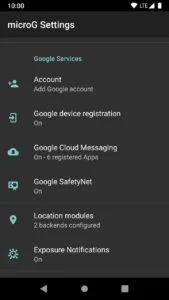
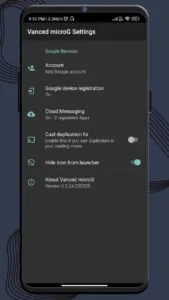
Open MicroG, go to the settings panel, and enable all the necessary options:
Google Device Enrollment
Google Cloud Messaging (GCM)
Safety Net (optional)
UnifiedNLP Location Services
- Add your Google account
Sign in to your Google account and sync services like contacts and calendars in MicroG or a supported app such as YouTube Vanced.
FAQs
What is MicroG?
The MicroG project is an open-source project designed to replace Google services.
Is MicroG secure?
Yes, the primary purpose of the MicroG project is to protect privacy.
Is ReVanced GMSCore secure?
Yes, because it is a fork of MicroG's GmsCore.
Can I use ReVanced instead of MicroG?
No, you cannot. You must install Vanced/ReVanced MicroG before you can install YouTube/Music ReVanced.
Summary
The MicroG APK is more than just an application; it's a digital freedom toolkit. Whether you prioritize performance, privacy, or compatibility on unsupported devices, MicroG is the ideal choice.








