

John GBA Lite is a popular emulator. This application offers powerful features, allowing users to enjoy a variety of retro games on their Android devices and experience a unique gaming experience. With John GBA Lite, you can run a variety of fun games smoothly without any lag. Players can use various cheat codes to access previously locked content, further personalizing their gaming experience. With these features, you won't need to painstakingly search for the games you want to play in your device's file system; you can quickly and accurately find games that interest you and start playing.
Click to load YouTube / 点击加载视频
YouTube ↗Highlights:
Original GBA engine
Cheats (Raw/GameShark/CodeBreaker)
High quality rendering
Search game files in SDCard & Internal Storage
Virtual On-screen keypad
Zipped file support
Save States (with previews)
Customizable keys
Turbo buttons
Screenshot
Fast forward / Slow down (x0.25 - x16)
Bluetooth/MOGA controller support
Dropbox support (requires John DataSync)
Features:
Original GBA Engine: Immerse Yourself in Nostalgia
With John GBA Lite, you can experience the authentic gameplay of Game Boy Advance (GBA) titles. This emulator uses the original GBA engine, allowing you to relive your favorite childhood games and enjoy a seamless gaming experience.
Cheats: Unlock Hidden Powers and Secrets
Take your gaming to the next level with the cheats feature. Whether it's Raw, GameShark, or CodeBreaker cheats, you can easily activate them and uncover hidden powers, secrets, and shortcuts in your games. Gain an unfair advantage over your opponents and dominate the game.
High-Quality Rendering: Visuals that Pop
The high-quality rendering of John GBA Lite ensures that you can fully appreciate the graphics and animations of your favorite GBA games. Enjoy vibrant colors, smooth animations, and stunning visuals that bring your games to life on your Android device.
User-Friendly Interface: Simplicity at Its Best
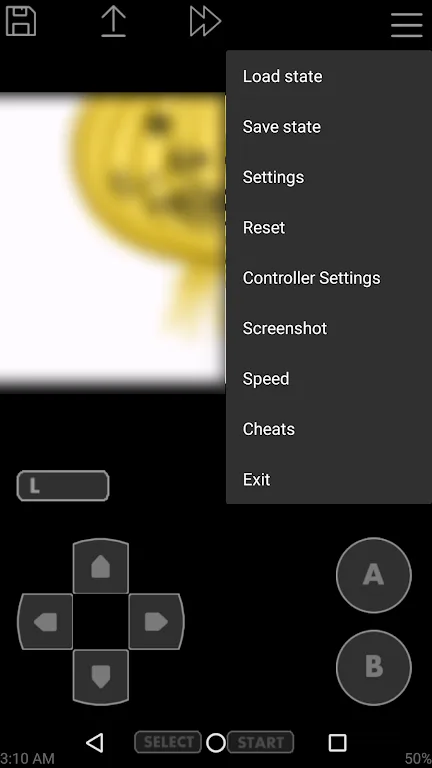
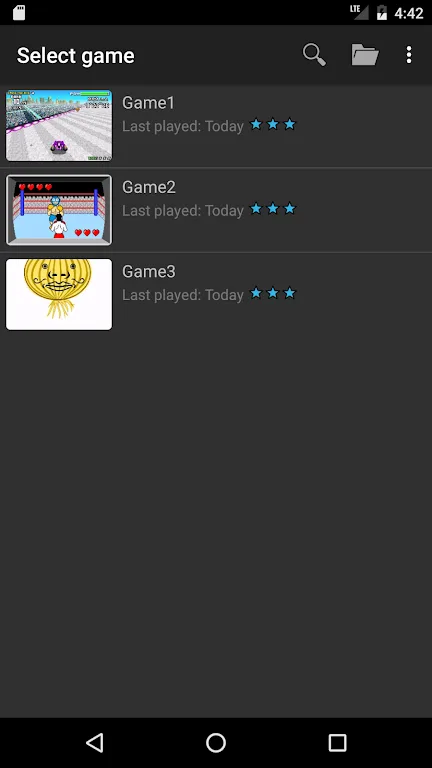
Finding and selecting game files is a breeze with John GBA Lite. It allows you to search for game files in both the SD card and internal storage of your device. The intuitive on-screen keypad provides a seamless gaming experience, making it easy to control your character and execute actions effortlessly.
Benefits:
IT SUPPORTS MANY POPULAR GAMES
As an emulator, John GBA offers countless different game genres for users to spend hours and hours exploring. If you are a lover of adventure, racing, or puzzle games… everything is pre-installed for you in this little emulator. One of the famous games that you will have the opportunity to experience is Minish Cap. This third game retains some elements of the previous games, the favorites racing game in different courses. Besides, there are many attractive games that you should experience right now.
DOWNLOAD FAVORITE GAMES
To successfully execute this emulator, the player must first prepare a space for the game files. You will have to download your favorite games and then start running in the background in the game. It will automatically confirm the game you downloaded and do the setup and rendering of the game. The emulator also helps when you fail the fun and feel like playing them again, and the emulator will give you more playtimes to enjoy the video games and video games. The most valuable advantage of John GBA is, it will automatically save the progress you are in the game, and the player is allowed to continue the game at any time.
EASY OPERATIONS CONTROL
For the most part, operations in John GBA are made relatively easy as an analog emulator. All modern functions are integrated into the emulator allowing users to manipulate in extremely convenient ways. There is one thing that players should note, if your game files are not there, the application will never be activated. As you can see, the emulator will fully display both screens, the primary game side and the so-called console, in real-time. However, the player can customize the display of either one of the games is occupied. Through the control panel, the control buttons allow you to customize the desired gameplay control. Besides, the emulator also adds support for external physical controller players.
Tips for Users:
Utilize cheats: Make use of the cheat feature to enhance gameplay and overcome challenging stages.
Customize key configuration: Experiment with different key configurations to find the controls that best suit your playing style.
Take advantage of save states: Use the save state feature to save your progress at any point in the game, ensuring you never lose your hard-earned achievements.
Try different gameplay speeds: Adjust the gameplay speed to your preference, whether you want to breeze through levels or slow down to enjoy every detail.
Conclusion:
The on-screen virtual keypad mostly is another popular addition to John GBA Lite. The emulator’s on-screen keypad can be configured to match the player’s fairly preferred controls. Thanks to this improvement, Android users can enjoy playing Game Boy Advance games without hassle, which is fairly significant. For those who prefer a more traditional gaming experience, the emulator also supports Bluetooth/MOGA controllers.








