

Have you ever forgotten your phone password? Technocare is an app designed to bypass Factory Reset Protection (FRP). You can easily bypass the FRP lock with Technocare and quickly unlock your phone! Worried about device incompatibility? Technocare supports multiple devices and works on most devices! Technocare is regularly updated, so it can help you whenever you need it! The app is simple to use; even without the relevant technical skills, you can easily bypass FRP with Technocare!
Features
- Easy to Use: Technocare APK is extremely simple to use, providing a step-by-step guide to bypass the FRP lock. The entire process takes only seconds to complete and gain access to your device.
- Supports Multiple Devices: Technocare APK supports a variety of Android devices, making it an ideal tool for bypassing FRP locks on different devices.
- No Root Required: You don't need to root your device to use the Technocare App. The tool works perfectly on unrooted devices.
- Safe and Reliable: Technocare APK is a safe and reliable tool that will not harm your device. It uses advanced algorithms to bypass the FRP lock without compromising your device's security.
- Regular Updates: The Technocare APK is regularly updated to keep up with the latest Android updates and provides seamless support for new devices.
Pros & Cons
Pros:
Free to use
No technical expertise required
Works with a variety of Android devices
No root access required
Avoids malware and virus infections when downloading from trusted sources.
Cons:
Not currently available on the Google Play Store
May not work properly with some newer Android security patches
Using the bypass tool may cause security issues
Limited support from the developer
Download
To download the Technocare App, visit our website and follow these steps to install and bypass the FRP lock on your new and old Google accounts for free.
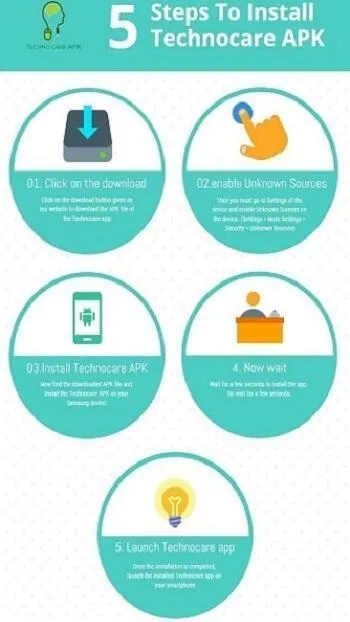
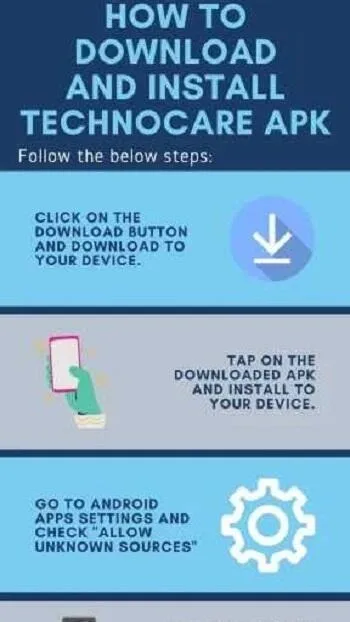
First, click the download button below on our website to download the APK file.
After downloading the APK file, go to Settings and enable "Unknown sources" in Security Settings.
Now locate the downloaded file and install it on your device.
This will take a few seconds, please wait a moment.
Now run the installation file on your device.
Installation complete. Now click to open the app.
After installing the app that bypasses the FRP lock, click the app icon to open it.
Once the app is open, enter your Gmail address to access your device's FRP module.
Once you have access to all device settings with your Gmail ID, you can use your Google account details to factory reset any Samsung device for free.
If you encounter any problems using the Technocare Tricks App, please watch the free video tutorials on various channels.
Like the Apex launcher, the APK app also requires a Google username and details, which you must provide to use and install the Technocare APK.
FAQs
- What exactly does Technocare do?
Technocare is an Android tool that helps users bypass FRP (Factory Reset Protection), allowing users to add a new Google account to their device after a factory reset.
- Is it safe to install the Technocare APK?
Yes, provided it is downloaded from a trusted source. Avoid using unofficial versions that may contain malicious code.
- Do I need to root my phone to use Technocare?
No! Technocare runs without root access, making it very user-friendly for those unfamiliar with the technology.
- Does Technocare run on Android 13 and 14?
Of course. It's frequently updated to maintain compatibility with newer Android versions, including Android 13 and 14.
- Why isn't Technocare available on the Google Play Store?
Because it bypasses Google's own security system, it cannot be listed on the Play Store. That's why you have to install it manually.
Summary
This app is most useful for used phone users, used phone buyers, or technicians who frequently need to troubleshoot locked devices. For them, it's a reliable addition to their toolbox. Technocare focuses on solving single problems and strives for perfection, saving time and preventing devices from becoming expensive decorations.








