

MX Player is a powerful media player for the Android platform, renowned for its superior decoding capabilities, broad format compatibility, and smooth playback experience. Equipped with the latest HW+ decoder, it fully utilizes the device's hardware for video decoding, supporting mainstream codecs such as H.264, HEVC, VP9, and AV1. It easily plays 4K and even 8K high-definition videos and features online subtitle matching and downloading, eliminating the need to manually search for subtitles when watching foreign language films, providing users with the best possible experience. Furthermore, it offers a privacy folder feature to hide sensitive video content.
Click to load YouTube / 点击加载视频
YouTube ↗Features:
Optimized Performance: Designed exclusively for ARMv7 architecture, this codec enhances MX Player's functionality, allowing for smoother playback of videos, even in high-definition formats. With reduced buffering and lag, enjoy your favorite movies and shows without interruption.
Wide Format Support: The MX Player Codec supports an extensive range of video formats and codecs. Whether you're watching MKV, MP4, AVI, or even more complex formats, this codec ensures that your media files are decoded efficiently, providing an optimal viewing experience.
Hardware Acceleration: By utilizing hardware acceleration, this codec allows MX Player to leverage your device’s GPU for improved performance. This not only increases playback efficiency but also reduces battery consumption during extended viewing sessions, allowing you to watch more content without frequently recharging.
User-Friendly Interface: The integration with MX Player maintains an intuitive interface that is easy to navigate. Users can access all playback features, including subtitle customization, playback speed adjustments, and audio track selection with just a few taps.
Frequent Updates: The MX Player Codec is regularly updated to ensure compatibility with the latest video formats and Android versions. This commitment to ongoing support means you can keep enjoying high-quality video playback as technology advances.
Multilingual Support: Built-in support for various languages enhances the user experience for non-English speakers. Enjoy an accessible interface that caters to a global audience.
Seamless Integration: The codec integrates fully with MX Player, requiring minimal effort from the user. Simply install the codec, and MX Player will automatically detect it, enabling you to start watching your favorite videos without any additional configurations.
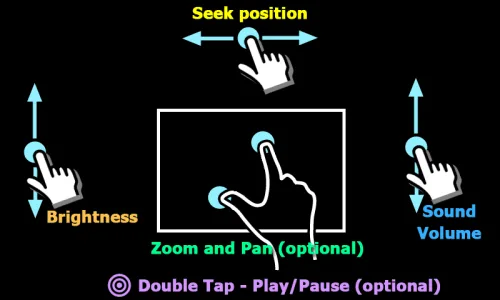
Highlights:
HW+ acceleration and multi‑core decoding keep videos smooth, even on phones.
Pinch‑to‑zoom and swipe‑to‑pan for precise video framing on screen.
Gesture‑based subtitles with broad formats, easy sizing and placement.
Privacy Folder, Kids Lock, and a free multi‑language streaming catalog.

Pros and Cons:
Pros
A ton of different codecs
Very small file size
Installs itself automatically
Enables full HD quality playback
Cons
Only a codec pack; doesn't offer anything else
Only available for Android 5.0 and up

FAQs:
Can I play online videos with MX Player?
Yes, the app supports playing online videos through direct links.
How do I load subtitles into MX Player?
Subtitles can be loaded directly from within the app or added manually from device files.
Does MX Player support 4K video playback?
Yes, but the device must support smooth playback of this high quality.








