

EasyShare is a mobile application for file transfer. Here, you can transfer photos, videos, apps, and documents without using mobile data. EasyShare uses Wi-Fi and Bluetooth to connect devices, ensuring stable and fast transfer speeds. Speaking of speed, EasyShare can reach up to 40Mbps under ideal conditions and supports various file formats, including system files and APK files. The interface is clean and clear, with no ads. Built-in tools guide you through the process, requiring minimal effort from you.
Usage
Open EasyShare on both phones and grant the requested permissions to allow nearby sharing and device discovery.
Tap "Send" on the sending phone and "Receive" on the receiving phone, then follow the prompts to connect via hotspot, local Wi-Fi, or Bluetooth.
Select the files, photos, videos, apps, or documents you want to send. You can add multiple items or entire folders if needed.
Confirm the transfer on the receiving phone and wait for the transfer to complete. Keep both devices nearby until the transfer is complete.
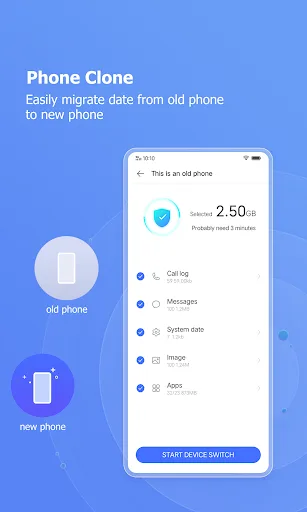
To clone a phone, select "Phone Clone" on both devices, setting one as the old phone and the other as the new phone, then begin the migration. Please note that app data may not be transferable between different brand phones.
Features
EasyShare Supports Multiple Platforms
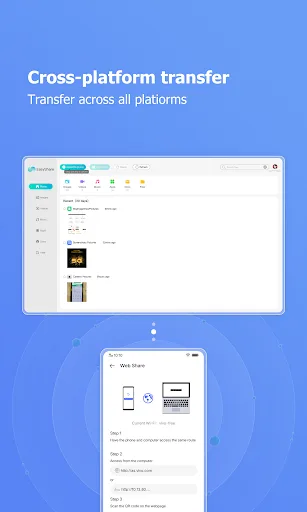
While EasyShare may seem to be only available for Android, the app actually supports most platforms. Whether you're using a Mac, Windows, Android, or iOS system, you can easily download and use EasyShare. Therefore, as long as your device has the app installed, you can build your own ecosystem in the data sharing and transfer field.
Easy Data Transfer and Reception
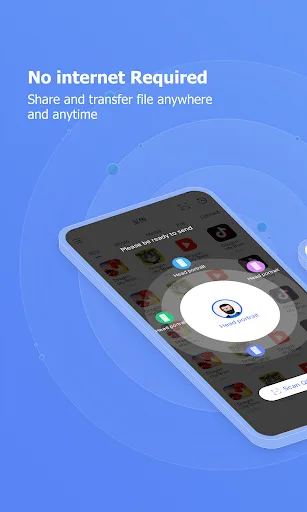
By granting EasyShare some basic permissions, such as read/write memory, notification permissions, and access to nearby devices and location information, you can easily use all the features of this application. The process is very simple; just select the file you want to share. Next, EasyShare will create a temporary access point with its unique QR code.
On the receiving device, you need to open the EasyShare app and use the "Receive" function. The system will automatically scan the access point created by the sending device. You can also use the "Scan Connection" function to scan the QR code above. Then wait a moment; the speed may vary depending on your device hardware, but it usually won't take too long.
Share Anything with Any Device
With the EasyShare app, users can share any file on their device. Regardless of the file format, such as MP4, MP3, AVI, APK, ZIP, RAR, etc., you can instantly share all files of your choice with a single tap. Furthermore, you can send files to devices running iOS and Mac operating systems—these operating systems are highly secure and rarely receive data from unknown sources.
Data Backup
While every device now has a built-in data backup function, not everyone can find the location of their backup files. Sometimes backup files are located in internal storage and may be deleted if you restore factory settings. Therefore, EasyShare can help you store and protect backup files. However, you'll need a computer to store it. On your computer, follow the instructions to download EasyShare, connect to the same Wi-Fi network, and then listen to a song while waiting for the backup to complete.
Phone Cloning
In today's rapidly evolving technological world, upgrading your phone has become a normal need for everyone. However, you might be struggling with how to transfer your data… Don't worry, EasyShare can help you solve this problem. Use EasyShare's phone cloning feature now!
At this point, EasyShare needs to read all the data and settings of your app, so you'll need to grant it some additional permissions. Rest assured, EasyShare comes from a globally renowned brand and is safe and secure. Now, simply open the EasyShare QR code on your new device, scan the QR code with your old device, and follow a few simple steps. This operation can also be easily done between Android and iOS devices, making it trusted by many users.
Advantages and Disadvantages
Advantages: Transfers files of all types and sizes. Shares data via Wi-Fi or Bluetooth. Transfer speeds up to 40 MB per second. Ad-free and supports cross-platform sharing.
Disadvantages: No sync player function. Music sharing function sometimes malfunctions.
FAQS
What is EasyShare?
EasyShare is a cross-platform file transfer application that allows you to transfer data between your phone and computer without using mobile data.
How fast is EasyShare for transferring files?
Depending on the device and network conditions, transfer speeds can reach around 40 Mbps.
Can EasyShare transfer data to a new phone?
Yes, the app includes a phone copy tool that can transfer text messages, call logs, media files, and apps.
Does EasyShare require an internet connection?
No, it uses Wi-Fi or Bluetooth for offline file transfer.
Who should use EasyShare?
It's suitable for users who need fast offline transfers, frequently change phones, or want an ad-free sharing tool.
Summary
EasyShare provides a simple and reliable way to transfer files between Android devices without any technical barriers or size limitations. Download EasyShare and make everyday sharing easier.








