

With the rapid pace of modern life, short videos are playing an increasingly important role in our lives, with TikTok being a prime example. However, while these videos are enjoyable, the inability to download them is a significant drawback. SnapTik is an application for downloading TikTok videos. Here, you can easily download TikTok videos to your phone without watermarks. The process is simple: copy the video link, open SnapTik, and the download will start automatically. The software has a built-in video player, allowing you to watch videos without an internet connection and enjoy entertainment anytime, anywhere.
Usage
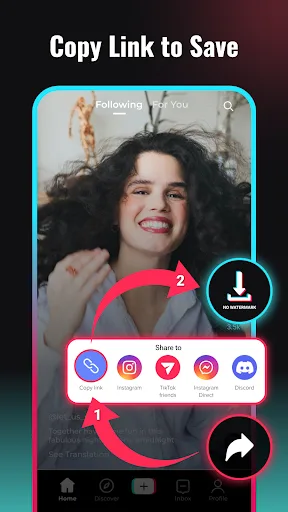
Step 1: Copy Link
In the TikTok app, open the video you want to watch, tap the share button in the bottom right corner, and then tap the copy link option.
Step 2: Paste Link
Return to the SnapTik website, paste the copied URL into the address bar, and then tap the download button.
Step 3: Download
Please wait while SnapTik processes the video. Select the desired quality and download the video.
Features
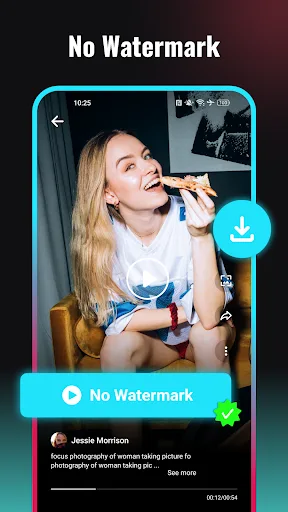
Watermark-Free Video Saving
SnapTik can download your publicly shared TikTok videos without the TikTok watermark. It supports links from TikTok, TikTok Lite, and Douyin. You can use it to save clean copies for backup or forwarding to other platforms.
Simple Two-Step Process
Open TikTok and copy your public video link.
Open SnapTik; the app automatically detects the link and starts the task.
The saved file is saved to your phone for quick access.
Background Download and Offline Playback
You can continue using your phone while downloading in the background. The built-in player allows you to watch videos without an internet connection, while the album feature helps you view saved video clips in one place.
No Login Required, Easy Installation
No account registration is required to use the core features. The SnapTik APK file is small, helping to save storage space. Please only use this tool for your own videos and obtain permission before reposting other content.
Highlights
When We Need a Free TikTok Downloader for Daily Use
We often want to download TikTok videos for offline viewing or sharing with friends. Due to the extremely fast content updates, we need a simple tool that allows us to stay up-to-date with the latest videos and not miss any exciting content.
When we want to download TikTok videos without watermarks for cleaner sharing
Watermarks can affect the viewing experience of TikTok videos. Choosing to download watermark-free TikTok videos makes them look clearer. This is crucial for sharing videos on other platforms, whether for entertainment or work purposes.
When we need high-definition quality and fast processing speed
Video quality is paramount. In our fast-paced lives, being able to quickly download high-definition videos is essential. SnapTik offers fast processing and high-quality downloads, bringing you a smooth, top-notch experience.

FAQs
How to download watermark-free TikTok videos?
Open the TikTok app on your phone/or open the TikTok web version in your browser.
Select the video you want to download.
Tap the "Share" button in the bottom right corner.
Tap the "Copy Link" button.
Download using a browser: For convenience, no software download or installation is required. I've also developed an app for this, but you can install it at any time.
Return to the SnapTik.App, paste the download link into the field above, and then tap the download button.
Please wait for the server to finish processing and save the video to your device.
How to get a TikTok video download link?
Open your TikTok app.
Select the TikTok video you want to download.
Tap “Share,” and then find the “Copy Link” button in the share options.
Your download link has been copied to your clipboard.
For example, the link will look like this:
https://v.douyin.com/UFLNjnh/
Or
https://www.tiktok.com/@philandmore/video/6805867805452324102
Or
https://m.tiktok.com/v/6805867805452324102.html
And many more…
Where are downloaded TikTok videos saved?
Downloaded files are usually saved to the default folder you set. Browsers usually set this folder automatically. You can also manually change and choose the save location for downloaded TikTok videos in your browser settings.
Summary
Snapchat provides a safe and convenient way for you to watch TikTok videos without watermarks. SnapTik also emphasizes respect for content ownership and recommends that users obtain appropriate authorization before downloading or sharing media. Download the SnapTik APK now to simplify your content saving process and explore TikTok media content as you wish.








