

Everyone has important files, and Swift Backup is an app designed to protect them. It offers powerful data backup capabilities, helping you effectively back up apps, text messages, and chat logs. The app is easy to use; with just a few simple steps, you can back up anything you want and save it to the cloud, making it easily accessible even when switching devices. You don't need to worry about recovery either; it allows you to quickly and completely transfer all your content from the cloud to your new device.
Usage
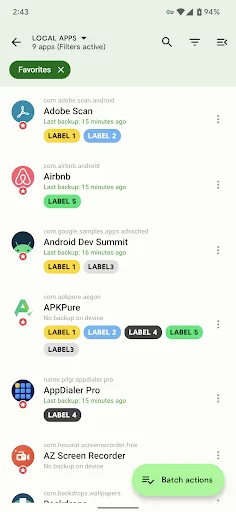
When creating an app backup, you can save the app's APK file to your Android device's memory. Afterward, you can share this APK file or perform any operations on it. For text messages or call logs, you can simply use the "Restore" function in the Swift Backup app to recover the information. This way, you can also view and restore downloaded apps, used background images, and contacts in your contact list.
Features
Easily back up your data!
Most devices today have the ability to back up and restore user data. However, Swift Backup stands out among many backup apps with its comprehensive backup capabilities. You can back up most data, including apps, text messages, call logs, and more.
You can even back up data from already backed-up apps. This is crucial if you want to reinstall your operating system without losing your data. Furthermore, you won't have to spend too much time reloading data when you switch to a new device.
With just a few simple steps within the app, you can easily back up anything you want. It's especially worth mentioning that most cloud storage services support data backup. After the backup is complete, you can store the backup file in a safe place, such as Drive, Google Drive, Dropbox, etc. Therefore, you can confidently choose a suitable storage service to save your data backups.
Fast Data Recovery!
If a data backup exists, Swift Backup also allows you to quickly and completely restore all the data in the backup. First, select the backup you created earlier. Then, you need to confirm the data to be restored. At this point, all the data in the backup will be transferred to your device in a short time. After the recovery process is complete, you can immediately use all your apps and data. However, before restoring, you also need to check if the app is compatible with your Android version.
Minimalist Design!
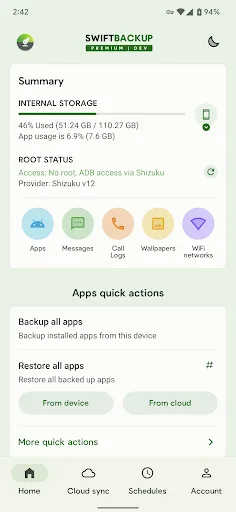
Often, some backup and data recovery apps are designed to be quite complex, making their functions difficult to understand. However, Swift Backup adopts an extremely simple design, providing you with the best user experience. The app uses a soft green color scheme, and the backup objects are logically divided. With just a few small details, you can complete your tasks more easily and efficiently.
Furthermore, the app will recommend backup storage locations based on your choices. With its minimalist design, you can explore all the built-in features yourself. Also, for the best experience, remember to grant the app access permissions.
Some tips!
If you have a lot of important data, back it up regularly to a fixed storage location. This helps avoid errors caused by accidentally deleting data and information on your device. It's especially worth mentioning that your data is always protected after continuous backups. Also, carefully review the app's features before backing up and restoring data.
Swift Backup is safe and free!
Swift Backup always puts the security of all your data first. The app comes with a professional support team to answer any questions you may have during use. The developers specifically emphasize that the app does not share user data with any other organization. Therefore, you can use the app with complete peace of mind. In addition, you can request the complete deletion of all data within the app at any time.
Furthermore, the app is completely free, bringing you a comprehensive user experience. With its excellent features, you don't need to spend a penny to use the app. Therefore, this gives the app a significant advantage over similar apps.
Highlights
App Settings Backup: After the developer update, users can finally see the app uploading data, whereas previously it could only be uploaded within the app itself.
Retain Login Information: This is especially useful for players who enjoy offline games, as the app saves all their game progress.
No Data Loss: With this app update, the app's data update functionality has been finally perfected. Now, users no longer need to worry about losing data from other apps.
Selective Backup: Users can now choose which data portions they don't need to store, saving more storage space.
Automated Controls: To help users avoid wasting valuable time storing data, the developers created a feature that allows users to set timers so the app can automatically perform data storage tasks.
FAQs
How do I delete my app backup?
To delete an app backup, open Swift Backup and click the "Apps" icon in the top card to enter the "Apps" interface. You can perform various app-related operations in this interface, so be sure to familiarize yourself with it.
First, depending on the location of the app backup you want to delete, switch to the "Local" or "Cloud" section from the top.
Delete Multiple Backups:
Tap the "Batch Operations" button at the bottom, then select the "Delete Backups" operation.
Now select the apps in the list and perform the "Delete Backups" operation on the selected apps.
If you only want to delete archived app backups, select the "Delete Archived Backups Only" operation.
Delete Backups of Specific Apps:
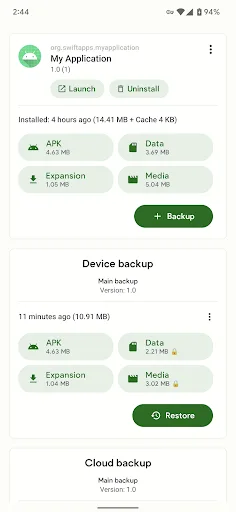
Tap the app in the list on the "Apps" screen.
In the screen that appears, tap the three-dot menu on the device backup card or cloud backup card, then select the "Delete Backups" operation.
Can I use a custom folder location for backups on my device or in the cloud?
There are currently no plans to support custom folder locations on cloud or local storage. All cloud services and local storage currently use standard folder locations, which helps us simplify operations and makes debugging easier in case of problems.
Can I uninstall system apps using Swift Backup?
Since Android 10, all device partitions except the /data partition are read-only at runtime, so this feature is no longer planned. This means that system apps can only be updated at runtime, but the original APK files located in the /system partition cannot be modified.
TWRP/Recovery Mode should be able to access all partitions. Therefore, to uninstall system apps, you can do so via a streamlined script in Recovery Mode.
Tip: Keep it simple and use Swift Backup to disable system apps you don't want to use.
How is my backup encryption password generated/stored?
For users signing in with Google: Encryption passwords are generated individually for each user and each backup type and are not stored anywhere. Note that your Google account email address is not used to generate the password. When you first sign in to Swift Backup with Google, you will create a dedicated Swift Backup account with its own randomly generated user ID. This user ID is one of the factors used to generate the key.
For anonymous users: All anonymous users use the same encryption password. Please use the "Advanced" policy (see below) and add your own custom password to the encryption logic to ensure your password is different from other users.
Summary
Swift Backup is a simple and secure application and data backup tool. It supports cloud services, making the backup process faster and more secure. Its clean design also makes it easy to use.








