MinerGate is a mining software specifically designed for cryptocurrency users. It supports multiple encrypted cryptocurrencies and allows users to view mining progress and profit calculations in real time, making mining easier and maximizing profits. The software is simple to use; with just a click, users can select from common cryptocurrencies to start mining. It displays various statistical data in real time, keeping users informed of the latest mining information. Security is paramount; advanced encryption technology protects user accounts and data, ensuring safe and secure mining. The software also supports different mining modes, allowing users to choose between solo mining or joining a mining pool to collaborate with users worldwide.
Click to load YouTube / 点击加载视频
YouTube ↗Features of MinerGate:
MinerGate is designed to be straightforward and intuitive, making it accessible for users with various levels of experience in cryptocurrency mining. Whether users are seasoned miners or just starting, the app's layout and features cater to their needs. The clear organization of information aids in understanding the mining process and managing mining activities effectively.
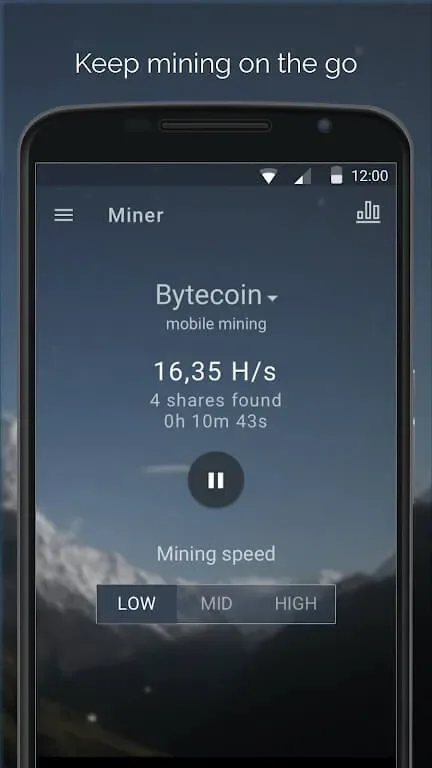
Users can also invite friends to join MinerGate through the app's affiliate program. This feature allows users to send invitations directly from the mobile application, promoting a collaborative mining experience. Although the app does not include mining functionalities due to Google Play Developers Policy, it facilitates group mining efforts through its pools.
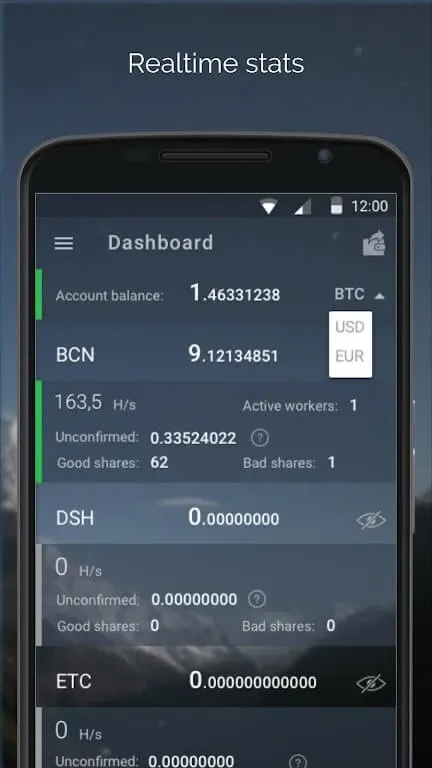
Monitoring mining activities is further enhanced by the app's ability to track equipment performance. Users can manage their workers and check balances, ensuring they remain informed about their mining efficiency. This ongoing oversight supports better decision-making regarding mining strategies and operations.
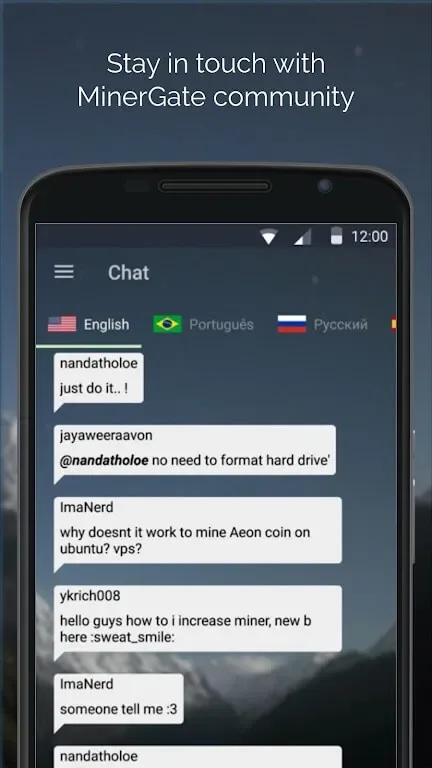
The app's design encourages engagement with the broader MinerGate community, providing users with opportunities to share insights and experiences. By fostering communication among users, MinerGate Control enhances the overall mining experience, making it more social and interactive.
Strengths of MinerGate:
User-Friendly Interface: MinerGate provides a clean GUI dashboard that helps many users understand the mining process without unnecessary complexity, and Smart Mining automatically selects the most profitable altcoins based on benchmarking rather than forcing someone to mine one cryptocurrency at random.According to user reviews, the interface gives newcomers immediate insight into MinerGate features and makes mining software feel more accessible than some competitor tools. The platform’s design helps enthusiasts mine coins efficiently while still retaining visibility over electricity usage and asset performance.
Full User Control: Unlike services that require dedicated mining hardware, MinerGate allows the mining program to run on a PC and lets users mine different coins across CPU and GPU simultaneously, which can optimize performance during merged mining sessions. MinerGate’s website explains that control levels are comprehensive — users can adjust how many cores to allocate, run the software on mobile phone for monitoring only, and withdraw funds through the withdrawal panel when ready.Despite this flexibility, profitability remains subjective because electricity costs, coin selection, and applicable regulations vary by region. MinerGate guidance in 2026 still emphasizes managing expectations rather than assuming mining will always be profitable.
MinerGate Mobile App: The mobile companion app does not mine but tracks sessions on desktop, giving clarity over fees and progress of the platform’s mining program. The app shows token information, projected earnings and which coins are currently being mined, but a fee of 1 coin minimum applies before withdrawal is processed. Some investors still question legitimacy and ask whether MinerGate is a scam, while others highlight transparency and trustworthiness, especially for those who withdraw funds regularly and treat mining as a long-term activity.For skeptics comparing alternatives, reviewing a MinerGate competitor comparison for merged mining and functionality can add context before deciding whether MinerGate’s approach fits their needs.
Useful Tips of MinerGate:
Regularly Monitor Hash Rates: Keeping an eye on your hash rates can inform whether you need to adjust settings. If the hash rates drop significantly, this may indicate issues within the app or network.
Optimize Device Settings: Make sure your device is running at its best. Close background apps that may drain CPU and RAM resources, ensuring Minergate can perform optimally without competition from other applications.
Stay Updated with Software Updates: Minergate frequently rolls out updates to improve performance and security. Keeping the app current ensures that users can access the latest features and optimizations.
Evaluate Electricity Costs: Mining does consume a lot of power. Comparing electricity expenses across different setups can help determine the most economical method. Consider using renewable energy sources where possible to decrease overheads.
Track Hardware Performance Costs: Any hardware used should be assessed for its return on investment. If certain devices are underperforming, it may be wise to either upgrade them or halt mining with that equipment altogether.
Implement Network Data Management: Mining can use a significant amount of data depending on your connection. Check whether your mobile plan supports adequate limits or if additional costs arise if you surpass them. If expenses become too high, consider limiting data usage or switching to WiFi where feasible.
Final Verdict:
Push notifications away from your hardware? Dont worry, you can always check the work of your mining equipment wherever you are. All you need is the MinerGate app and internet connection. And you will automatically receive push notifications on your smartphone screen as soon as your miner started or stopped working.