
Purr — Rootless Resolution Cha uses a unique calculation method to obtain DPI, allowing you to easily change your device's resolution for a better experience whether you're playing games, watching movies, or streaming shows. It doesn't require root access and can reduce GPU load and improve compatibility with certain games. Furthermore, you can customize the resolution, giving you complete control over your device rather than being limited to a fixed resolution.
Features
Non-root screen customization: Adjust display settings without the complexities of rooting your phone.
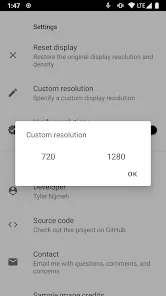
Custom resolution settings: Set personalized resolutions tailored to your preferences.
Pixel density calibrator: Modify DPI values to fit your new resolution perfectly.
Display compatibility checker: Ensure your chosen resolution works flawlessly before applying it.
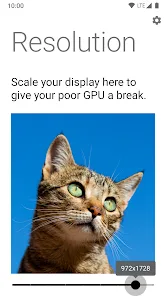
GPU performance optimization: Lower screen resolution to boost graphical performance in games.
Cute animation: Enjoy a delightful cat animation every time you open the app, adding charm to functionality.
Open-source transparency: Access the app's code and contribute to its development.
Advantages
No root access required: Purr allows users to change the resolution of their Android devices without root access, making it easily accessible to more users.
Reduced GPU load: By lowering the display resolution, Purr helps reduce the load on the device's GPU, thereby improving performance and battery life.
Improved game compatibility: Some games may be designed for standard -9-inch displays rather than widescreen displays. Adjusting the resolution to a more suitable aspect ratio can improve the gaming experience.
Precise DPI Calculation: Purr uses sophisticated mathematical calculations to precisely determine the DPI (dots per inch) of a new resolution. This eliminates the need to manually calculate the diagonal length of the resolution, making the process simpler and more accurate.
Compatibility Verification: Purr verifies the compatibility of resolutions before applying them, acting as a safety measure to ensure only compatible resolutions are used.
Customizable Resolution: Users can customize the resolution to their personal preferences, allowing for more flexible adjustments to the device display. Additionally, the app features a cute cat logo, adding a touch of charm to the user experience.
Pros and Cons
Pros: Can change display resolution without root access.
Reduced GPU load, resulting in improved performance and extended battery life.
Helps prevent smudges or scratches on curved or notch screens.
Works even after initial ADB setup.
Cons: May disable gesture navigation and fingerprint scanner.
Causes visual glitches.
Reviews
It works perfectly! Thank you developers! Could you also make a CPU overclocking app as easy to use as the resolution adjustment app? And I don't want to root my device.
If you're using the Prevent and Purr apps, simply copy the following command to change your screen resolution.
Here's a simple way to run Purr without root access: Step 1, find the "Build number," tap it 7 times consecutively, find "Developer options," and enable USB and wireless debugging. Return to the home screen, open the Play Store, search for and download the Previte app. After downloading, open Previte, return to the home screen, open Purr, copy the command from the Previte app, and then execute the command "delete adb shell." After the command executes successfully, return to Purr, and Purr will open.
This app is amazing! I can change the resolution, and games run incredibly smoothly without any lag, all thanks to this app! Thank you for developing this app!
Summary
An all-in-one tool for easily changing the resolution of your Android device without root access! You might ask, how does it work? We use Android SDK reflection to access hidden APIs to change the phone's screen resolution. We only need one special permission, which can be granted via ADB.








