

4G LTE Only Mode is an outstanding network mode switching utility that helps non-Samsung phone users easily switch to LTE Only network mode, ensuring your device always maintains a stable 4G network. The app presents a powerful yet lightweight and easy-to-use network settings program, allowing users to experience rich customization options, including notification logs, battery information, Wi-Fi information, statistics, and more. The app interface is intuitive and user-friendly, helping you test network signal strength for an excellent internet browsing experience.
Click to load YouTube / 点击加载视频
YouTube ↗Awesome Features of 4G LTE Only Mode
Boost Device Performance with a Comprehensive Suite of Functions
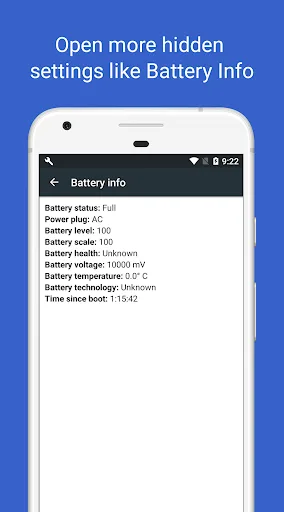
In addition to network management, this utility offers a range of functions to improve device performance. You can easily view notification logs, assess battery details, view usage statistics, and evaluate Wi-Fi connectivity. These features are essential for better managing your device and improving its efficiency.
Optimize Network Settings and Signal Quality with Advanced Tools
Furthermore, the app enables VoLTE on compatible devices, allowing you to lock onto stable network frequencies and providing SIM card and phone information. To optimize signal quality, the app includes a built-in signal strength meter and network speed test tool, supporting multiple network types (2G, 3G, 4G, Wi-Fi, LTE) to assess and confirm your network connection strength and speed.
Amazing Performance of 4G LTE Only Mode
Users can also access SIM card and phone information through the app. This feature provides detailed information about the SIM card installed in the device, including carrier information and related settings. Users can also easily access phone information to view the device's basic specifications and configuration. This comprehensive information helps in troubleshooting and optimizing device performance.
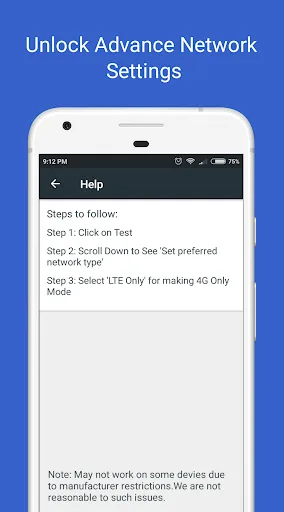
The app's interface is clean and user-friendly, allowing users to easily navigate various settings and options. Even less technically savvy users can benefit from it, as it simplifies the process of adjusting network settings and accessing hidden features. The intuitive layout optimizes the user experience, allowing users to quickly make adjustments without requiring extensive technical knowledge.
Fantastic Highlights of 4G LTE Only Mode
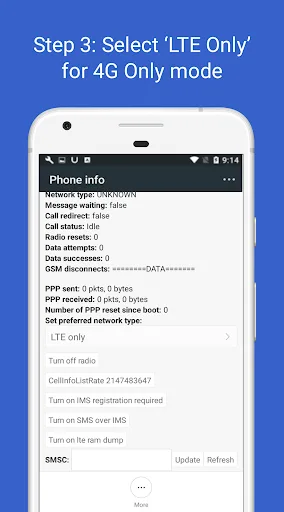
Switch to 4G-only mode
Lock your phone to a stable 4G/3G/2G network signal
Enable VoLTE on supported devices
Advanced network configuration
Turn on notification logs
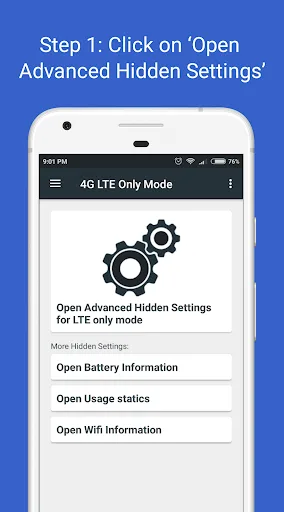
Turn on battery, Wi-Fi information, and usage statistics
View your network speed test
Check your phone signal strength
SIM card and phone information
User's Comments of 4G LTE Only Mode
This app does exactly what it promises in a simple manner. No fancy interface and buttons. It's just a convenient shortcut to devices' hidden settings, so that you can control your data signal. Of course, if you don't know what you're doing, you can disable data or calls, so have that in mind. Despite its really small size, it offers quite a few extras that could also be helpful.
This app does exactly what it promises in a simple manner. No fancy interface and buttons. It's just a convenient shortcut to devices' hidden settings, so that you can control your data signal. Of course, if you don't know what you're doing, you can disable data or calls. So keep that in mind. Despite its really small size, it offers quite a few extras that could also be helpful.
I was frustrated by the phone randomly switching from LTE to EDGE, totally disrupting the data connection. This appears to have fixed the problem. It can be frustrating using the app to choose the right network combination; so many choices didn't allow both voice and data.
Summarize
In short, the "4G LTE Only Mode" app is a powerful tool for Android users looking to optimize their mobile network settings. It has a variety of functions, including network locking, access to hidden settings, network speed testing, and detailed phone information, making it very versatile. After downloading the "4G LTE Only Mode" app, users can better control their network connection, ensuring they always connect to the most stable network. The rich features offered by this app make it a valuable choice for anyone looking to improve their mobile experience.








