

ArduinoDroid is a fun and engaging game for Android devices. It boasts beautiful graphics and numerous features, including test programs and libraries, and displays syntax errors in your code. With ArduinoDroid, you don't need an internet connection or cloud services; you can even upload your programs from USB drives, Dropbox, or Google Drive. You can utilize many coding aids, including a built-in small software keyboard designed specifically for coding, and a file navigator to help manage multiple files in your sketches. Furthermore, the app features real-time diagnostics to help you correct and optimize your code.
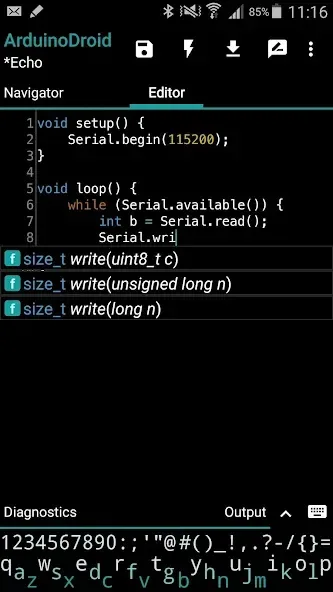
Highlights:
- onboarding
- open/edit Arduino/ESP8266/ESP32 sketches
- example sketches and libraries included
- code syntax highlighting with themes support *
- code complete *
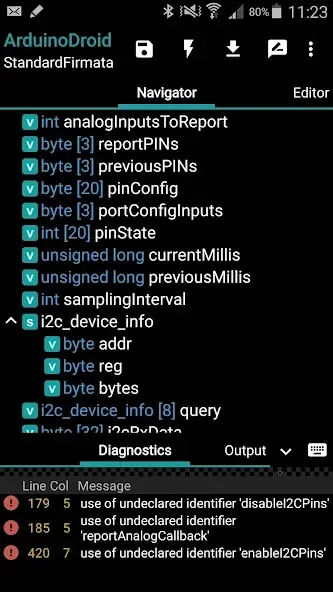
- real-time diagnostics (errors and warnings) and fixes *
- file navigator *
- tiny built-in software keyboard *
- compile sketches (no root required)
- upload sketches over USB (all ESP8266 boards, all ESP32 boards, Arduino Uno/Uno_r3, Duemilanove, Nano, Mega 2560, Leonardo, Micro/Pro Micro, Pro, Pro Mini, Yun, Esplora, Robot Control, Robot Motor boards are supported, android devices with USB-host support required) and WiFi (OTA for ESP8266/ESP32)
- serial monitor
- works offline (no internet connection required)
- Dropbox support
- Google Drive support
- material design
Features:
Mobile IDE with helpful coding tools*
ArduinoDroid provides syntax highlighting, themes, code completion*, real time diagnostics*, a file navigator*, and a small on screen keyboard* designed for coding. These advanced options help reduce errors and speed up editing on mobile. See advanced features on the official site for details.
Compile and upload from your device
You can build sketches locally and upload over USB to popular Arduino boards. Moreover, you can use Wi‑Fi over the air for ESP8266 and ESP32 targets when a network is available, which keeps your workflow flexible.
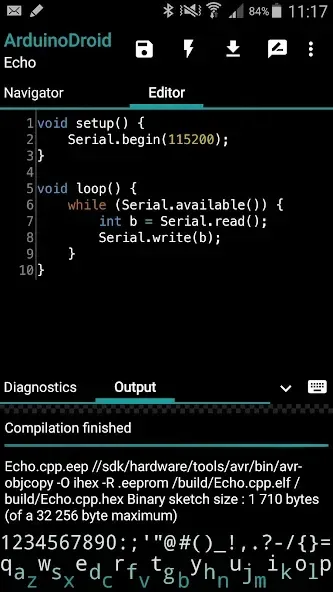
Integrated serial monitor and output views
ArduinoDroid includes a serial monitor for viewing logs and interacting with your board. In addition, output and diagnostic panes help verify builds and troubleshoot common issues during development.
Offline by design with optional cloud sync
The app works fully offline using local compilers, libraries, and examples. Also, optional Dropbox and Google Drive integrations let you back up or sync sketches if you prefer a cloud workflow.
Broad board coverage for common projects
ArduinoDroid supports Arduino Uno, Mega 2560, Nano old and new bootloader, Leonardo, Micro, Pro Micro, Pro and Pro Mini, Yun, Esplora, Robot series, plus ESP8266 and ESP32 families. Digistump boards are also supported.
Onboarding with examples and libraries
Bundled example sketches and libraries help you get started quickly. Therefore, new users can open a sample, set the target board, build, and upload in a few steps without extra setup.
Pros & Cons:
Pros
Convenient
Works without internet connection
Sketch compilation doesn’t require a rooted device
File navigator
Cons
Can’t be installed on an SD card
Requires 500 MB of free space
FAQs:
Does ArduinoDroid work offline?
Yes, ArduinoDroid works fully offline because it includes local compilers, libraries, and example sketches. You can write, build, and upload without an account or a network connection, which makes it reliable in classrooms, workshops, and field projects.
How do USB and Wi‑Fi uploads work in ArduinoDroid?
ArduinoDroid uses an internal uploader for many Arduino boards over USB and supports Wi‑Fi over the air for ESP8266 and ESP32. If an upload fails, the app can fall back to Avrdude in certain cases; see the troubleshooting page for board specific steps.
Which boards are supported by ArduinoDroid?
ArduinoDroid supports Arduino Uno, Mega 2560, Nano old and new bootloader, Leonardo, Micro, Pro Micro, Pro, Pro Mini, Yun, Esplora, Robot series, plus many ESP8266 and ESP32 boards and Digistump. Check your specific model and connection type in the app before uploading.
Conclusion:
For makers who value mobility and offline work and are willing to pay to remove ads and access the full editor feature set, ArduinoDroid can be a powerful companion. Those who rely heavily on advanced code navigation or who are sensitive to interruptions from ads may prefer to use it as a secondary tool rather than their primary development environment.








