
Edgest Edge Gestures & Control is a device accessibility app designed specifically for Android devices. This app boasts beautiful graphics and incorporates a variety of fun features, allowing users to navigate and use the screen with simple gestures. With Edgest Edge Gestures & Control, you can operate your device with one hand, enjoying fast and smooth operation every time you use it. A simple touch quickly accesses the screen edges, and a tap on the screen provides easy and quick access to various real-time device control functions.
Highlights:
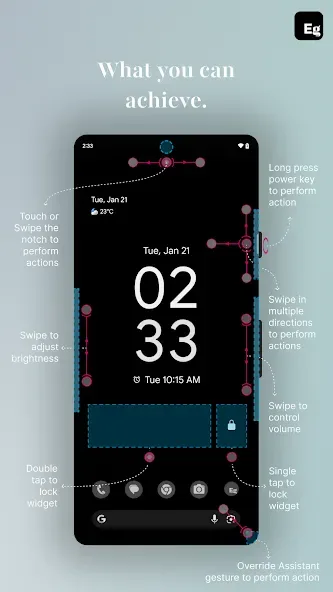
Edge gestures for quick gesture navigation and instant access to your favourite apps and actions.
Notch gestures for phones with a display cutout: assign actions to swipes and taps near the notch so you get another gesture zone without cluttering the screen.
Volume control and brightness control directly from the screen's edge - adjust without opening menus.
Custom gestures to launch apps, open system menus, or trigger shortcuts.
Add a quick settings tile for instant access to custom actions.
Lock screen widget with single-tap or double-tap lock options.
Control media playback with gestures or quick settings.
Override assistant triggers to perform any custom action.
Open URLs, take screenshots, open the notification shade, and more - all from gesture shortcuts.
Highly customisable with more features coming soon!
Features:
Instant Edge Access: You don’t need to perform many steps to access your device. Because you just need to touch the edges of your phone, and you can use it immediately. This will make you extremely satisfied every time you use it.
One-Hand Navigation: With this app, you can use your phone with just one hand. This feature allows you to use your phone while doing other things, providing a captivating and enjoyable user experience.
Fluid System Control: You’ll experience incredibly smooth and seamless device operation without any lag or stuttering, delivering absolute satisfaction with no complaints.
Fully Personalized Gestures: With this app, you can set and customize your own gestures. You’ll quickly become familiar with the device without needing much time to get used to it.
System Action Override: The application also allows you to override your actions. You can override any action without encountering too many difficulties or restrictions.
Privacy First Design: With this application, you will have a device with advanced and professional security. Your personal information and data will always be kept private, providing you with an extremely safe user experience.
Tips for Users:
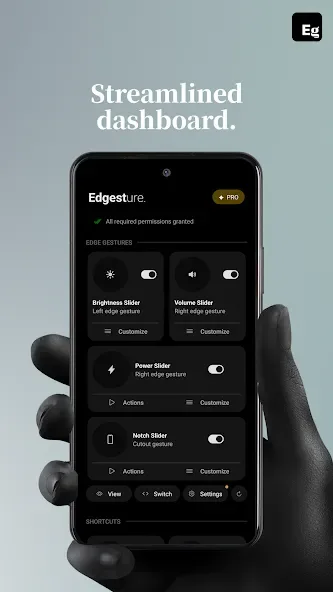
Edge swipes, taps, and long-presses mapped to apps and system actions
Slide along edges to change volume and brightness with clear visual indicators
Quick Settings tile for one-tap custom actions and media playback control
Lock screen widget for single or double tap to lock the device
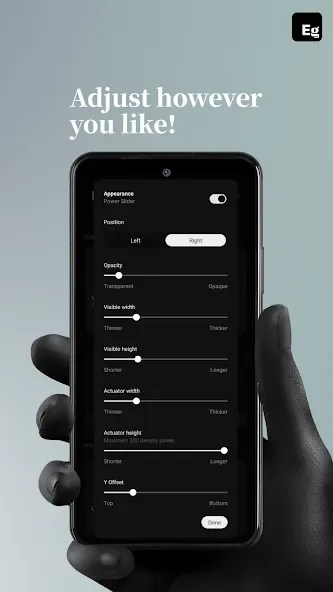
Gesture settings with icons, customizable feedback, and sensitivity tuning
Pros & Cons:
Pros
Intuitive gesture navigation
Highly customisable options
No ads or tracking
Lightweight and battery-friendly
Enhances productivity
Cons
Limited to Android devices
Requires accessibility permissions
Some features may need technical understanding
Premium version might be costly
Conclusion:
Edgest Edge Gestures & Control uses the Accessibility Service API to deliver its edge gesture functionality without collecting or sharing your data. It is a practical solution for users seeking a faster and smarter way to interact with their Android phones.








