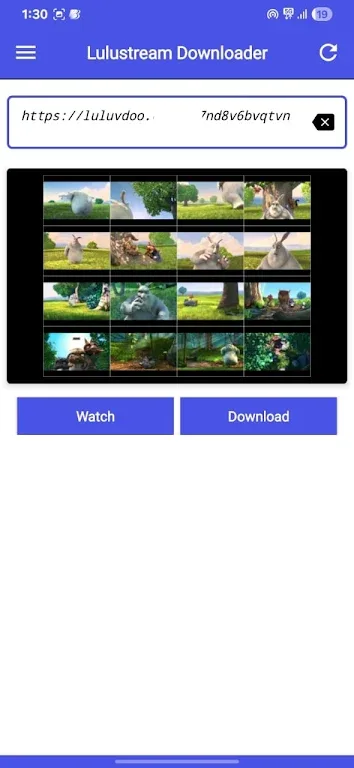
Lulustream Downloader is a fantastic video downloader. With its clean interface and extensive video selection, it allows users to easily build their own offline video library and say goodbye to buffering hassles. With Lulustream Downloader, you can freely choose the videos you're interested in, easily download, stream, manage, and enjoy them. Users simply paste the video link into the provided text box to quickly access the download link in their default browser. Furthermore, the application offers multiple resolution options, allowing you to choose freely based on your storage space and preferences.

How to Use:
Copy your video link
Open Lulustream Downloader
Link auto-pastes instantly
Preview thumbnail and details
Tap Download
Watch and share anytime
Highlights:
Download from LuluStream links
LuluStream Downloader & Player lets you paste a LuluStream video URL and choose the available resolution before saving. You can select from multiple formats when the source supports them. This direct link approach keeps the process simple and reduces extra steps during downloads.
Play saved videos offline
The built in player handles your saved LuluStream files without external apps. You open a video and it starts smoothly, even when the phone is in airplane mode. This setup is useful when traveling or when a stable network is not available.
Quick, clear controls
The interface uses clean menus and one tap actions for common tasks. You move between the downloader, player, and gallery with minimal steps. This design makes routine actions faster, such as starting a download or opening a recent file.
Manage downloads with details
During saving, you see file size, duration, and format for predictable results. You can pause and resume as needed, which helps when switching connections or preserving data. These controls support reliable downloads without losing progress.
Organize your LuluStream library
An integrated gallery collects all saved LuluStream videos in one place. You can sort, play, and remove items to keep storage tidy. The gallery view helps you find content quickly and manage space with simple actions.
Features:
Smart Auto Paste
Automatically detects copied video links from your clipboard and pastes them instantly for faster downloading.
Multi-Platform Support
Supports downloading and streaming from multiple supported video platforms and direct video links.
Built-in Video Player
Watch videos directly inside the app before or after downloading with fullscreen support.
Fast Download Engine
Download videos quickly with stable speed and optimized performance.
Thumbnail Preview
Preview thumbnails before downloading to confirm the correct video.
Hidden Folder Support
Save videos inside a hidden private folder for better privacy and security.
Save to Gallery
Users can also save downloaded videos directly to their phone gallery.
Deep Link Support
Open supported video links directly inside the app automatically.
Download & Play History
Track downloaded videos and previously watched videos anytime.
Easy Video Sharing
Share downloaded videos directly with friends and social media apps.
Tips and Tricks:
Save videos for offline viewing during flights, commutes, or spotty connections.
Paste a Lulustream link and start an automated, reliable download process.
Choose from multiple resolutions to match screen size and storage space.
Avoid playback interruptions by watching saved files instead of streaming.
Simple, clutter-free interface focused on getting downloads done quickly and clearly.
Data privacy in mind, with downloads stored locally on your device.
Build a personal library to watch again without using mobile data.

Conclusion:
Key features of Lulustream Downloader include fast redirection to the browser, enabling instant access to video downloads. The app is lightweight, ensuring it does not consume excessive storage while still delivering a fast performance. With no hidden charges or subscriptions, this tool offers a hassle-free solution for anyone wanting to save their favorite videos.