

Solid Explorer File Manager is a file management tool designed specifically for mobile devices. It aims to help users manage device files, freeing up storage space and making devices run more smoothly. Users can upload files, photos, and videos of various formats. All files are uploaded to the cloud, and users can set passwords for them. Users can also log in to different devices with their accounts and download the same files to other devices. The software has a built-in search function; users can quickly find the files they need by simply entering keywords, facilitating batch deletion and movement, saving users time.
Click to load YouTube / 点击加载视频
YouTube ↗Features of Solid Explorer File Manager:
Offers both light and dark themes: To help users use their phones more comfortably at night or in places with low light, the app also provides them with a mode to help them switch back and forth. Between day mode is night mode.
Animations and transitions: In addition, developers also pay special attention to the interface while designing the app. The purpose of this is to make it easier for users to use this application and not encounter any difficulties.
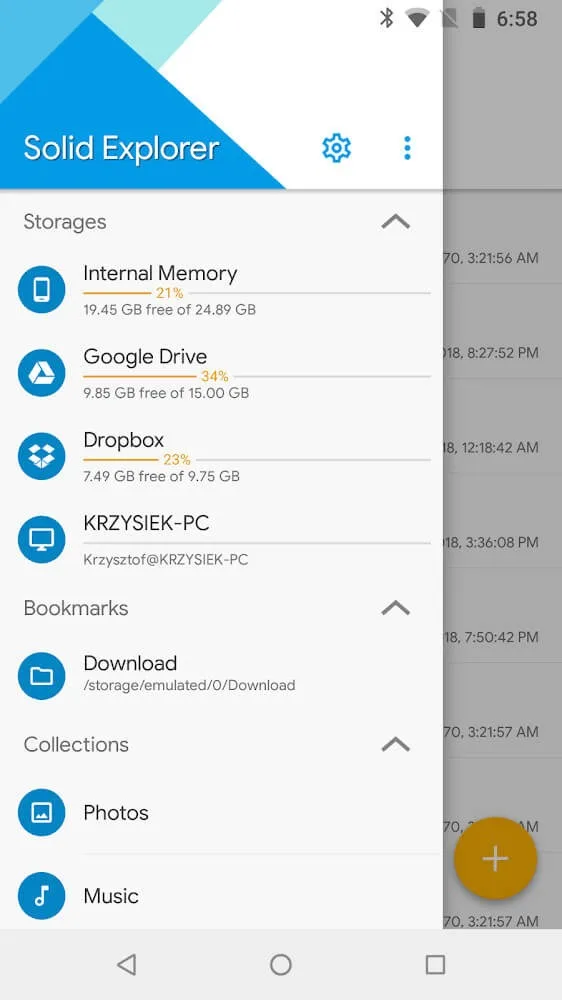
Seamless access to major cloud services: By using this application, users do not need to worry about their device running out of memory anymore because the application is combined with many other cloud applications, creating an extremely large storage space.
Transfers between cloud services are made easy by drag and drop: The most convenient thing when using this feature is that users do not need to do cumbersome steps to bring applications from their device to the cloud. Users just need to turn on dual-screen mode and drag and drop the application from their device into the already-opened cloud application.
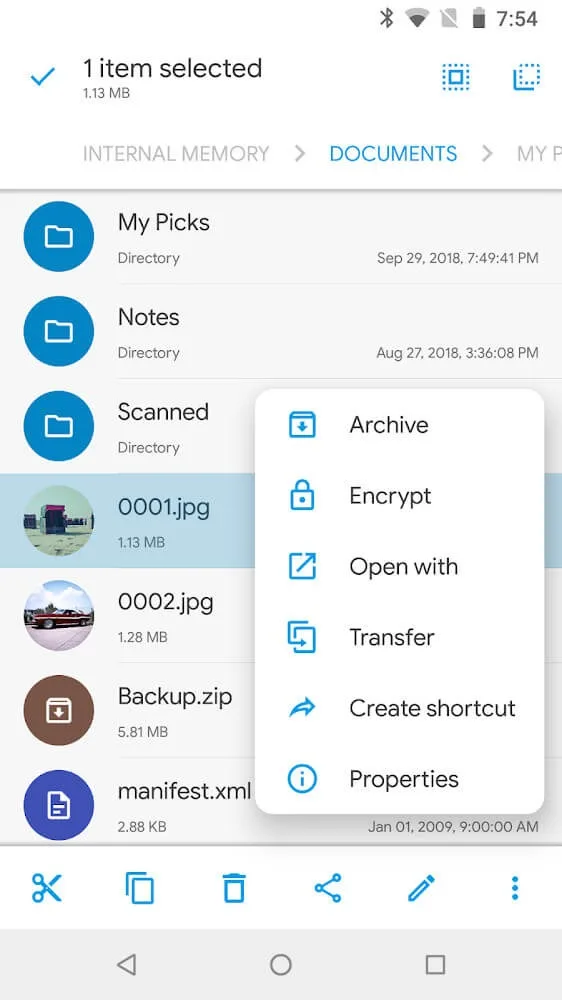
Packed with all essential file management tools – copy, move, delete, rename, share: The application has all the basic tools to help users comfortably use, from copying to renaming and even file sharing. The strength here is that users can share files only via Bluetooth.
Highlights of Solid Explorer File Manager:
Dual pane browsing and fast file operations: Solid Explorer shows two locations side by side to help you work faster. You can drag and drop to copy or move files between panes, then run batch operations when many items need to change at once. This layout reduces back and forth navigation, so common tasks feel more direct.
Cloud and NAS connections in one place: Solid Explorer connects to Google Drive, OneDrive, Dropbox, Box, and servers using WebDAV, FTP, SFTP, or SMB. You can browse remote folders, transfer files, and even move content from one cloud or NAS to another without downloading locally first. Mega support is available with a paid add on, which sets clear expectations for that service.
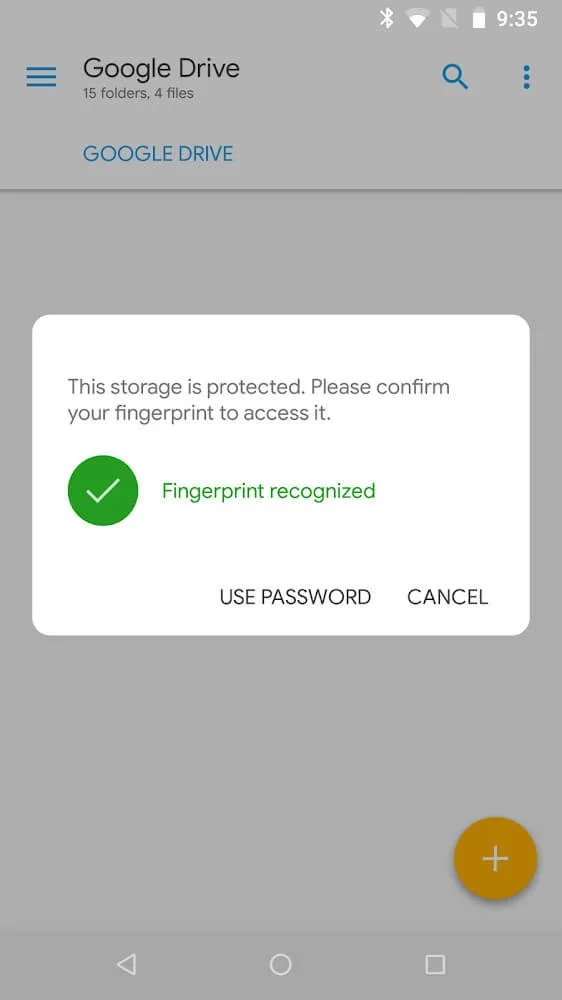
File security and encryption: Solid Explorer lets you protect files with AES encryption and unlock them using a password or fingerprint. Secured folders remain protected even after you uninstall the app, which helps maintain privacy. You can also create and extract encrypted ZIP and 7ZIP archives, with read support for RAR and TAR formats.
Tools for advanced users and PC access: Solid Explorer includes a root explorer for devices with root access, plus batch rename with patterns for consistent file names. Built in viewers let you open images, music, and text without extra apps. An FTP server is available so you can access your phone from a PC over the same network.
User Reviews of Solid Explorer File Manager:
I've been using SolidExplorer for years, and LOVE it! It took some getting used to the left and right panels, but once I figured that out, no going back to ordinary file explorers. Easy connection to local network shares and cloud services, all in one app. I occasionally encounter issues or crashes navigating network shares, but overall, I love it.
The ability to have 2 panes displaying at the same time-the source and the destination locations-is invaluable. It also save one a lot of time. Samsung My files was not able to move files from the local Download folder to a One Drive folder. This app had no problem doing it!
Just started using solid explorer. Love the dual pane feature/ability to swipe to change active folders and the FTP option. So far only very limited issues where sync isn't quite right or can't select account options, but a quick restart of the app fixes it immediately.
brilliant app. i often have to scroll through tons of system folders. This app allows me to hide them without adding anything like a prefix. you pick the folder say ringtones and hide and it's done. makes navigating the phone folders really simple now as i only see what i want to. wish i found it years ago. not sure what pro ads i just needed the hide option which was free.
FAQs of Solid Explorer File Manager:
WHY SOLID EXPLORER STILL RUNS IN THE BACKGROUND AFTER EXITING?
The short answer is: you shouldn’t care about that.There is no proper way to exit the app, i.e. terminate its process. As a PC user you’re used to close the app when you’re done with it, but mobile operating systems are different. On the Android you don’t exit the app, you leave it. That’s why it doesn’t matter if you hit the home or back button. Well, actually it does, because hitting the home button will save the app state, so it’s even better. Anyway, in both cases the app will be moved to background an will sit there until you open it again or your device will run out of free RAM. In the second case, Android’s memory management will kill the process to make room for a new app. If you really want to release resources eaten by the app, remove it from recents. That will do the job.
THE APP TELLS ME, THAT THE FOLDER IS EMPTY, BUT IT ISN’T?
If you renamed, copied or moved the folder to another location, Android’s media scanner needs to scan the files again. That may take a while, so that’s why you don’t see the real size yet. Once the scan is complete, after you refresh the directory you’ll see the real folder size.It’s also worth noting, that sometimes folder size can be innacurate. It fully depends on Android’s media scanner and on how many files it actually scanned. Anyway, in most cases folder size calculation seems to be accurate.If you still see the folder as empty even after waiting some time, there must be something wrong with Android’s files database. This problem is not related to Solid Explorer and can’t be fixed inside the app.
I CAN’T COPY ANYTHING TO SD CARD?
If you’re running Android Lollipop or higher, you need to grant write access to Solid Explorer. Prior to attempt to write anything you’ll see a popup asking you to select the root folder of SD Card and tap the Select button at the bottom. If you don’t see your SD Card in the sidebar, look for an option to show it in the overflow menu.If you’re running Android KitKat and your device is not rooted, you won’t be able to write to SD Card.
Conclusion:
Solid Explorer File Manager offers a more straightforward file management experience with just one app. Users can capture all information related to download or new file creation. Right on the user interface, you will be able to fill in basic information, design your own space, and document storage layout quickly. Special types of encryption developed by the system will help you preserve your information well. In addition, users can also manipulate easily if they want to back up file information to a new address.








