Crosshair Hero This is a customizable visual pointer overlay application for first-person shooter games, compatible with various software, making it a very practical tool. It's a game assistant that helps players easily improve their aiming skills. The software is simple and easy to use, requiring only simple settings to get started. The interface is clear and straightforward, allowing players to quickly adjust settings. This software allows players to choose from up to thirty preset aiming styles according to their personal preferences, and also allows them to change the pointer's size, color, and position to ensure a perfect integration between the pointer and the game. In short, this software is a powerful assistant in any game toolkit
Features
Customizable Pointer Styles:
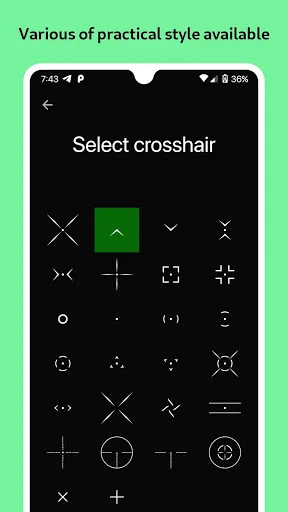
Choose from over 30 pre-set pointer styles or upload your own PNG file for a unique touch.
Adjustable Size and Color:
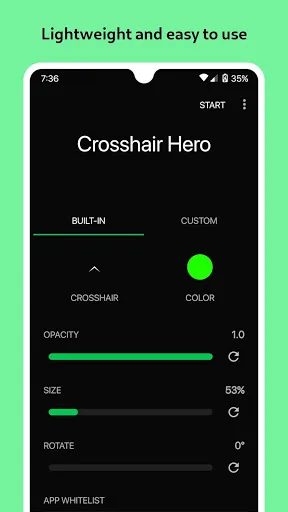
Tailor the pointer's size and color to seamlessly integrate into your gaming environment.
Versatile Compatibility:
Works smoothly across various applications, enhancing gameplay in numerous first-person shooter titles.
User-Friendly Interface:
Navigate easily through the app's settings and customization options without hassle.
Customization:
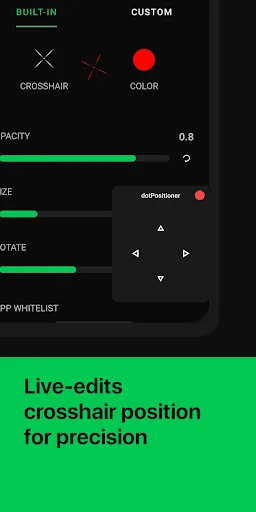
Crosshair Hero offers extensive personalization options that empower users to craft their ideal gaming interface. Adjust the pointer size, select your preferred color, and position it anywhere on your screen to achieve the perfect alignment. The ability to upload your own PNG files allows for further individualization, ensuring that your crosshair reflects your style and improves your performance.
Modes/Functionality:
Simple Overlay Activation: Quickly enable or disable the overlay in your gaming sessions.
Real-Time Adjustments: Make on-the-fly adjustments to ensure your crosshair fits your changing preferences or needs during gameplay.
Highlights
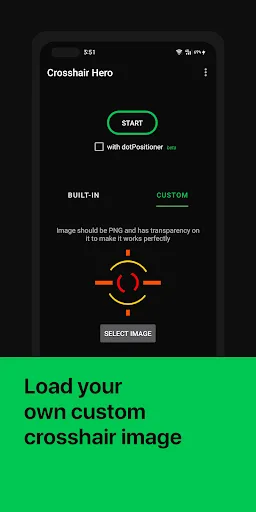
Lets you load your own PNG as the reticle graphic
Includes more than 30 built-in reticle designs ready for immediate use
Operates as a lightweight overlay that won’t weigh down your device
Displays the pointer across nearly any app or game window
Gives fine control over color, scale, and placement
Available at no cost
Advantages and disadvantages
Pros:
Wide variety of pre-set and customizable pointer options.
Enhances aiming precision in fast-paced gaming environments.
Easy to use with a streamlined interface for quick adjustments.
Compatible with multiple applications beyond gaming, broadening its usability.
Cons:
Some users may experience a learning curve in adjusting settings for optimal performance.
Depend on specific graphics settings or hardware for the best performance.
User comments
This app is very helpful especially for those players who plays Codm. and it's very easy to set the crosshair, you can adjust it even inside the game. and it has many built-in crosshair options. But, there is one problem that I encountered and that is the disappearance of the Crosshair and it happens often I can't say when it exactly will happen but in my observation it can happen anytime. Maybe for new users it's okay but for those who are used to it, it's really a big hassle.
Perfect, it has X and Y adjustability for the crosshairs. I would give it 5 stars if you could overlay more then one crosshair, so you could have multiples up for different ranges. Kinda of like building your own custom scope. You would also need to create a way for us to save different layouts. Actually, this app is perfect for what it does for free. Build me another Pro version of this for 5 dollars with the all the "bells and whistles" aforementioned and anything else you deem marketable.
It works really well, and is very very accurate. It is at the most center and I can see that this crosshair is completely inside the built-in crosshair of the game. All I want to add is a thickness option. Because that sometime my problem here is that if I set it to small, I hardly can see the crosshair cuz it is thin. When It is too large, i can hardly see the screen, The thickness adjustment option will help me able to see the crosshair at a small size. Please. Thank you!
Conclusion
To sum up, if you own a Samsung device that you use primarily to play first-person shooters, the Aim Assist app is pretty much a must-have in your list of tools. It's such a simple yet handy utility that helps you improve your aim in-game, as it offers various customization options, to boot. Give it a try now and experience it for yourself. Recommended.