

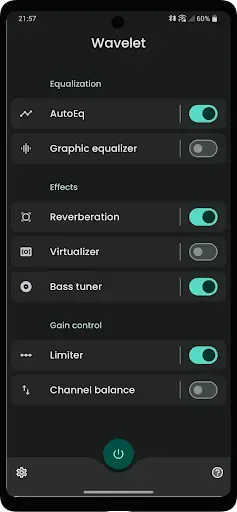
Wavelet is an excellent music tool. The app boasts an advanced amplification system and optimized options for various headphones, ensuring users receive the highest quality audio, tailored to their preferences. With Wavelet, users can edit and customize various sound effects to enhance the listening experience for specific headphone models. Previously, the app could automatically measure volume and personalize tuning based on your screen settings, providing intelligent adaptability. With its user-friendly interface and advanced features, this app is an essential tool for anyone looking to improve the audio quality of their mobile device.
Click to load YouTube / 点击加载视频
YouTube ↗Features:
AutoEq profiles and custom imports
Wavelet offers more than five thousand AutoEq profiles based on the Harman target to help correct headphone response. Selecting a profile takes only a moment. You can also import your own calibration data to match personal preferences.
Adaptive to your setup
Beyond presets, Wavelet adjusts in real time to connected gear. Headphone specific controls appear when you connect wired, Bluetooth, or USB devices, and your saved profile loads automatically when you switch. Equal loudness compensation based on ISO 226 can adapt to your listening volume.
Works across apps
To keep listening consistent, Wavelet processes audio from many sources, so you get a stable sound whether you use streaming services or local players. This helps keep your tuning active without managing separate settings per app. It stays active while you listen. These options are available in the Wavelet latest version.
Pros & Cons:
Pros
Intuitive to use
Novel AutoEQ
Pro version features are worth considering
Cons
Would randomly stop working at times
FAQs:
Does the app support a wide range of headphones?
Yes, the app offers 3400 optimizations to meet the requirements of various headphones currently on the market.
Can users simulate reverberation on different sounds?
Yes, users can simulate reverberation of voices, ocean waves, or any other timbre they require with the app.
How easy is it to remove unwanted noises from songs or videos?
Users can easily remove unwanted noises from songs or videos on their mobile devices with just a few simple steps.
Changelog:
- Split up input gain into a separate feature
- Detect BLE hearing aids
- UI touch ups
- Stability improvements
- Translation updates
Conclusion:
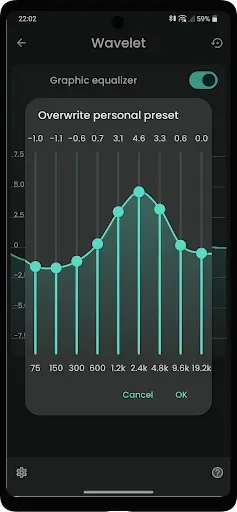
In the sound equalizer part of the app, there are various bands that you can individually change to try and adjust the frequencies. It is also easy to eliminate noise spikes and add reverbs that make the bass even more powerful. In fact, you also have a function that lets you get rid of any annoying echoes. Wavelet has a range of options that let you easily boost sound quality. Without a doubt, this is a fantastic tool that helps you to get the most out of any earphone model you use.








