

Wifi Map Tripbox is a tool designed for Android devices. The app features a user-friendly control panel and a clean interface, allowing users to easily find and connect to nearby Wi-Fi hotspots without being asked for passwords. With Wifi Map Tripbox, users can access the control panel, view maps, and see a list of available Wi-Fi connections with just a few taps to enable location services. This app is essential for tourists visiting unfamiliar towns, as finding free Wi-Fi can be difficult without assistance.
Click to load YouTube / 点击加载视频
YouTube ↗Highlights:
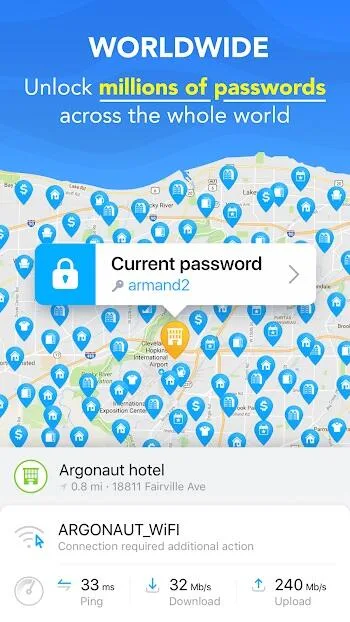
Check the WiFi Speed. When you click on a WiFi hotspot, its details will pop up. Ensure that you check the speed (usually given in Mbps or Mb/s). Speeds of low than 10 Mbps may have downtimes and slow upload times. As such, you should compare the available networks and only select the strongest.
Check Connections History. While this is not a direct performance signal, it can suggest the preferred network in a particular location. For example, if WiFi X has 300 connections and WiFi Z has 26 connections within the same space, then it means that users prefer WiFi X whenever they visit that location.
Test Each Connection. There is no limit on how many WiFi hotspots you can link your device to. As such, you can try several options and only select one that suits your download and upload needs.
Features:
Global WiFi finder
WiFi Map provides access to millions of community shared hotspots in more than 200 countries. Each entry can include a password and notes, so you see what other users experienced before you try to connect. The map view helps you spot nearby networks quickly, and search makes it easy to look up a place before you arrive.
Offline maps and places
You can download city or region maps in advance to find WiFi without mobile data. Offline maps also highlight useful places such as toilets, clean bathrooms, and drinking fountains. This makes the app practical for long travel days when you want to save data and still locate basic services.
Network tools
You can run a WiFi analyzer to check signal strength and identify the best spot for a stable connection. A built in speed test shows download and upload performance, which helps you decide if a network suits video calls or simple browsing. Results added by users make it easier to compare options nearby.
Travel eSIM data
WiFi Map offers contract free eSIM data packages with quick activation. You can choose a package by country or region and start using mobile data without a physical SIM. This is helpful when WiFi is not available or when you need a backup connection while moving between locations.
Community and rewards
WiFi Map encourages users to add new hotspots, verify details, and run speed tests. These actions can earn $WIFI tokens that unlock selected premium services inside the app. You can also receive cashback on eSIM purchases, which supports continued use during longer trips.

Tips and Tricks:
Find open Wi-Fi anywhere in the world
When you open the app and allow it to access your location, WiFi Map shows you the nearest Wi-Fi hotspots. By tapping on one, you can see the name and get directions in your navigation app of choice to get there. You can also see images that other users share and, of course, if the network is protected, you can see the password to access it.
Use offline maps to get all the information you need
If you are going to travel and do not plan to have a data plan at your disposal, WiFi Map is the ideal travel app as it allows you to download offline maps of specific regions. This way, you can locate nearby Wi-Fi hotspots without having to be connected to the Internet, ensuring that you can always find a connection when you need it most.
Find other useful sites when you are on the road
In addition to offering Internet access, WiFi Map includes the locations of nearby public restrooms and drinking fountains, which can be a great help when you find yourself in an unfamiliar city. What's more, the app offers practical widgets such as an exchange rate converter, world clock, tip calculator and local weather information.
Sign up for eSIM services
WiFi Map also hosts an eSIM service through which you can contract a data tariff to surf the Internet from another country. The eSIM offered by WiFi Map is available for more than 70 countries, and is valid for 30 days. You can choose between 1, 3, 5 and 10GB data packages. The tariff is pay as you go, so you do not have to sign up for anything. Network connectivity is 4G LTE.
Connect securely with the integrated VPN
Any traffic that is not encrypted is accessible and can be eavesdropped on a public Wi-Fi network. Therefore, WiFi Map offers you a free VPN that protects your privacy and secures your data as you browse. By activating this feature, you can surf securely, make calls and send messages without worrying about possible vulnerabilities in the network.
Changelog:
Improved offline maps downloads.
Various bug fixes and stability improvements.
Thank you for being part of our community and helping make the world a little more connected.
Conclusion:
WiFi Map Tripbox is an essential app for travelers, offering a helpful community platform to access WiFi hotspots without language barriers. With its easy installation process and location-based recommendations, users can easily connect to the best WiFi connections near them. The app's interactive dashboard and detailed hotspot information assist users in selecting the strongest and most reliable connections for optimal browsing experiences. Download now to stay connected wherever you go.








