

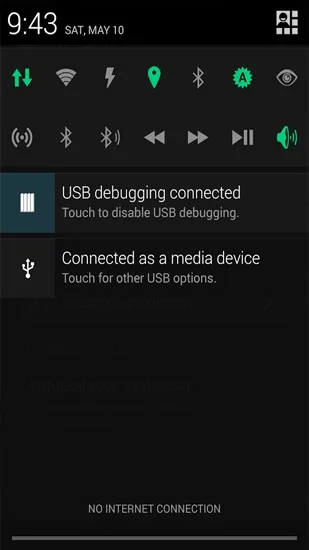
Power Toggles is a control utility for Android devices that allows users to manage various system settings and functions; the app is completely free and ad-free. It offers over 40 toggle options that can be quickly activated, and supports the creation of shortcuts for these functions. Featuring a user-friendly interface, the app is easy to master and allows for a high degree of personalization. By streamlining phone management, it boosts efficiency and adds convenience to the user's daily life.
Features
An advanced power control widget. FREE and No ads
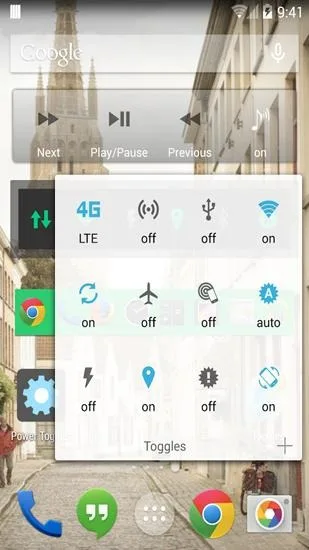
Contains 40+ toggles including
Wifi
Mobile Data (3G/4G)
Bluetooth (toggle, discovery and tether),
Flashlight
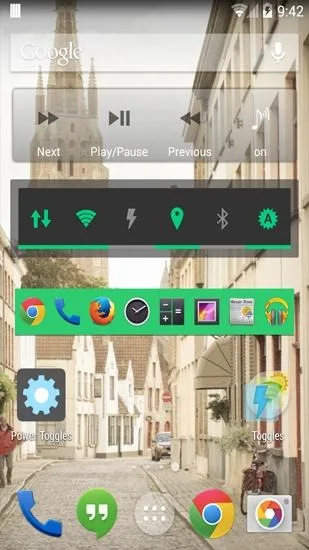
Custom application shortcut
Custom system shortcuts
Advantages and disadvantages
Pros:
User-friendly interface for quick access to settings.
High level of customization for personal and device preferences.
Advanced controls for connectivity and device performance.
Cons:
May require a learning curve for new users unfamiliar with Android settings.
Some advanced options might be overwhelming for casual users.
Review / Evaluation
The apps depend on the applications that you have installed on the device whereas custom links can be added on the bars as well.
Custom: Toggle folder, Bookmark, Contact, Directions, Email folder, Settings Shortcut, Translate, WhatsApp Camera, WhatsApp Chat.
You add or remove options with a tap on them, and may change their position on the toolbar afterwards as well as icons and other styles.
As far as general settings are concerned, there are plenty as well. You can change icons and positions of each bar, add toggle folders which are displayed on the homescreen when you do, or make custom changes to several of the toggles.
It is for instance possible to change or add levels to the brightness toggle to toggle between all configured states, change high and low battery levels and how they are displayed by the app, or change screen timeout intervals.
The app is compatible with all recent versions of Android but a bug prevents Power Toggles from working properly on Lollipop devices. Most toggles work directly while a few open a settings page instead.
All in all, this is a great application for Android users who want faster access to certain system settings or often used apps/features on their device.

User comments
Sometimes it is and sometimes it's great to use and it is great to use once you get through are you get back back and forth when pops they pop up ads I'm learning a lot more about it it does all kinds of stuff for me anyway
Great! I know that is Tony the Tiger's line but that is what this app is for me. wanted an easy way to get to the data on/off. This app makes it easy. Just oil down from top of screen, turn WiFi Off turn MOBILE data On.
It is good that there is a Setting app like this. It's not far from the original one given by the device makers. It's easy to choose what you want to choose here in the app permissions. Thank you very much
Summarize
When managing the various settings on our Android devices, we sometimes struggle to locate the right option amidst the vast array of available features. Power Toggles is a tool that simplifies access to these basic and advanced settings, allowing us to adjust them at any time with just a couple of taps on the screen.








