

Eden Emulator is a user-friendly game emulator that allows you to enjoy a wide range of Nintendo titles on your mobile device; simply import the appropriate ROM files to get started. You can save your progress and exit the game at any time, and the app automatically tracks your gaming history. Additionally, you can customize button layouts and game settings to suit your preferences, ensuring a more comfortable gaming experience. The software is continuously updated with feature improvements, so there is plenty to look forward to!
Click to load YouTube / 点击加载视频
YouTube ↗Features of Eden Emulator:
Extreme Performance Optimization: Experience smooth gameplay with high-speed rendering. Our optimized engine minimizes lag and stuttering, even in demanding 3D environments.
Enhanced Visual Quality: Unlock the true potential of your device’s screen. Enjoy resolution scaling, anti-aliasing, and HD texture support that make your games look sharper and more vibrant than ever before.
Universal Game Compatibility: Eden Emulator is built to support a massive range of titles across all genres, including Action-Adventure, Platformers, and Simulation games.
Advanced Save Systems: Never lose your progress. Use Instant Save States to pause and resume your game at any exact moment, bypassing traditional checkpoint limitations.
Fast Loading & Shader Caching: Say goodbye to long wait times. Our smart shader caching system ensures that once a game is loaded, the performance remains consistent and fluid.
Customizable Control Schemes: Take full control with a highly responsive on-screen interface. Customize layouts to fit your playstyle or connect your favorite Bluetooth controllers and gamepads for a true console feel.
Highlights of Eden Emulator:
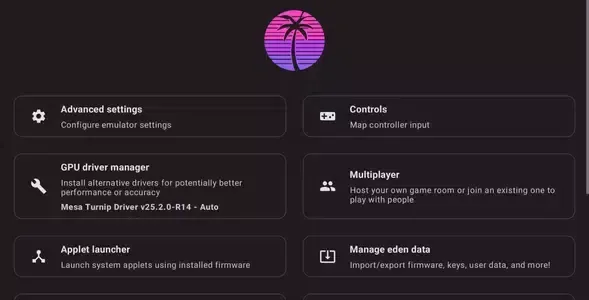
Fast Android emulation: Eden Emulator is tuned for mobile performance with optimized frame pacing that helps reduce stutter during busy scenes. It uses Vulkan 1.3 graphics and efficient shader and asset caching to improve frame rates over longer play sessions. These choices aim to deliver stable gameplay while keeping visuals intact on many Android devices.
Wide game format support: You can run many Nintendo Switch titles with support for XCI and NSP formats, which makes it straightforward to organize and launch a personal library. Eden Emulator reads your chosen directory, lists compatible games, and keeps management simple. This approach lets you focus on playing rather than manual file handling.
Touch and controller options: Eden Emulator gives you control flexibility on mobile. You can drag, resize, and reposition on screen buttons to match your grip and device size. If you prefer a gamepad, the app supports external controllers over Bluetooth or USB, including common Xbox, PlayStation, and 8BitDo devices.
Quick setup and clean UI: Getting started is direct. Add your game directory, pick a title, and launch it from a clean, readable interface. Core settings are easy to find, with no sign in required, so you can adjust essentials and return to gameplay fast.
User Reviews of Eden Emulator:
To get the best results from Eden Emulator APK, keep these tips in mind:
Choose the right APK: Use the Optimized build on mid-range devices for stable performance.
Lower resolution scale: Start at 0.5× for smoother FPS, especially on demanding games.
Adjust CPU ticks: Reduce by small increments if you notice stutters.
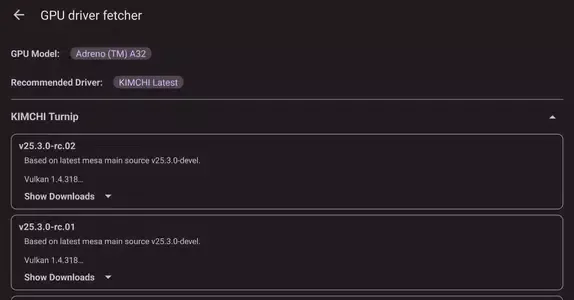
Pre-download GPU drivers: Install stable versions from the built-in manager before playing heavy games.
Backup save data: Export saves regularly to avoid losing progress when updating Eden.
FAQs of Eden Emulator:
Is Eden Emulator free to use?
It is completely free to download and use.
Can I play all Nintendo Switch games with Eden Emulator app?
Yes, it is compatible with the majority of games available on the gaming platform.
Do I need to register to use the app?
No, you just need to download and install the app to get started.
Can I customize the controls on this app?
Yes, you can customize controls.
Can I use the app on iOS devices?
No, the emulator is only for Android devices.
Final words:
In short, download Eden Emulator if you want a very interesting option within the landscape of emulators for Android. Its accessible and straightforward approach makes it a solid alternative for gamers who want to enjoy Nintendo Switch titles on the go.








