

Double Tap Screen On and Off is a convenient utility application. It boasts a user-friendly interface, powerful functionality, and requires no root access, effectively improving the user experience. With Double Tap Screen On and Off, you can simply double-tap the home screen to turn your phone on and off, without pressing the power button. Users only need to download, install, and configure the software to wake their phone by double-tapping the top edge of the screen. Furthermore, the application provides gesture lock and a floating pop-up button for quick access to apps and settings.
Features:
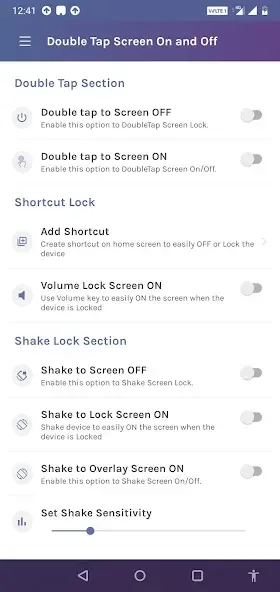
Double-Tap Screen On/Off: Quickly turn the screen on or off by double-tapping the display, eliminating the need to press the power button.
Shake Phone to Unlock/Lock: Wake or sleep the device by shaking it, handy when your hands are full or the power key is hard to reach.
Gesture Lock Screen: Set a custom gesture as a lock method for added privacy, eliminating the need to type a PIN or password each time.
Floating Popup Button: A movable on-screen button gives instant access to favorite apps, shortcuts, and settings from any screen.
Touch Screen Lock: Temporarily disable touch input to avoid accidental taps when the phone is in your pocket or bag.
Mode Switching: Easily switch between different behavior modes (e.g., double-tap only, shake only, mixed) to suit your usage.
Customizable Sensitivity: Adjust the sensitivity for double-taps and shake detection so the app responds accurately to your device and habits.
Quick Enable/Disable: Turn the app’s features on or off from the floating button or main settings without needing to open deep menus.
Low Battery Impact: Designed to be lightweight, so it has minimal effect on battery life while running in the background.
Accessibility Integration: Uses Accessibility services to ensure consistent behavior across Android versions and apps that might otherwise block screen control.
Benefits:
Turn on/off the screen by double-clicking on the status bar: This feature allows users to easily turn on or off their Android device screen without having to root their device, making it convenient for all users.
No root access required: Unlike other similar apps, this application does not require root access to function properly, making it accessible and user-friendly for all device owners.
Quick and easy installation: The app can be freely downloaded and installed without any hassle. Users can save time and start using the app immediately without the need for complex root settings.
Decreased wear on the power button: By using the double-tap action to turn the screen on and off, users can reduce the wear and tear on their device's power button, extending the longevity of the button.
Customization options: The app offers customization features such as changing the app icon and adjusting the brightness with a gesture, allowing users to personalize their experience according to their preferences.
Additional features: Apart from the main double-tap screen on and off feature, the app also provides the option to activate the general line for notifications, making it a comprehensive utility for managing various aspects of the device.
FAQs:
Is this app safe to use?
Yes, the app uses standard Accessibility and Device Administrator permissions to control the screen. Only grant permissions you are comfortable with and download from a trusted source.
Will double-tap work on any screen protector?
Most modern screen protectors are compatible, but very thick protectors or certain tempered glass may reduce sensitivity. You can adjust sensitivity in settings.
Does the app use a lot of battery?
No, it is designed to be lightweight. However, enabling many background features or high sensitivity may increase battery use slightly.
Conclusion:
Accessibility permission is required for Pie and above, whereas Device Administrator permissions are needed for older versions. Additional permissions like Draw Overlay and Usage stats ensure smooth detection of gestures on the home screen, with a clear assurance of no data collection. Double Tap Screen On and Off is a smart choice for anyone seeking a practical and efficient way to manage screen interactions through intuitive gestures while enhancing device functionality.








