
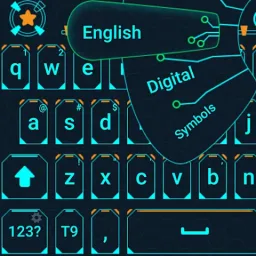
Hacker Keyboard is a feature-rich and user-friendly keyboard application. It boasts a stunning collection of hacker keyboard themes designed to beautify users' mobile devices. With Hacker Keyboard, you can customize your keyboard with your favorite colors in just seconds. Give each keyboard an authentic look and create the best personalized typing experience with its modern elements. Furthermore, the application supports layouts in multiple languages, and you can download additional language packs to switch layouts to suit your preferences and create a personalized input experience.

Type more efficiently:
If you want to upgrade the functionalities of your keyboard, you’ll certainly like Hacker's Keyboard. At first glance, it looks like your typical keyboard. However, what makes the app stand out is it features function keys, “PgUp” and PgDown” buttons, an “End” button, and many more—making typing a more pleasant experience. With this tool, you’ll no longer have to settle for boring virtual keyboards.
As it is disabled by default, you’ll need to enable it yourself by tapping the “ENABLE KEYBOARD” button and selecting “Hacker’s Keyboard.” Two warning pop-ups will then appear on the screen. From there, just tap “OK” and you’ll be able to use the keyboard. To change your current active input method, you need to touch “SET INPUT METHOD” followed by the “Hacker’s Keyboard” button.
You can change the app’s language input to your native language, too. Apart from English, it also supports French, German, and Russian, to name a few. Although the “SETTINGS” page can overwhelm users, it’s surely a rewarding experience once you’ve tweaked the keyboard layout, behavior, and others according to your preferences. You’ll also have access to the app’s project web page, where you can read the User’s Guide and FAQ.
Benefits:
What sets Hacker's Keyboard apart is its accessibility to keys that are missing or hard to access on most mobile keyboards. Dedicated Tab, Ctrl, Shift, and arrow keys enable efficient navigation and text manipulation, improving workflows, especially when using terminal emulators, remote desktop clients, coding apps, or chat tools relying on keyboard commands.
The app supports multiple language layouts, catering to international users. Users can download additional language packs and switch layouts to suit their preferences. Handy features like auto-capitalization, predictive text, and customizable key size help tailor the typing experience.
Hacker's Keyboard provides robust configuration options, including adjustable keyboard height, custom themes, and variable key labeling. Users can fine-tune the keyboard’s behavior, adjust vibration and sound feedback, and modify appearance for improved readability. Power users will appreciate the ability to enable or disable key rows, redefine modifier behavior, and control advanced settings such as swipe gestures and long-press actions.

Features:
Complete PC-style keyboard layout optimized for coding and technical input
AI-powered suggestions and auto-correction tailored for programming languages
Extensive customization: key mappings, themes, and layouts to suit your workflow
Fast, accurate typing designed for developers, hackers, and tech pros
Supports multiple languages, emojis, and coding symbols
Privacy-first approach with no intrusive permissions or data sharing
Pros & Cons:
Pros
Functions like a real keyboard
Can change the keyboard layout
Multilanguage support
Accessible User’s Guide and FAQ
Cons
Overwhelming “SETTINGS” page

Conclusion:
Hacker Keyboard shines in scenarios where precise input is required—such as software development, system administration, SSH sessions, or remote desktop work—where access to function keys and shortcuts is vital. It's also beneficial for language learners or those typing in scripts and dialects not fully supported by standard keyboards. The developer maintains a transparent privacy policy, emphasizing that the keyboard does not collect personal data without user consent. As with any third-party keyboard, users should remain aware of privacy implications and review permissions accordingly.








