To-Do List is a note-taking app. Here, you can set goals for all your to-dos, work, or personal plans, add tasks, categorize them, and add time limits. The app will remind you when the date is approaching. It can also help you remember important birthdays or dates, ensuring you never forget anything significant and maintaining relationships. Furthermore, To-Do List allows you to customize the app's theme, creating a personalized experience.
Usage
If you have projects or plans to complete, I recommend using a to-do list to record tasks. Typically, to create a new plan record, you need to follow these steps:
Add a new category: For example, if your plan is to clean the house, create a new category called "House Cleaning."
Add tasks to categories: Use the "Add Task" feature to create a to-do list. Don't forget to select the category you just created. Then adjust the task's execution time; otherwise, the time will always display today's date.
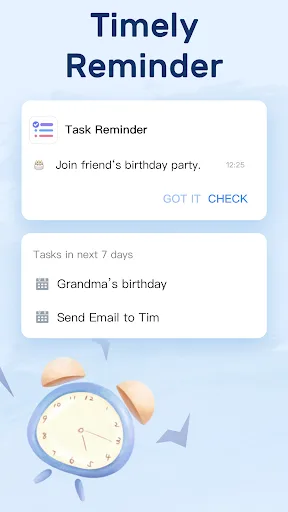
Complete the work according to your plan, and check the "Completed" checkbox when finished. The app will remind you of the next to-do. If you forget, the to-do list will send a reminder notification via banner or sound.
Features
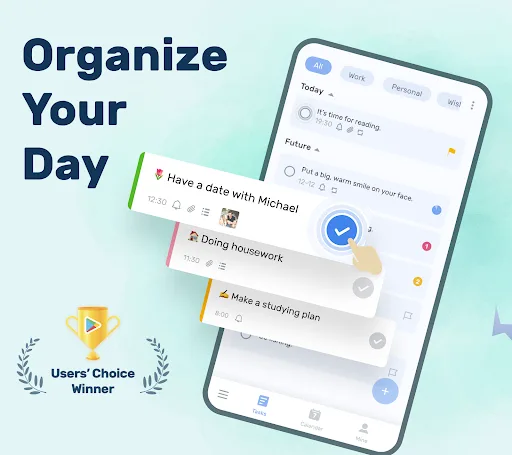
Intuitive Task Management: Easily create and organize tasks. The app allows users to assign deadlines to each task, set reminders, and create detailed notes. Tasks can be categorized into different lists for better organization, and tasks can be flexibly moved or copied between different lists.
Personalized Daily Planning: The "My Schedule" feature helps users focus on priorities by providing a personalized view of daily tasks. You can add tasks manually or have the app recommend unfinished tasks based on past activity.
Integration with Microsoft Services: Microsoft To-Do integrates seamlessly with Outlook, allowing users to sync tasks and reminders across apps. This is especially useful for managing professional workflows. Its compatibility with Microsoft 365 also ensures users can access tasks across devices via the cloud.
Collaboration Tools: Share lists with colleagues, friends, or family to collaborate on tasks and projects. This feature is ideal for team planning or coordinating group activities.
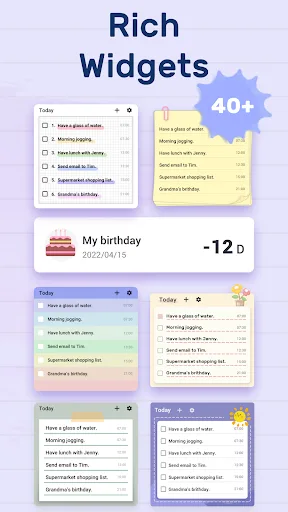
Cross-Device Sync: As part of the Microsoft ecosystem, To-Do syncs across multiple devices, ensuring you can access your tasks anytime, whether you're using a computer, smartphone, or tablet. Customizable User Interface: Personalization options, such as colorful themes and backgrounds, allow users to customize the interface to their preferences, creating a visually appealing and engaging workspace.
Smart Suggestions and AI Integration: The app provides intelligent task suggestions and prioritization to help users optimize workflows and ensure no critical tasks are missed.
Highlights
The app also includes built-in tutorials to guide new users through its features and ensure they get the best experience. With battery life optimization, "To-Do List" is designed to save device power while maintaining performance, making it a practical choice for users who rely on mobile devices all day.
For smartwatch users, the "To-Do List" app is compatible with Android smartwatches and displays notifications directly on the device. This feature allows users to quickly get updates and reminders without frequently checking their phones. In addition, the app offers convenient widgets for users to quickly create or modify tasks.
Users can customize task priorities, with each priority level corresponding to a specific color. This visualization system helps users quickly understand the urgency and organization of tasks. The free version of the app is limited to handling 10 tasks, so users are advised to upgrade to the premium version for more features.
To Do List's combination of features ensures users have powerful tools to efficiently manage their daily tasks. The app allows users to create tasks, set deadlines, customize notifications, and integrate with calendars, providing a comprehensive set of organizational tools.
Integrating these features into daily life can significantly improve productivity and time management skills. For users looking to enhance their task organization abilities, the To Do List is an invaluable tool that helps them achieve their goals and take control of their schedules.
Summary
In conclusion, To Do List is an excellent solution for anyone looking for a simple and efficient task management app that helps you stay organized and complete tasks on schedule. Download To Do List now and take control of your life.