

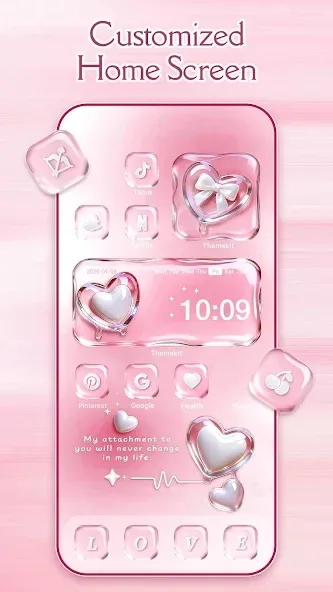
ThemeKit is a powerful personalization app that offers a wide range of design options, allowing users to easily transform their phones and create a unique user experience. With ThemeKit, you can choose from a vast collection of high-definition wallpapers to customize your home and lock screens to your liking. You can effortlessly browse and apply various themes, wallpapers, and icons without any complicated steps, keeping your device's look fresh and exciting. Plus, the app continuously releases new wallpapers and themes, ensuring your device always sports a new and stylish appearance.
Highlights:
Many choices for you: With a large number of icons, it is understandable that you will find a suitable package.
Optimal product design: Have a quality product that comes from professional creators.
Control settings: Home screen changes are managed and innovated according to user preferences.
Application compatibility: To ensure a stable combination of themes, icons, etc, users can know their results in advance.
Fast search: The application’s search efficiency is very high and promotes easy color conversion.
Many supported devices: Most smartphones of famous brands today are potential customers of the application.
Features:
Apply themed layouts
ThemeKit provides theme sets that coordinate icons, widgets, and wallpapers for a consistent home screen. The ThemeKit latest version adds new seasonal and holiday options, along with refreshed wallpaper collections.
Change app icons with shortcuts
Next, you can create a shortcut on the home screen that opens an app with a new icon. Pick images from your gallery or select from built in icon packs, then label and place the shortcut wherever you like.
Edit widgets and build your own style
Also, ThemeKit lets you add and adjust widgets such as clock, weather, and countdown. Sizes and styles can be chosen before placing them. You can also design icons and widgets using album photos to match a wallpaper or color palette.
Control Center overlay
Finally, to show a floating Control Center for music and volume, ThemeKit uses Android Accessibility Services. You can enable or disable this in system settings at any time. According to the developer, no information from Accessibility Services is stored or shared.

Tips and Tricks:
Experiment with Different Themes: Don’t be afraid to try out different themes to see how they change the look of your device. Switching between styles can keep your phone looking fresh and exciting.
Match Wallpapers with Icons: Choose wallpapers and icon packs that complement each other. ThemeKit offers coordinated designs, making it easy to create a cohesive look for your home screen.
Preview Before Applying: Many of the themes and wallpapers in ThemeKit have preview options. Use these previews to see how your phone will look before applying any changes.
Use Dark Mode Themes: If you’re looking for something sleek and battery-saving, try out dark mode themes, which are not only easy on the eyes but also extend battery life on OLED screens.
Keep the App Updated: To get the latest designs and enhancements, regularly check for updates within the app. New themes and icon packs are frequently added to keep your customization options fresh.
Changelog:
Experience the best yet with our latest update! Here's what's new:
- Brand new themes, icon packs, and widgets.
- Enhanced stability and bug fixes for better performance.

Conclusion:
The tool also includes more realistic-style content that even lets you decorate your smartphone with images of real objects, animals, or plants. Download the ThemeKit APK for Android and enjoy this extensive pack of themes you can install on your smartphone completely free of charge. You can also uninstall the themes you no longer use whenever you want to free up storage space.








