

Gaming Mode is a user-friendly game accelerator that enhances the gaming experience, providing a smooth gaming environment. Users can customize configurations for different games to suit their needs, and the software automatically saves and applies the settings to each game. During gameplay, the software automatically blocks incoming calls, pop-ups, and messages, adjusts screen brightness and sound settings, and uses a built-in VPN to open games at high speed, ensuring a comfortable gaming environment. Users can also create widgets for games, allowing them to launch games directly with a single click.
Click to load YouTube / 点击加载视频
YouTube ↗Features of Gaming Mode:
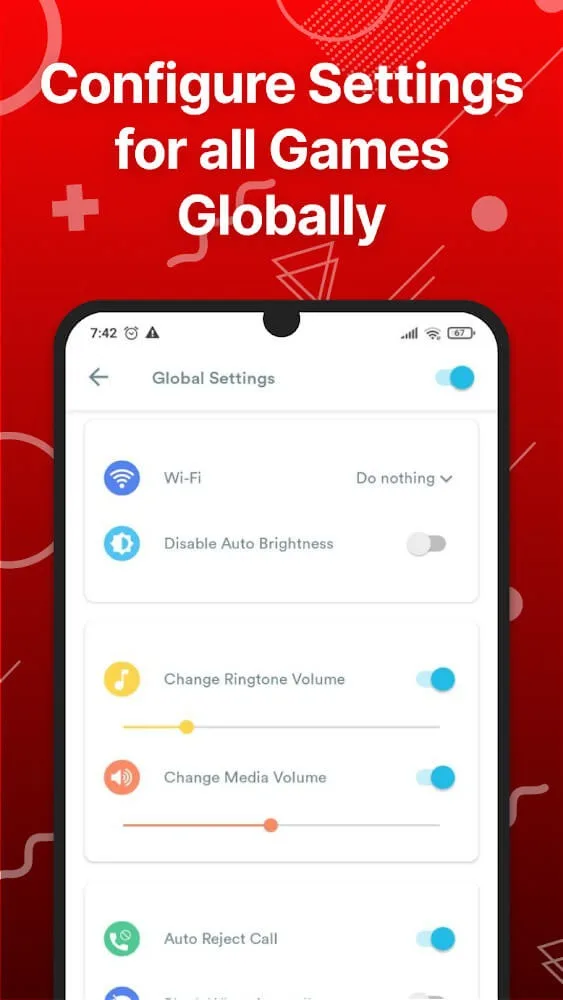
What Features Does It Configures Automatically?
Auto Reject Incoming Calls: Say goodbye to interruptions while showing off your skills.
Block Notifications: Enjoy an uninterrupted gaming experience with Game Booster.
Disable Auto-Brightness & Optimize: Adjust brightness to your desired level for optimal gameplay.
Change WiFi State: Easily switch WiFi on or off for an uninterrupted connection.
Change Ringtone & Media Volume: Customize audio settings to suit your preferences during gameplay.
Highlights of Gaming Mode:
This is the only application that helps you enhance your experience when entering battle with enemies in games. Specifically, once activated by you, this application will act as a protector to help you against distractions from the outside world. It can be the appearance of unexpected incoming calls and notifications from other applications. Thanks to that, you can perform your gaming skills better than other opponents.
Not stopping there, this application also combines with the Game Booster feature to help you not have to wait for any lag with each live-action in the game. Thanks to that, each of your emotions or moments becomes even more wonderful. Besides, this application is so smart that it automatically deletes unnecessary background applications. Thanks to this feature, a huge amount of RAM has been freed up. In addition, this application also adds an extremely effective ping booster for yourself, and it comes in handy when you get into the game with intensity.
In addition, we also favor the user when turning off the default auto-brightness feature. The main change is that you will achieve the brightness you desire, making your eyes more comfortable. At the same time, you will be overwhelmed with the appearance of a highly convenient and fast wifi status automatic change feature. Players can experience every moment when loading the game with the most robust network. Quickly use Game Booster to enjoy maximum speed.
Gaming Mode allows you to implement widget creation to auto-launch games directly from the smart home screen. Besides, we also bring you automatic detection of games or any application that has been downloaded but is reverted to the original version. , most urgent. In addition, you will enjoy a pure white list of applications that you have selected to block notifications. Freedom, fast is the self-locking this app wants to bring to you.
User Reviews of Gaming Mode:
if you were to go through the 3 or 4 google accounts I've maintained - over the last 11-12 years of my play store purchase logs you'll find huge empty blank spaces in the "system utilities" columns. go ahead, I'll wait... while you're at it, take note of the number of game booster apps I've installed and the frequency of use they've enjoyed. no hurry I'll wait... what'd you find? I've tried and confirmed useless all but one. that's right - one. gaming mode. so I bought it. best.purchase. ever.
This app is simple, smooth, and easy to Use. It helps me focus on gaming by Reducing distractions, and it works well On my device. Great experience overall. Highly recommended.
very great it get my game boosted significantly like when im playing nte i get stuck on yhe loading screen for straight 7 or 14 mins but with this booster it got it down to 7 or 9 second.
Great app for any gamer. The best feature, that a lot of the other apps similar to this don't have, is the option to mute & hide any pop-ups or calls that could interfere with the game. This is incredibly useful, especially when playing PvP games that are real time & can't be paused or stopped, without having a negative outcome. You can also change what games it blocks those interruptions for, & make exceptions where & when needed. Just wish there was a info page & FPS option available. -9.5/10.
Final Thoughts:
Gaming Mode is designed to enhance the gaming experience. One of our core features is allowing users to block internet connection to focus on their game without interruptions. This is done using a local VPN service that does not transfer data outside the device.








