
Nomad Sculpt is an excellent sculpting and drawing tool. The application offers a comprehensive suite of specialized drawing tools, covering virtually all sculpting tools, helping users refine their artwork and create uniquely captivating pieces. With Nomad Sculpt, users can easily create highly detailed models using a variety of advanced sculpting tools. From delicate lines that outline luster to signature highlights, it provides a complete creative experience, allowing users to express their unique personality.
Click to load YouTube / 点击加载视频
YouTube ↗Highlights:
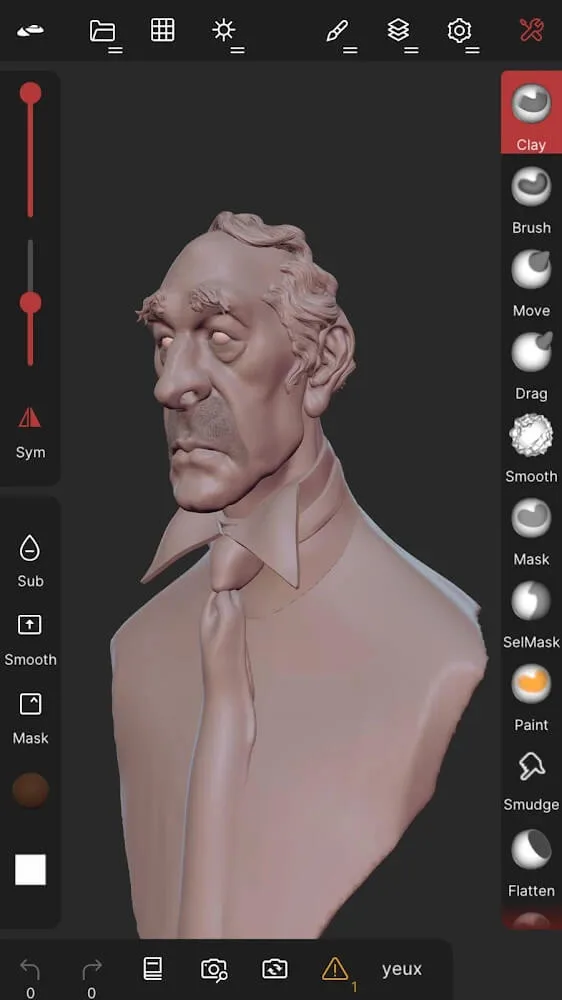
Flattening, blurring, smoothing, masking, painting, moving, and dragging are the main options in Nomad Sculpt APK.
You can also fold, pinch, trim, split, project, transform, measure, insert, and more.
Boolean cutting is available with lasso, rectangle, polygon, line, or eclipse.
The stroke can also be customized regarding drop, tiling, pen pressure, or other parameters.
Regarding the paints, you can choose the color, opacity, roughness, and metallic finish.
For a flexible workflow, you can resort to multiresolution sculpting using meshes. Voxels can be applied to these.
Features:
Use the Nomad Sculpt tutorial
If you have no previous experience using modeling apps, Nomad Sculpt has a tutorial that you can watch to learn increasingly sophisticated techniques. In this sense, the tool will allow you to try out different tools and features that are perfect for generating 3D shapes and realistic figures that you can slowly shape.
Sculpt, paint, and model like with desktop software
In Nomad Sculpt, you'll find multiple virtual tools that you can use to sculpt each shape. There are even various light and shadow settings to adapt the camera view and working conditions to your needs. Additionally, the app has features to customize stroke parameters such as alphas, pen pressure, or falloff. If you need to, you can also easily save your favorite settings to use them again later.
Multiple export formats
Through Nomad Sculpt, you'll be able to use multiple popular export and import formats, such as glTF, OBJ, STL, and PLY. This will allow you to take advantage of numerous customization and compatibility options when saving or sharing your projects.
Changelog:
usd: fix crash on export and import
scene: group lock will now lock its children
boolean: fix random crash
input: fix second single tap sometimes not being recorded
reference: simplify reset view on unlock option
reference: fix transform mode going crazy when reference is locked and rolled
Conclusion:
Download the Nomad Sculpt APK for Android and take advantage of the wide range of options and features that this 3D shape sculpting app has to offer. Explore all its resources for free and get the most out of your smartphone to generate limitless, realistic figures.








