

Android Proxy Server is a proxy server tool application for Android systems. This application allows users to share network connections on laptops, tablets, or mobile phones. Users can share VPNs and bandwidth. Considering that some devices do not support VPNs, the application can also bypass VPN restrictions, providing a more flexible data routing method. Users can connect to VPN connections on other devices without root access, and the ability to customize IP addresses caters to different user needs.
Click to load YouTube / 点击加载视频
YouTube ↗Features
Multi-protocol Proxy Support
Android Proxy Server can host multiple proxy types on a single Android device to help you meet different client needs. You can use it for browsing the web, establishing tunnels, or forwarding traffic across a network.
HTTP and HTTPS for network traffic
SOCKS5 for general proxying
Shadowsocks for encrypted tunneling
TCP Relay for forwarding applications like Orbot
Secure Access with Authentication
Android Proxy Server allows you to add username and password authentication for any supported proxy type. You can define credentials and control which users can connect. This protects shared access when your phone acts as a proxy gateway in a hotspot or LAN.
Share VPN or Mobile Data Between Devices
You can share your phone's VPN or mobile data connection with other devices connected to the same hotspot or local network. Android Proxy Server forwards traffic to your active connection so that laptops or other phones can securely route their requests. This feature is useful when a device does not support a VPN client or requires quick temporary setup.
Plug-in Enhanced Routing
The Network Sharing Tunnel plugin extends how Android Proxy Server handles traffic. It helps bypass device VPN restrictions, forcing the use of mobile data even when the phone is connected to Wi-Fi. This provides greater flexibility for scenarios where routing via mobile data is always required during testing or sharing.
Developer and Tester-Friendly Workflow
The Android proxy server works with packet capture apps, allowing you to intercept and analyze requests and responses from connected devices. This aids in troubleshooting, quality assurance, or understanding network behavior. You can bind to 0.0.0.0 to expose the proxy on all device IPs without root access. A dark mode is also available for comfortable use.
Usage
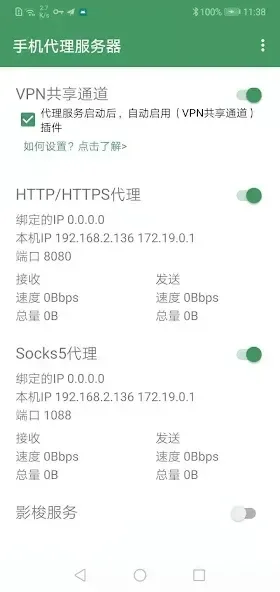
First, download the Android Proxy Server app and open it on your phone. This app allows you to provide HTTP, HTTPS, SOCKS5, Shadowsocks, or TCP Relay services to other devices. Follow these steps to configure and connect the client in a typical hotspot or LAN setup.
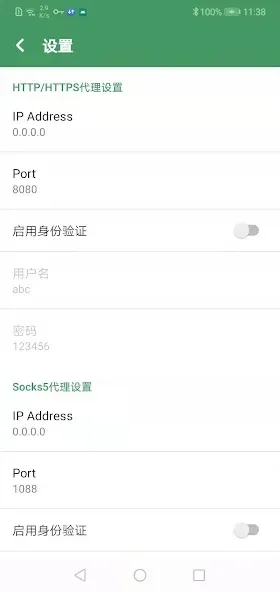
Launch the application and select the desired proxy type. Then set the port number and choose whether authentication is required.
Set the listening address. If you want devices on your LAN to easily access the proxy server, use 0.0.0.0. Save your changes and start the server.
Connect your client devices to your phone's hotspot or the same Wi-Fi network. On each client device, open your network or browser's proxy settings, enter your phone's IP address and the port you set. Test a simple website or request to confirm the routing is correct.
To share VPN traffic, open the VPN app and configure it to bypass the Android Proxy Server traffic. If you are using the Network Share Tunnel plugin, install version 2.2 or later and enable the plugin before starting the proxy.
If your phone needs to share mobile data when connecting to Wi-Fi, please close all running VPN applications first. Open the plugin and enable "Force plugin to use mobile data". Then launch the proxy and verify the client request. To diagnose problems, use a packet capture application to check traffic.
Pros and Cons
Pros:
Powerful features, supports multiple proxy protocols.
High level of security through authentication options.
User-friendly interface with customizable settings.
No root access required, allowing more users to access the service.
Compatible with VPN services, ensuring a continuous connection.
Cons:
For optimal performance, some knowledge of network and proxy settings is required.
May contain ads that may negatively impact user experience.
Conclusion
Android Proxy Server turns your Android device into a powerful proxy server, supporting HTTP and HTTPS protocols and handling GET or POST requests. With this app, you can forward all connections to the default host and port, allowing seamless use of other protocols via sockets. It offers robust functionality, allowing you to add a server (whether it's a proxy server or a dynamic DNS updater) and configure three rules. Always a convenient and fast proxy server.








