
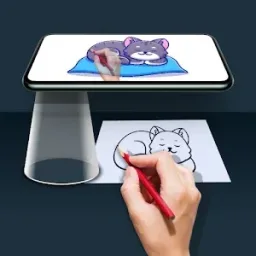
Are you interested in drawing like a professional but lack the necessary skills? Look no further than Draw Easy! This innovative app utilizes tracing technology to transform photos into outlines, making drawing easier than ever. Simply select an image, apply the tracing filter, and draw while viewing the lines on your phone’s screen. With practice, you’ll be creating stunning and accurate illustrations and portraits. Additionally, Draw Easy offers a variety of editing tools to refine your work. Let this virtual art instructor guide your hand and unlock your drawing potential! Highlighted features of Draw Easy include the ability to trace images by applying a filter on your phone’s camera viewfinder. This makes it simple to sketch on paper while using the transparent trace as a guide. You can also import photos from your camera roll or the web, allowing you to trace any type of image and expand your skills.
Click to load YouTube / 点击加载视频
YouTube ↗Features:
Essentially, Draw Easy allows you to overlay the outlines of subjects on your phone’s camera viewfinder and trace photographs by adding a filter. Lay a piece of paper in front of your gadget and use the translucent trace as a guide for your drawing. Freehanding simplified!
Open Draw Easy and import any picture from your online or camera roll. Photographs of landscapes, celebrities, or even self-portraits benefit greatly from the tracing filter’s magical effects. Develop your abilities!
Utilize the extensive editing toolkit to refine traced drawings. To make your work flawless, adjust sharpness, raise contrast, minimize noise, and improve lines. Soft filters are useful for smoothing uneven edges.
Carefully draw fine lines and features by enlarging on certain areas of the picture. Pinch-to-zoom to get up close and personalize your line work.
After finishing sketches, utilize the app to share your creations with others all around the globe. Get inspired by the designs and advancements of others.
Draw Easy’s intelligent UX and simplified UI, which were designed with usability in mind, eliminate creative barriers and make drawing seem intuitive.
Avoid outside distractions when you’re sketching. Draw Easy was purposefully created to be clutter- and ad-free to allow for unhindered creative expression.
To best fit your eyesight and the ambient lighting conditions, alternate between bright and dark themes to create a cozy atmosphere.
With only one reasonably priced purchase, get complete access to all features. Without paying recurring membership costs, enjoy Draw Easy.
You may now tantalizingly attain your goal of developing your talents and releasing your inner artist with Draw Easy. Let’s get started on the journey to become outstanding sketchers!
Functions:
Image Selection: Choose an image from your gallery or capture one with your camera.
Filter Application: Apply filters to adjust the image for better clarity and tracing.
Transparency Adjustment: Adjust the transparency of the image displayed on your screen.
Camera Integration: Use your phone's camera to display the image over your drawing surface.
Real-Time Tracing: Trace the transparent image directly onto paper or sketchbooks.
Ad-Free Experience: Enjoy the version's uninterrupted, focused drawing session.
User-Friendly Interface: Navigate the app effortlessly, thanks to its simple design.
Drawing Practice: Perfect for learning and improving drawing techniques.
Portable Sketching Tool: Practice art anywhere without needing a lightbox or projector.
Educational Tool: Ideal for kids and beginners learning basic drawing skills.
Benefits:
Edge level : With Edge Level filter, you can control the sharpness and definition of edges in your drawings, giving them a different and professional look. Adjusting the Edge Level can help you achieve different artistic styles and emphasise specific details.
Contrast :The Contrast filter lets you enhance the tonal range in your drawings, making the colors appear more vibrant and the shadows and highlights more pronounced. It adds depth and richness to your artwork.
Noise: To tackle any unwanted noise in your drawings or images, we have included a Noise filter. This feature helps reduce graininess or pixelation, resulting in cleaner and smoother lines and surfaces.
Sharpness : The Sharpness filter enables you to enhance the overall clarity and crispness of your drawings. By adjusting the sharpness level, you can achieve a more defined and polished look, making your artwork stand out.
Summary:
Have you ever wanted to draw like a pro but lacked the skills? Draw Easy finally makes it possible! This ingenious app uses tracing technology to transform photos into outlines for easy drawing. Simply load any image, apply the special filter to reveal the trace overlay, then draw by hand while viewing the lines on your phone’s screen. With practice, you’ll be creating beautiful, accurate illustrations and portraits. Plus, Draw Easy’s robust editing tools help refine your work. Let this virtual art instructor guide your hand – drawing mastery is now at your fingertips!








