

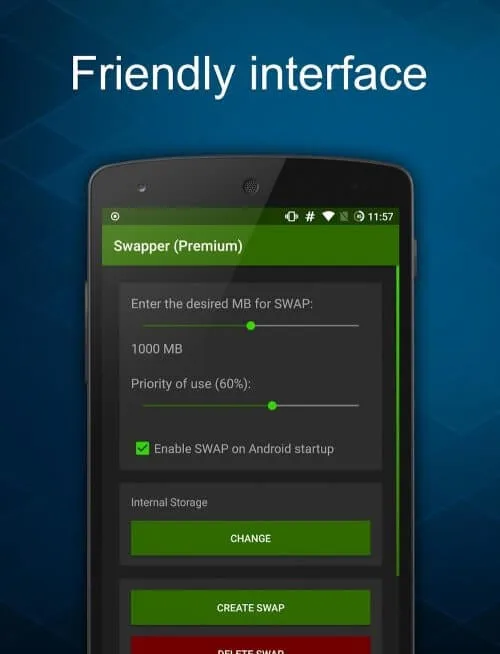
Swapper is a utility and tool application that could help you get more storage on your phone. It enables you to create, add, and manage swap memory without actually switching partition on SD. With this, you will have extra space for that new app that you want. Developed by DevLab Technologies, it allows you to increase the size of your RAM. This will come in handy especially since the smartphone's RAM size can't be simply changed by buying a new one like an SD card. It is a lightweight and free of charge storage upgrade option. To use the app, you only need to choose the swap directory and set the swappiness level. The swappiness parameter allows you to control how your Android device uses the swap. The higher the value, the more the swap used. The default swappiness value is at 60, while the maximum value is at 100. For your convenience, you can set the app to activate the swap on boot. If you need to change the swap size, you need to reconfigure the app. However, it is important to note that this solution requires root and kernel swap support to run. As stated, it does not need swap partition on SD for it to work but, it does not partition the SD card as well.
About:
Swapper is an innovative application designed to enhance your device's performance by creating additional swap files from unused internal storage. With the capability to generate swap files up to half the available free storage, it provides a significant boost to memory management. Users can easily manage their device's swap memory by creating multiple swap files as needed and removing them once they're no longer required.
The user interface allows for quick viewing of all created swap files, streamlining the process of memory optimization. While larger swap files may take more time to create, the option to produce multiple, smaller swap files offers greater flexibility. This is particularly useful for those seeking to improve their device's multitasking capabilities and overall responsiveness.
With the help of this tool, devices that often struggle with demanding applications can maintain smoother operation and better manage active tasks. The convenience and utility it offers make RAM Swapper a practical solution for memory management challenges.
Highlights:
Increase your device storage to the most optimal way according to your device.
The application is designed in the most optimal way not to take up much space when downloading.
Your phone performance will also be better optimized when using the application.
Files created while using this application will also be well managed by the user.
The interface is well designed, friendly, easy to get used to for new users.
Features:
Experience the vast virtual storage space
Swapper – ROOT is the application that users need to have if they want to set up simulated swap memory on their Android device. It can be installed and activated with the application’s permission; the user gets a separate swap with a larger storage space than the default memory. With the support of this application, the risk of information leakage to the outside of the user will also be reduced because people often get into the memory when the storage space is too entire, and everything starts out of control. Swapper – ROOT will help users maintain stable system operation to avoid trouble while working or playing with mobile phones. It encourages users to clean the swap memory before deleting the application so as not to cause memory difficulties.
Increase device storage
The principal function that Swapper–ROOT brings to users is to create additional SWAP Memory for the device. Set up virtual RAM to replace the main RAM when it is complete and can’t carry more data. Not only that, swap memory can work concurrently with main memory to increase capacity. Therefore, this application can develop additional security procedures to ensure that all user data stored will be safe. Even if the user’s system runs slower than usual, Swapper – ROOT MOD APK can assist the user in keeping it running. Users can also install other related applications to support the operation and improve the device’s stability. However, look carefully and choose carefully to find the best support.
Appreciate user contributions
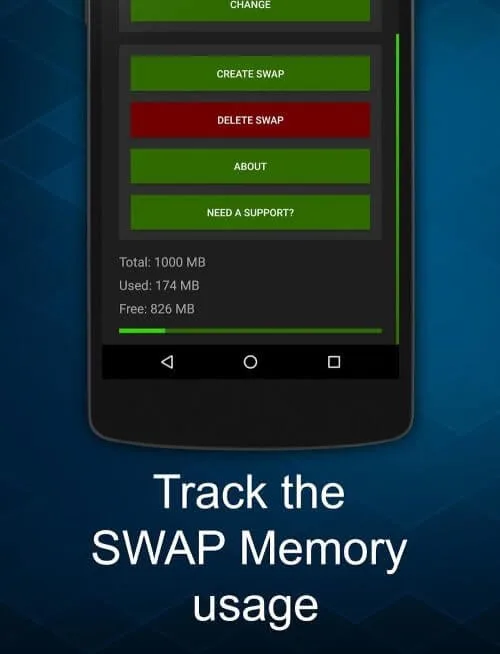
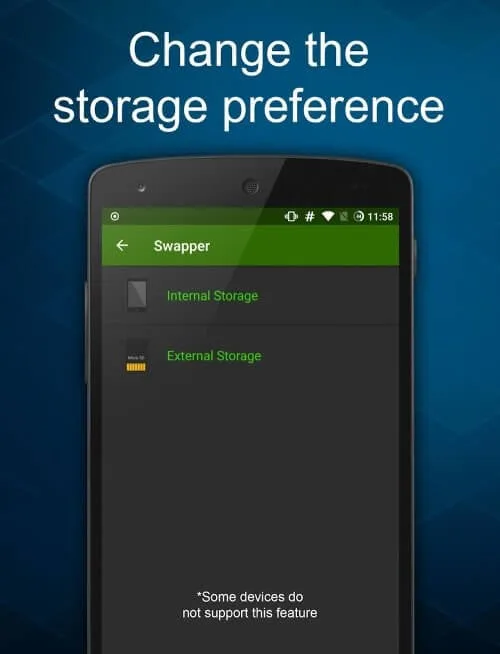
The application encourages regular users to make compelling suggestions that the program can adapt or implement. These contributions can be created and activated concurrently with the program’s installation. However, the only thing that can’t be changed is to move the SD Card’s SWAP memory. These adjustments will not be possible for some devices. For this reason, the application has developed a sensor that allows location search, saving the user from searching for the widget and turning it off. If you’ve created a swap, but the data bar is still at 0, there’s nothing to worry about. This app doesn’t update and display them yet because the device doesn’t require swap memory. The system calculates and displays the most accurate number when the user changes the priority.
Check settings when you want to delete apps
Swap activity won’t appear in device settings because it’s fake RAM. So users will not be able to locate them in the device’s controlled memory list but can only manage swap operations when accessing Swapper – ROOT. And it will work with applications to get access and processing rights to data. Therefore, the user cannot delete the program after enabling the swap memory for the device. To ensure that his Android smartphone does not interfere with the deletion of the exchange, the user should check all settings very carefully. If you want to delete an app the next time you visit, restart it and try deleting it again. The way to activate this application is also straightforward; clicking or munching “Enable swap” so the user can turrets the serially.
Conclusion:
Swapper is an essential application for Android users with storage limitations. It allows users to enhance their device's memory by creating a swap file, which serves as additional virtual RAM. This improves overall performance and helps run more applications smoothly. Manufacturers typically allocate a fixed amount of memory for each device, but the app allows users to extend their storage capacity without hardware modifications. The app enhances the overall user experience using advanced toolkits and remarkable optimization technologies, making it an excellent solution for low-memory devices. It creates virtual RAM, which enhances multitasking and optimizes device performance efficiently. With an intuitive interface and robust functionality, it is an excellent tool for users who need more memory without upgrading their hardware. This app is a must-have for improved performance if you own a low-memory device.








