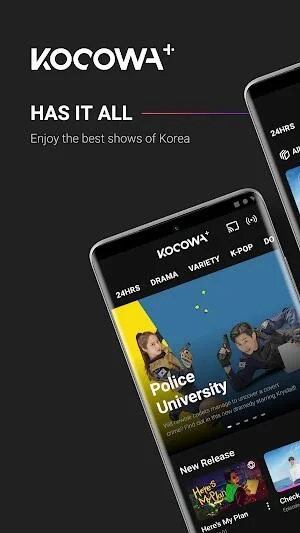
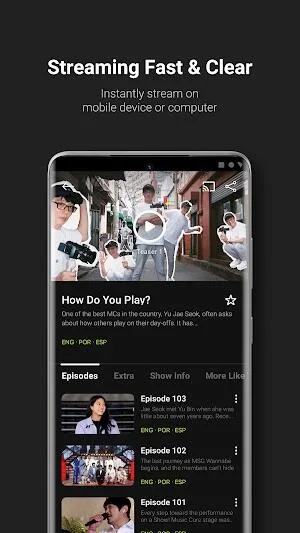
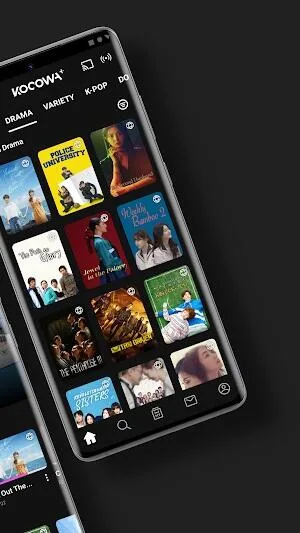
KOCOWA is a film and television software designed specifically for users in South Korea. Users can watch the latest and hottest Korean dramas, news, variety shows, live broadcasts, etc., and download their favorite works to their devices to watch anytime, anywhere. As the user's viewing time increases, the software will recommend film and television works that better suit the user's taste, helping users discover more treasure resources. At the same time, it will automatically block corresponding advertisements and pop-ups during the viewing process, creating the most comfortable film and television environment for users. The software will also continue to add more types of film and television resources to keep users fresh. What are you waiting for? Come download the software and start your own film and television journey!
Click to load YouTube / 点击加载视频
YouTube ↗Movies:
Korean Dramas: Enjoy all-time favorites like Coffee Prince, The Heirs, Descendants of the Sun, The Weightlifting Fairy Kim Bok Joo, Hwarang: The Poet Warrior, and more. Do not miss the most-talked-about Korean Dramas like The Penthouse, Weak Hero Class 1, My Dearest, Taxi Driver, Dr. Romantic, A Tale of Lady Ok, and The Real Has Come!, among others.
Korean Movies: Discover the most popular Korean movies like Along with the Gods, Train to Busan, The Wailing, The Beauty Inside, A Taxi Driver, and more.
Korean Variety Shows: Watch the fastest subtitled episodes of the biggest variety shows like Running Man, Home Alone, and The Manager, plus variety shows starring K-Pop artists like BTS’ In The Soop, Welcome to NCT Universe, EXO's Travel the World on a Ladder, aespa's Synk Road, Nana Airbnb with SEVENTEEN, and so much more.
K-Pop: Indulge in special performances, debut stage performances, and LIVE comebacks from K-Pop idols like BTS, BLACKPINK, Stray Kids, SEVENTEEN, Twice, EXO, and NCT, on K-Pop music chart shows, behind-the-scenes documentaries, and Variety and talk shows.
Useful Tips:
Use the Search Functionality: This application has an advanced search functionality that allows you to easily find the content you are looking for. You can search by channel, genre, or keyword to quickly pull up the shows and movies you want to watch.
Project to TV or Second Screen: You can easily connect your device to a TV or other streaming device for bigger and better viewing. This way, you can enjoy your favorite shows and movies with friends and family.
Adjust Playback Settings: You can customize your playback settings in the app to optimize your viewing experience. For example, you can adjust the video quality or turn on subtitles if you prefer them.
Download Content for Offline Use: If you are going to be without internet access for a while, you can download any shows or movies you want to watch for offline viewing. This way, you can enjoy your favorite content even when you are not connected to the internet.
Turn on Notifications: To stay updated on the latest shows and movies, you can turn on notifications. You will get instant alerts when new episodes are added to the library.
Browse by Category: The Kocowa APK library has a wide variety of content from different channels, including comedy, drama, sports, news, and more. To easily find what you are looking for, ensure you browse by category when you open the app.
User Reviews:
In general, I like the app just fine. Some of the functionality issues I had were either added recently or newly documented in a way that made them obvious and usable. The biggest issue I have is how impossible it is to manage what you’re actively watching. The episodes list in the app doesn’t show any check marks or progress bars and the history is too limited and erases itself regularly. So if I’m binging a show, it’ll kick the last viewed episode of any other series I’m watching off the list in fairly short order. Or, if I have a stretch of a few days where I’m not able to watch anything on KOCOWA due to real life requiring that I come up for air occasionally, the watched list will be erased entirely and then I have no way to find out where I left off if I can’t remember off the top of my head until the next time I can access the site on my desktop. That’s really my biggest frustration. Otherwise, the app functions reliably and well on my phone.
Have a paid monthly, wanted to switch to yearly. Now, I'm doubtful about either. Was going to show someone the benefit of it since it can end the weekend off laughing BUT after choosing a show, being told to BUY. Decided to see what happens if I chose buy, it says I'm a monthly subscriber. It won't even let me buy it. Did the restore purchase, cleared the cache. Submitting a help request now. Next is to delete the app. 1 star for having last week's #runningman episode less than a day after broadcast. Hopefully, I can edit the review if things are resolved.
Hello! I love this app! I saw a lot of comments about the ads and to her honest it is kinda annoying but like it’s easy to get over. Im 15 so I don’t really have a way to make money yet and a lot of k-drama apps like to make every k-drama movie they have a plus or a special k-drama. I don’t want to actually tell the app that I’m implying this to but I think you know. In order to get to watch majority of their shows you need a pass to watch. Me being 15 I can’t pay for that and my parents won’t pay for something that won’t entertain all of us as well. While I do have their app I’ve seen some of their movies that are in need of a pass to watch it and on your app it’s free! I kinda laughed at this because they have to pay for those when they could come here and watch it! Im not saying I hate or that I don’t like that app altogether, but I just don’t like the amount of plus and standard movies there are. I’m pretty sure that app is worth the money however in my opinion I will always stick with this app! I want to show my appreciation for this and how grateful I am to be able to find this app! I Love It!
FAQs:
How to Make your Favorites List
Start the KOCOWA channel
Select a series that you wish to make your favorite
Press the '*' button on your Roku remote controller
Once the series is set to 'Favorite', you will see the '*' mark right below the image.
How to Download Episodes?
While using the mobile app, please follow the steps below to download the episode to your device and access the downloaded videos:
After signing in, navigate to the page of the show you wish to download
On the title's page with the episodes list you should see 3 dots next to each listed episode. Press on these dots and select the "download" option
The download will start in the background of your phone
To watch the downloaded video while offline, make sure you are logged in on your account before going offline
When offline, open the app, navigate to the "My KOCOWA" page -> "Download" and select the video you wish to play
If you are not able to see this option even though you have purchased a premium subscription, please make sure to log out and back in to the account that contains your subscription.
How to use a premium pass
Here are guidelines to use a premium pass:
- Click the ‘Premium Pass’ button on the top-right menu.
- Type in the premium pass code in the textbox below, and click "Apply"
- If the coupon was applied successfully, you will see the message "COUPON APPLIED SUCCESSFULLY" in the message box on the top right
- Fill out your payment information to complete the coupon & payment process, and click "Checkout"
- Enjoy your premium pass on KOCOWA!
Why Don't you Ever Answer to My Email?
We mostly answer your inquiries during business hours -- Monday through Friday, 9:00am to 6:00pm(Pacific Time) -- and try to answer to every ticket we receive within 1 to 5 business days.
Customers complain that we never answer usually when:
Leaving us an invalid email address by mistake -- there is no way for us to respond back
Setting emails from KOCOWA in the spam folder as 'filtered' -- they never realize emails from KOCOWA are getting filtered
The first thing you need to do after submitting an inquiry to the Help Center is to check your email if you have received a notice email. We have set a trigger to send you an automated notice email when a VOC(Voice of Customer) ticket is submitted. If you have received it, that's good. You probably will receive an answer within 1 to 5 business days.
If you haven't, please check if you created a welcoming environment to KOCOWA emails, which means that you need to unspam emails from KOCOWA.
Conclusion:
Known as the top streaming app for Korean culture lovers. From classic dramas to the latest shows, the software offers a rich entertainment experience with many genres such as movies, K-Drama, K-Pop, and popular variety shows. With a high-quality multilingual subtitle system, you can easily follow your favorite content without worrying about language barriers.