

Samsung Smart Switch is your Galaxy's smart assistant. With this app, you can conveniently manage contacts, music, photos, calendar, text messages, device settings, and more—all with one tap, eliminating the need for re-configuration. Samsung Smart Switch helps you save the important information on your Galaxy device. You can quickly transfer and back up important files, even backing up your Galaxy's custom settings. Download Samsung Smart Switch and start using this specially designed app!
Click to load YouTube / 点击加载视频
YouTube ↗Overview:
Samsung Smart Switch is a mobile application designed to facilitate the transfer of data between devices, specifically for users transitioning to a new Galaxy device. This app is particularly useful for individuals who want to move their contacts, messages, photos, music, and other important information from their current device to a Samsung Galaxy smartphone or tablet. Available for the Android platform, users can easily download Samsung Smart Switch to streamline the migration process.
Features:
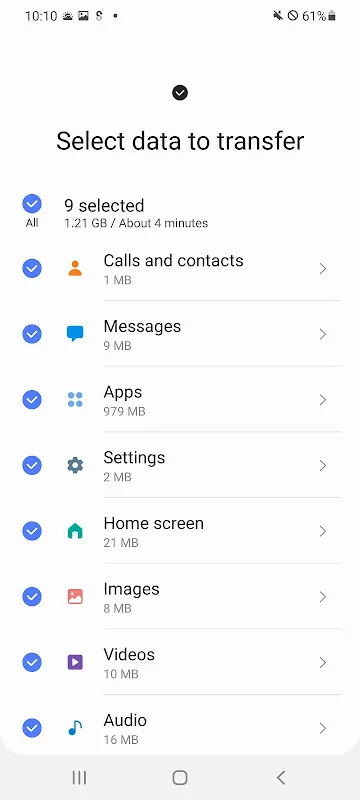
The application supports a variety of data types for transfer. Users can move contacts, calendar information, messages, photos, music, videos, call logs, memos, alarms, Wi-Fi settings, wallpapers, documents, and even app data, although some features may be limited to specific Galaxy devices. The app provides a seamless experience for users switching from both Android and iOS operating systems.
For Android users, the app is compatible with devices running Android 5.0 or higher. This broad compatibility ensures that a large number of Android devices can utilize the service to transfer their data. The transfer process is efficient and user-friendly, allowing users to select what data they wish to move and complete the process quickly.
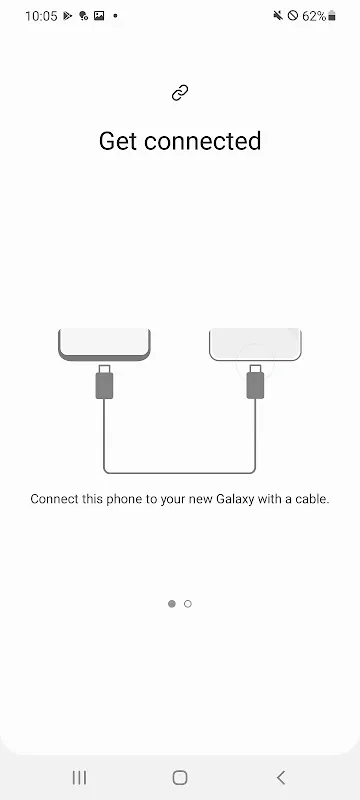
iOS users are also supported through various transfer methods. Those with iOS devices running version 5.0 or above can utilize a wired transfer option, which requires an iOS device cable and a USB connector. Alternatively, users can import data from iCloud if their device runs iOS 4.2.1 or higher and they have an Apple ID. For those who prefer using a computer, the app is compatible with iTunes on both PC and Mac, enabling users to transfer their data effectively.
The Smart Switch application requires a minimum of 500 MB of free space on both devices to initiate data transfer. This requirement ensures that there is adequate storage for the data being transferred. Users experiencing connectivity issues with non-Samsung devices are advised to adjust their Wi-Fi settings to enhance the transfer process.
Highlights:
One of the significant advantages of Samsung Smart Switch is its ability to suggest similar apps and help users find their favorite applications on Google Play. This feature is particularly beneficial for users who are not familiar with the Android ecosystem and are looking for alternatives to the apps they were using on their previous devices.
The app also allows users to transfer home layouts and app data, but these functionalities are restricted to Galaxy devices that are upgraded to the M OS, specifically from the Galaxy S6 and newer models. This capability provides a personalized touch to the new device, allowing users to maintain their preferred layout and settings.
For security and functionality, the app requires various permissions, such as access to contacts, SMS, call logs, and storage. These permissions are essential for the app to perform its functions effectively, ensuring that all data is transferred securely and without loss.
Advantages:
Samsung Smart Switch is designed to make the transition to a new device as smooth as possible. Its user-friendly interface allows individuals to navigate through the transfer process with ease, minimizing the technical barriers that some users may encounter. The step-by-step instructions provided within the app guide users through the various methods of transferring data, whether they are switching from another Android device or an iOS device.
In addition, the app's ability to transfer data over a wireless network or via a direct connection adds to its flexibility. Users can choose the method that best suits their situation, making it a versatile tool for data migration. The application effectively addresses the common challenges faced by users when changing devices, ensuring that important data is preserved throughout the transition.
Conclusion:
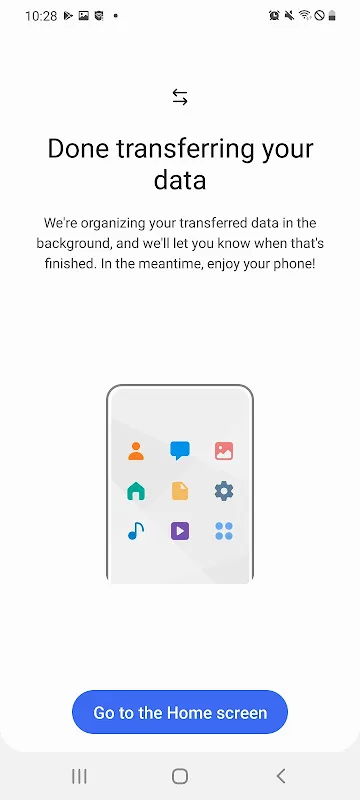
By focusing on the specific needs of users moving to a new Galaxy device, Samsung Smart Switch offers a practical solution that simplifies the process of data transfer. Its wide range of supported data types, compatibility with both Android and iOS platforms, and various transfer methods make it a valuable resource for anyone looking to switch devices.
For further information about the app, visit Samsung's official website at http://www.samsung.com/smartswitch.








