
Invoice Maker is a simple and efficient tool app. It helps users easily create professional invoices, estimates, and purchase orders in seconds, using ready-made templates. Users can track invoices, receive real-time notifications, and offer clients multiple payment options. Ideal for small business owners, sole proprietors, and more, this app syncs data across devices and works offline, automatically syncing to the cloud when you reconnect. Download Invoice Maker now and start printing invoices with ease!
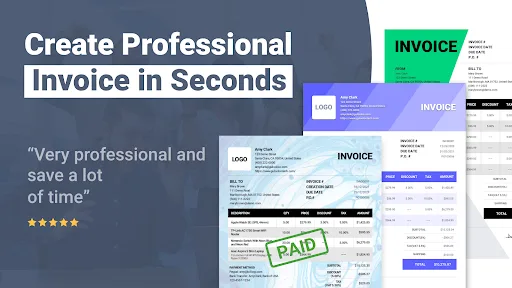
Features:
Generate invoices automatically, suitable for many needs
Before starting the invoice creation process with Invoice Maker, users need to clearly define what their invoice creation needs are. The expression of the invoice types will also change depending on the user’s purpose of use. To start creating invoices, simply click on the “Create Invoice” button displayed on the main screen. Then add some other necessary information to make the invoice more complete, including payment time and point, customer name, amount to pay, item name, and more.
A special feature is that creating invoices through this application is completely free and saves maximum operation when used. Therefore, even if you are a novice, you can easily create complete invoice templates through this application. Overall, this application can meet the needs of creating invoices in many different industries easily. In addition, users can choose to send invoice files via smartphones to customers or print them on paper to ensure transparency.
Meet the needs of use anywhere
With Invoice Maker, users can print invoices anywhere and anytime through available templates. Of course, you will not be able to design the invoice according to your needs, because the invoice needs to show the information and regulations from the company. Therefore, please consult the needs of your superiors before using this application to print any invoice.
Besides the important price lists available, users can also easily add a business logo or a leader’s signature to create a complete invoice. In addition, Invoice Maker also supports users to be able to view the invoice they are creating in real-time to make it easier to change the content before exporting the file or sharing it.
Support printing, backing up invoices quickly
After successfully creating an invoice with this application, the user will have 4 different forms to back it up or share it. Includes Send, Print, Export, and Share features. Each form has advantages and disadvantages, but in general, their main function is still to support users to store invoices conveniently. In certain cases, the generated invoice will not be compatible with several different formats. Therefore, you should directly convert it to a PDF file so that it can be easily accessed by any device.
Intuitive display interface
Like most applications on mobile platforms, Invoice Maker has a relatively intuitive design that allows users to easily access it. Most of the features are represented by different icons. So you won’t get confused when using them. Accordingly, the color system in this application also gives users a comfortable feeling through a lot of different colors presented on the screen. In general, the interface is an important highlight to help this application achieve much success at present.
Benefits:
Invoice from your phone, tablet or computer, work on your own or together with colleagues in this bill maker
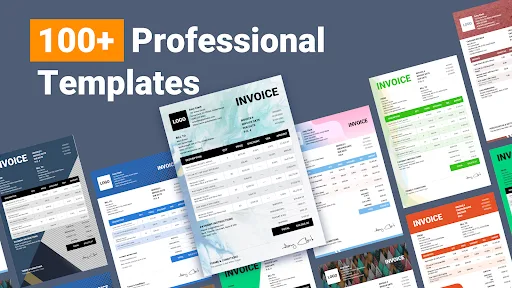
Create unique invoices for business or estimates with more than 500 background images for your invoice template
Upload your own background image for you bills and estimates
Add your logo or signature to your invoice and quote
Share an invoice & estimate via all apps capable of sharing (SMS, MMS, Skype, WhatsApp, etc)
Use the integrated reports to check on your sales, customers, payments, items or report on Sales Tax invoices. You can also create accounting and bookkeeping documents
Easy and quick ways of looking at your invoices & quotes by customer or in categories such as “Unpaid” or “Overdue”
If you are offline, you can create invoices but you can only send them when you are online
Add photos when invoicing or estimating
Copy old invoices and quotes to work quicker
Add contractual terms, drawings or project plans in Word, Excel and PDFs to any invoice and quote
Import and export data to Excel
Receive a copy of all invoices and estimates to your company's email address
Select from 35 languages and any currency
You can convert an estimate to an invoice
Flexible pricing
Record item cost and report on profitability
Sales Tax can be disabled or enabled when invoicing
Multiple Sales Tax rates for items with a summary on each tax invoice
Capture the signature of your customer on invoices and estimates with your phone or tablet
Full payment functionality including pre- and part payments and credits when invoicing
Set credit terms per customer
Send out receipts or include payments when invoicing
Print the invoice and estimate from your PC, Mac or your phone

Conclusion:
Invoice Maker is an easy and reliable app that allows users to create invoices, estimates, and bills quickly. It offers customizable invoice templates and the ability to generate invoice reports. The app also includes features such as automated payment reminders and receipt making. Users can track invoices, receive live notifications, and offer multiple payment options to clients. AtomInvoice is suitable for small business owners, contractors, and self-employed individuals. It can be used offline and data will automatically sync to the cloud. The app is widely used by various industries, including electricians, carpenters, painters, and movers. Users can create up to three documents for free per month, with unlimited options available for paid users.








