KineMaster is a powerful video editor that incorporates AI technology to help users efficiently create their favorite works. KineMaster is a user-friendly app that requires no technical skills and is easy to use. Whether you're seeking inspiration or creating freely, KineMaster provides you with the best resources and intelligent tools. Download KineMaster and make your work stand out quickly!
Click to load YouTube / 点击加载视频
YouTube ↗Features:
Here you’ll find all the exciting features that the game has to offer:
Intuitive interfaces with multiple-layer editing
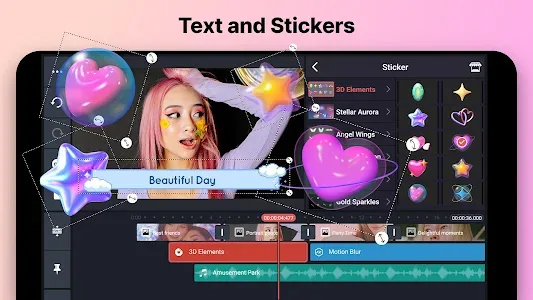
To start with, you now able to edit your videos in multiple layers, which allow users to effectively make uses of the available customizations. The intuitive interfaces make it extremely easy for you to position your edits and make changes to the videos. Feel free to add images, stickers, special effects, text, handwriting, and more. Preview the videos as soon as you add in your changes to have a complete view of the final products. Have a complete look to the videos and their edited contents with just a quick look at the interfaces. Decide and make your changes with ease whenever you want.
Reverse your videos to create unique settings
And to make your videos a lot more interesting, Android users are also allowed to make simple changes to their editing by completely reverse the videos and all of its content. This includes all the available edits that you’ve made, and therefore, making the videos extremely fun and interesting to look at. You can now flip or reverse your old videos and add many interesting elements to it.
Make uses of the blending modes to create beautiful effects
As you dive into the world of video making in KineMaster, the app also provides a variety of different blending modes and filters that you can make uses of. Feel free to make uses of the available blending options to create crisp, stunning, and beautiful visual effects on your videos. And at the same time, completely change how your videos look and feel with the available color filters. Make your video stand out and extraordinary at the same time.
Multiple sound adjustments on your videos
Together with the available visual customizations, the app also comes with multiple sound adjustments that you can have on your videos. These include voiceovers, background music, voice changers, and sound effects, which would allow you to make complete changes to the videos. Feel free to add certain customizations and adjustments to your videos as you try to alter its audio. Try out different settings to changes your overall impressions.
Useful editing tools for your videos
And at the same time, you can now make uses of the intuitive and useful editing tools on your devices, which would allow for effective uses of the video editor. That’s said, here, you can easily edit your videos by trimming, splicing, and cropping certain parts of the videos. Make various changes to each and every section of the entire videos as you want.
Commit certain customizations on your videos and enjoy convenient editing with KineMaster. And combined with the intuitive touch controls, you would find the game being more effective and convenient than those on PC.
A huge library of editing materials
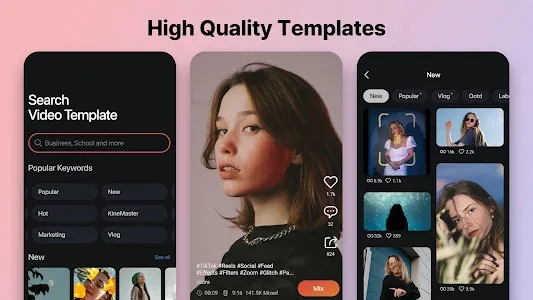
And of course, to assist you in editing videos, the app also provides a huge collection of different editing materials. Here, you can make uses of the available music, clip graphics, fonts, stickers, transition effects, and many more features on the app. Feel free to change how your videos would look and feel with the available editing materials. And stay eager for new updates with each and every update of KineMaster.
Highlights:
Adjust the speed on your videos
As you dive into the editing interfaces on the app and make uses of its features, you can also make changes to the frame speed in each part of the videos. Therefore, enabling various changes with speed control for time-lapse or slow-motion effects. Thus, it’s possible to create fantastic pieces of videos with KineMaster. This is where real arts are made.
Control the audio with intuitive EQ settings
For those of you who’re interested, the app will let you make detailed changes to the audio with the intuitive EQ settings. That’s said, with multiple EQ presets, you can quickly change the sounds, adjust the volumes, and tune the sounds in various aspects for more enjoyable audio.
Add motion to each layer
And if you wish to make your videos more interesting, it’s also possible for users to add certain motions to their videos. Feel free to adjust the animation for each layer and change how you perceive the videos with these awesome settings.
Export high-quality videos and quickly share your videos
And last but not least, after all those interesting editing and customizations, you can easily export the video to the highest quality of 4K and at 30FPS. This, surprisingly, is quite close to the standard quality of those high-quality videos that were edited using PC. And once the videos is complete, you can easily share them on many social channels or online drive to show your friends, such as YouTube, Facebook, Dropbox, and more.
Free to use
Surprisingly, despite having all those amazing features, the app is still free for all Android gamers to enjoy on their mobile devices. That being said, you can easily download KineMaster APK from the Google Play Store without having to pay anything.
Unlock full features with our mod
However, since the app is still a freemium item, you would need to pay for certain in-app purchases in order to use the full version. This can be quite troublesome for many users. Hence, you might want to take a look at our modified version of KineMaster, which features removed watermark, advanced editing features, and more. All you need to do is to download and install the KineMaster Pro APK from our website instead. Follow the provided instructions and start enjoying the brilliant app to the fullest.
Tips:
As a smartphone video editor, the app doesn’t come with any specific requirements. Users are free to use KineMaster on their mobile devices to edit videos and clips with little limitations. However, you should be mindful that editing videos will require your devices to have a capable hardware. And more specifically, devices with multi-core processors will work better for the job.
Hence, you might want to consider your device’s capabilities before editing certain videos, since adding too many effects and customizations can put a lot of stress onto your phones.
Conclusion:
For those of you who’re looking for a decent FilmoraGo alternative, you wouldn’t find a better option than KineMaster anytime soon. That’s said, the video editor offers a variety of useful editing options that can completely change your in-app experiences. Make uses of the huge library of editing materials, useful options, and features to effectively change how your videos would look and feel. But most importantly, feel free to have access to the full version of KineMaster on our website for absolutely free.