
Download Adobe Scan now and start using it! This trusted scanning tool is the most reliable mobile scanner on the market. Adobe Scan supports scanning receipts, notes, documents, photos, business cards, whiteboards, and more. Use Adobe Scan to fully meet your professional and academic needs. You can also store your files securely in the cloud and share them instantly with anyone.
Click to load YouTube / 点击加载视频
YouTube ↗Brief Introduction:
Adobe Scan is a powerful and easy-to-use document scanning application that allows users to convert paper files to electronic formats with simple operations, supporting two main file formats: PDF and JPEG.
Features & Highlights:
Diversified file type scanning:
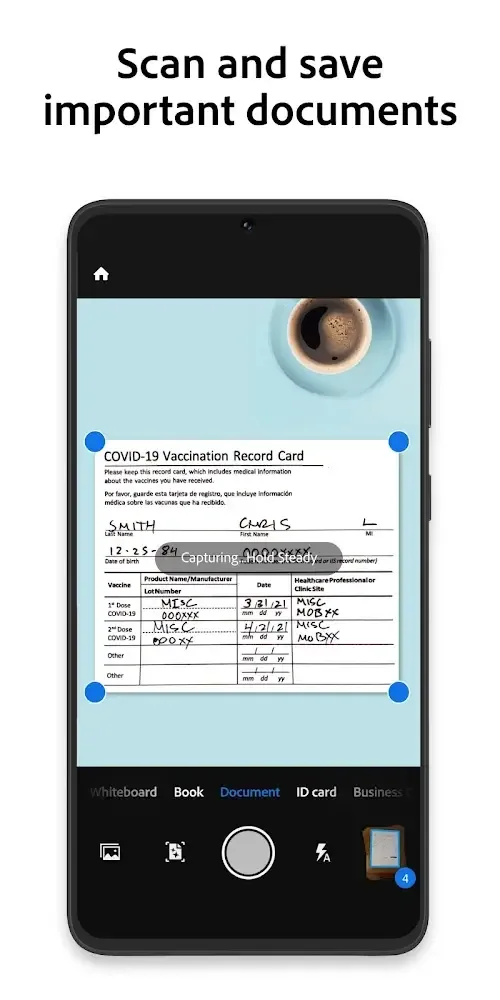
Adobe Scan supports scanning multiple types of files, including but not limited to book pages, business cards, printed documents, etc., and provides specialized scanning modes for different types of files.
Efficient batch scanning and merging:
Users can scan multiple documents at once and merge them into one PDF file, which is particularly useful when dealing with multi page documents.
Book mode:
Specially designed book mode for scanning book pages. This mode can automatically recognize and segment pages, allowing users to easily transfer and read their favorite book content on Android devices.
File compression and sharing:
In the new version, Adobe Scan has added file compression functionality to help users reduce file size for quick sharing.
Information extraction:
When scanning business cards, the application can not only capture images, but also extract the information on them, making it convenient for users to save contact information.
Cloud platform support:
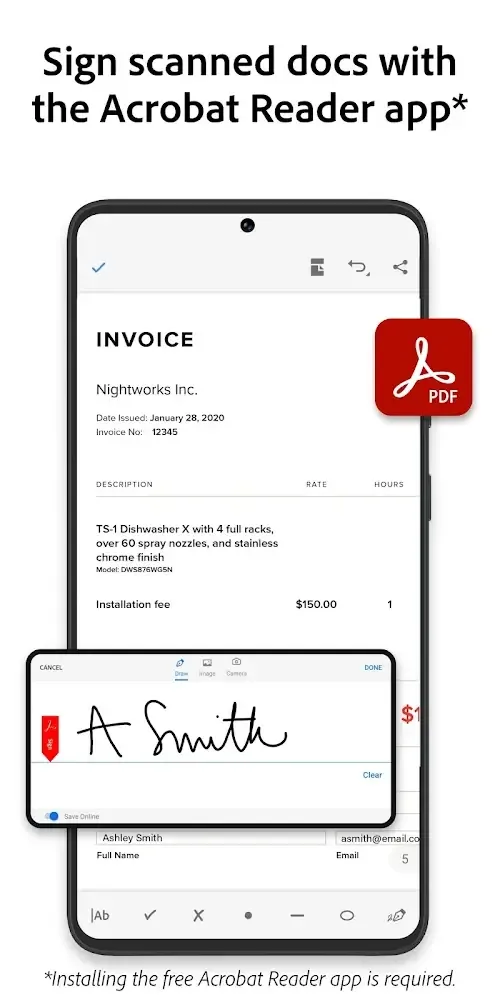
Users can easily share files through the application's cloud platform, and also perform operations such as signing and copying on scanned files.
Editing function:
Users can edit the file after scanning, such as adjusting colors, selecting recognition areas, etc., to ensure the quality of the final output.
User friendly:
The design of Adobe Scan is intuitive and user-friendly, making it easy for even novice technicians to get started.
Advanced features:
The advanced version provides more features, such as an increased single scan page limit (from 25 pages to 100 pages) and stronger file compression capabilities.
Main Function:
ADVANCED OPTICAL CHARACTER RECOGNITION FOR EXTRACTING AND EDITING TEXT
Adobe Scan makes it completely easy to convert any printed file into a scanned file, and this can be done anywhere as long as you have a smartphone and documents. The way to use the application is completely simple because you will feel the intimacy when using it. In other words, this app has similar features to a photo editing feature and requires users to take a quality photo before going through features like filters. At the same time, you will also be amazed and surprised to see the images you uploaded completely transformed into a scanned file to meet your work needs.
Easily export information: Users can gather or retrieve important information from paper copies to corresponding PDF versions.
Save a lot of time: Instead of having to retype all the content, you should let the application help you retrieve the necessary elements using OCR.
SEAMLESS CONVERSION TO UNIVERSAL PDF FORMAT
In Adobe Scan, users will need to follow the steps to have a complete quality scan file. First, the image quality needs to be sharp and completely balanced in terms of composition, as you will need to ensure all content and angles of the document are properly captured in the photo you take. Perfect and uncut. In addition, you can have two options: feel free to let the application do all the subsequent work, or you can edit it completely manually. This requires the user to be completely careful because sometimes the auto-correction feature does not meet your needs, and you have to angrily edit it using the corresponding features.
Adobe support: Through scanning, the application creates PDF files that can operate stably on any device.
Compatible with many platforms: Developers create links between devices to make work more stable and smooth.
MOBILE SCANNING ON THE GO WITH A SMARTPHONE CAMERA
Once you have a file, you can push it to image files or PDF files, and PDF will often be the optimal choice and suitable for the working environment. At the same time, scanning and exporting files is absolutely not the only function that this application can do; it also has other features, such as text scanning. OCR is what will support text scanning, so when you use the application, you can get the information of the printed file completely quickly. From there, you will be happy not to have to retype the entire text from scratch; you just need to take the content and edit it according to standards. Anyone will like this because it creates speed in the working process and minimizes text typing tasks.
Can scan anywhere: Without being dependent on a specific device, users can share files on any platform.
Compact and convenient: With a smartphone, storing and organizing documents is easier than ever.
Advantages & Benefits:
IMAGE ENHANCEMENT TOOLS FOR OPTIMIZING SCANS
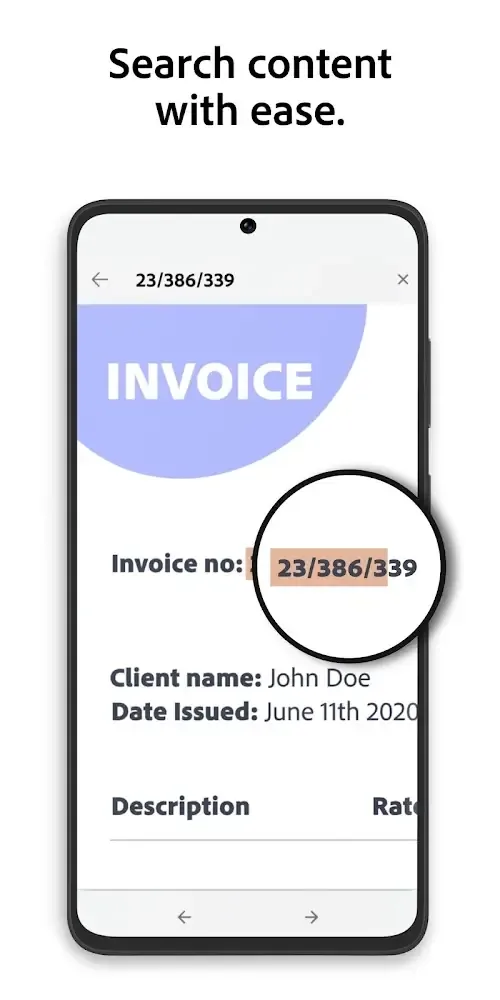
The OCR feature not only stops at recognizing text and exporting text according to the user’s wishes but can also help them scan the necessary information. Some necessary information and important details in the file can be searched completely easily. Therefore, you just need to type in the necessary keyword and then wait a few seconds, and the application will quickly send the results to you based on OCR support. You will be able to check any files you scan and will feel secure that they do not have any errors.
Change document elements: Before creating a finished product, you can crop, rotate, and sharpen the content to make it recognizable.
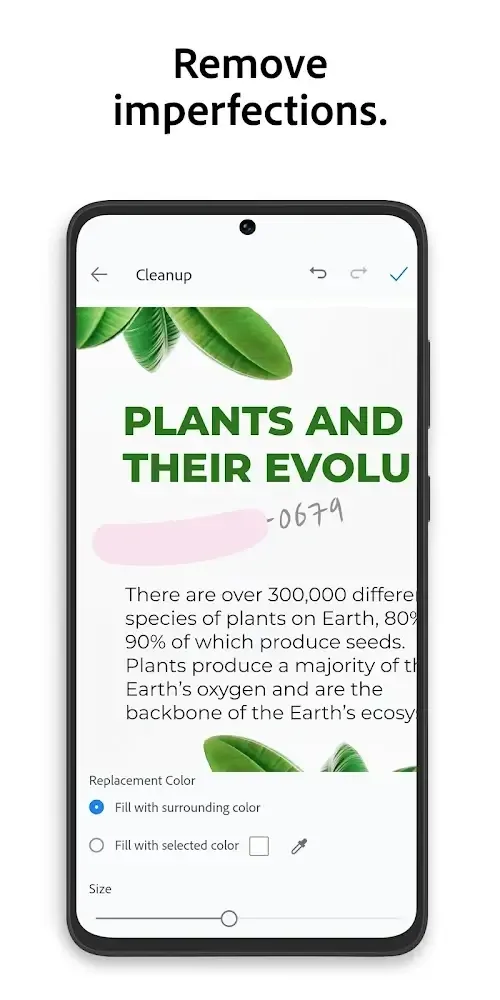
Increase quality: Users can freely add edits to resemble a machine-generated file and restore bad elements.
Optional in editing: With the features on the screen, you can use them all until you feel satisfied.
CLOUD STORAGE AND SHARING FOR SEAMLESS COLLABORATION
Besides scanning important information in documents, the application also supports a number of additional features to make using scanned files more convenient. The scanned file is not only a file used to send during work, but it can also become a sample file. This comes from lost files when anyone will feel tired of retyping lost files from the beginning based on existing printed files. Of course, this will not need to be repeated as everything will be resolved by deleting the necessary information, and from there, you will have an empty file of information. You can store files that have deleted this information for future use.
Cross-platform sharing: Cloud websites created by Adobe themselves will be a complete storage space to protect document safety.
Compatible with applications: With elements in the developer ecosystem, information processing becomes faster.
Convenient information sharing: Users can easily send scanned files to colleagues to save time with simple tasks.
Summarize:
Adobe Scan is a powerful support tool that can help you complete the process of processing and scanning printed files easily. Users can turn any printed file into a scanned file with just a few simple steps that anyone can do, and diverse storage features suit different situations. In particular, throughout the experience, users can fully take advantage of what the OCR feature can do and make the most of the content of printed files that are within their reach. So, this is a solution to help you get rid of boring text typing tasks!