

Brother Mobile Connect is an excellent yet simple tool designed to help you easily configure your printer from your mobile device. It allows you to configure your Brother printer, crop and print photo documents, scan files to your mobile device, save history, manage ink and toner levels, customize layouts, and more. Use Brother Mobile Connect to streamline your work, simplify complex tasks, and make your printing tasks easier and more reliable!
Click to load YouTube / 点击加载视频
YouTube ↗App Features
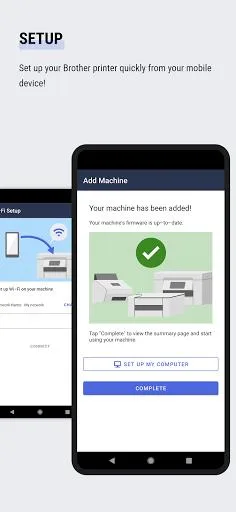
Setup: Easily set up your Brother Printer from your mobile device.
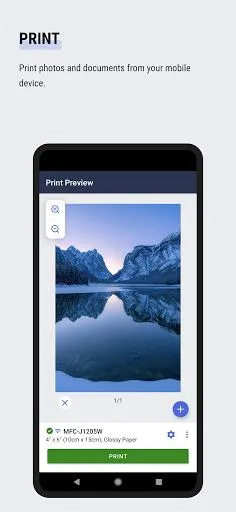
Print: Print photos and documents directly from your mobile device, with the ability to trim photos before printing.
Scan: Scan photos and documents directly to your mobile device in PDF or JPEG format.
Copy: Change copy settings and start copying documents from your mobile device.
History: Save scanned data in your device history for future use, with options to print, share, or save previous scans.
Management: Check ink and toner levels from your mobile device and easily purchase Brother Genuine ink and toner.
Core
- Setup
Set up your Brother printer from your mobile device.
Print photos and documents from your mobile device.
Trimming photos before printing is possible.
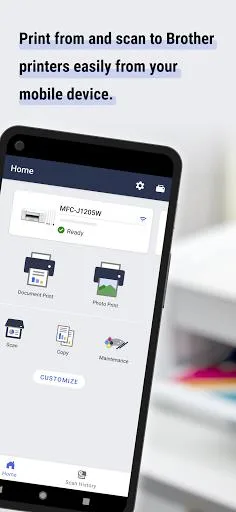
- Scan
Scan photos and documents directly to your mobile device. (PDF/JPEG)
- Copy
Change copy settings and start copying documents from your mobile device.
- History
Save scans to your device history.
You can print, share, or save previous scans.
- Manage
Check ink and toner levels on your mobile device!
Purchase genuine Brother ink and toner using the app.
*Not available in all countries/regions.
- Customize
Arrange your home screen the way you want for quick access to frequently used features.
- Notifications
Receive information about supplies and services*
*Not available in all countries and models.
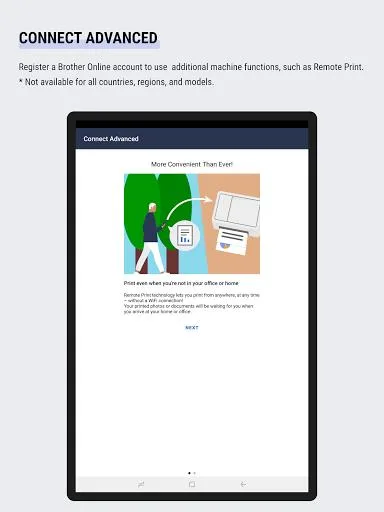
- Connect Advanced
Register for a Brother online account to access additional machine features, such as remote printing.
*Not available in all countries, regions, and models.
Outstanding Function
Easily manage your printing needs anytime, anywhere with the Brother Mobile Connect app. Designed to effortlessly connect to compatible Brother printers, it's a versatile tool that helps you print, scan, copy, and adjust printer settings right from your mobile device.
Set up your Brother printer with ease, eliminating the hassle of traditional operations. Experience the convenience of quickly printing photos and documents, even cropping photos before printing to ensure the perfect size. Scanning is just as easy, saving directly to your phone as PDF or JPEG.
The in-app copy feature simplifies adjusting settings and initiating document copies. All scans are neatly saved in your device's history, making them easily accessible for future reference, sharing, or storage.
Maintaining your printer has never been easier. Monitor ink and toner levels and purchase genuine Brother products as needed for optimal printer performance (some regional restrictions apply).
Customize the home screen for easy access to frequently used features. Notifications provide updates on supplies and service information, but these features may vary by region and model.
To access additional features like remote printing, register for a Brother online account, though features may vary by location and model.
When you integrate this support tool into your daily work, you'll benefit from a customized experience for both personal and professional use, taking advantage of the various features unique to each printer model.
Real User Reviews
It's legitimately insane that my brother printer has scanning settings that are just absent from this mobile app. It's so easy to scan from the smartphone, but I'm capped at a lower dpi than I want... for seemingly no reason. And the PC scanning app has a higher dpi than that machine settings! it's wild! there's absolutely no consistency between UI modes!
I used this without issue initially. Now it wants me to authenticate, but my printer doesn't respond when I follow the directions indicated by the app. I have been trying for weeks. I sent an email to tech support for the app a few weeks ago and got no reply. I just sent another today. In the meantime, I've had to go pay to print at Staples. Where is tech support??
used to connect to my Motorola phone. Won't connect with my new OnePlus 12, which is a flagship phone. Brother can't seem to help me fix it. Their SETUP CONNECT software won't access the Internet. They are telling me it's my phone. Nor can the printer find my IP address. Reinstalled software per their instructions. No resolution of these problems.
Worked absolutely fine up until yesterday. Today it's completely refusing to connect to the phone that it knows is there. Nothing has changed. I've spent the whole afternoon uninstalling and reinstalling everything to no avail. Exceptionally difficult to set up in the first place... The printer is now completely useless as we use it for tablets and PCs. Edited to add, it's no use keep replying to comments with please contact us ... There's clearly an issue that needs a fix!
seems fine. I'm printing from a different room. I don't hear it printing. I wanted to save the file and print later just in case it didn't print, but don't seem to see the option. will try another way Still trying to get some reasonable use out of this printer. Definitely my least favorite in my many years of IT. Unable to save info in PDF format when online. Still unable to send or receive a fax. Ink is extremely expensive and is used up due to an auto cleaning process. Can't find help.
Conclusion
With the Brother MobileConnect app, users can conveniently set up and manage their Brother Printer from their mobile device. The app offers features such as printing, scanning, copying, and ink/toner management, making it a versatile tool for both personal and professional use. Additionally, the customizable home screen and notifications feature enhance user experience and ensure easy access to frequently used functions. With the app's user-friendly interface and convenient features, it is a must-have for Brother Printer owners. Click the link below to download the app and start enjoying its benefits today!








