

DevCheck is a powerful mobile tool that quickly reads basic phone information and monitors the CPU and GPU frequencies in real time. It collects this data and regularly sends it to users, generating analysis reports and improvement suggestions to improve the speed and smoothness of their phones. The software is constantly being updated, adding more practical features while staying current with the current version. Users can look forward to it.
Click to load YouTube / 点击加载视频
YouTube ↗Features:
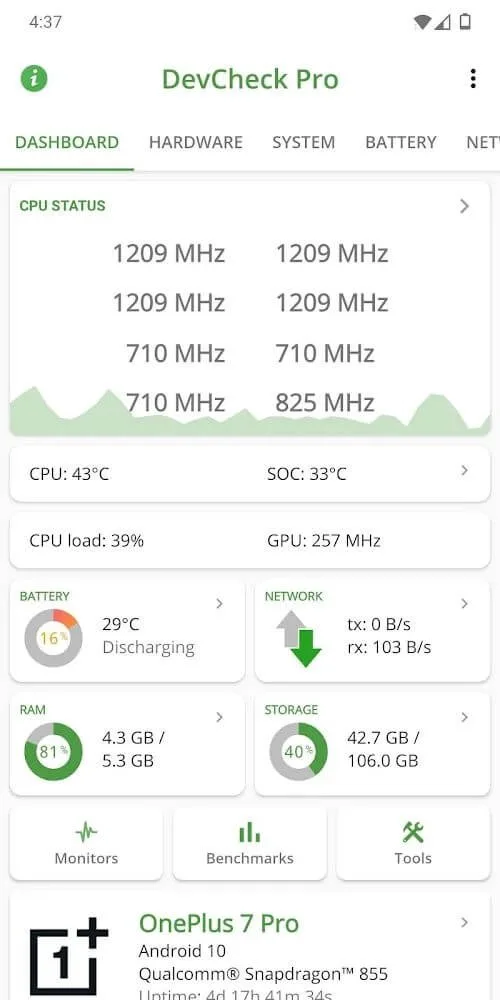
Pilot Floating Monitors: DevCheck Pro gives the user access to floating monitors with real-time information such as the CPU frequency, the screen refresh rate (FPS), battery temperature, charge and so forth. It allows users to maximize performance both through apps and games by providing real-time on-screen stats and it is ideal among gamers and beta testers.
Battery De-mo Charging Info: Monitor battery temperature, discharge/charge rates and check of your fast/super-fast charger is giving the advertised number of watts. Determine whether it is the charging problem of the wire, adapter, or gadget. It also detects real-time battery cycles, current capacity and health.
It has a full system hardware review: DevCheck includes precise information regarding CPU, GPU, RAM usage, SoC and even build day. It is the most excellent device to check device specifications such as NPU or screen refresh rate or processor. Is able to work on various handsets such as new RedMagic and Samsung phones.
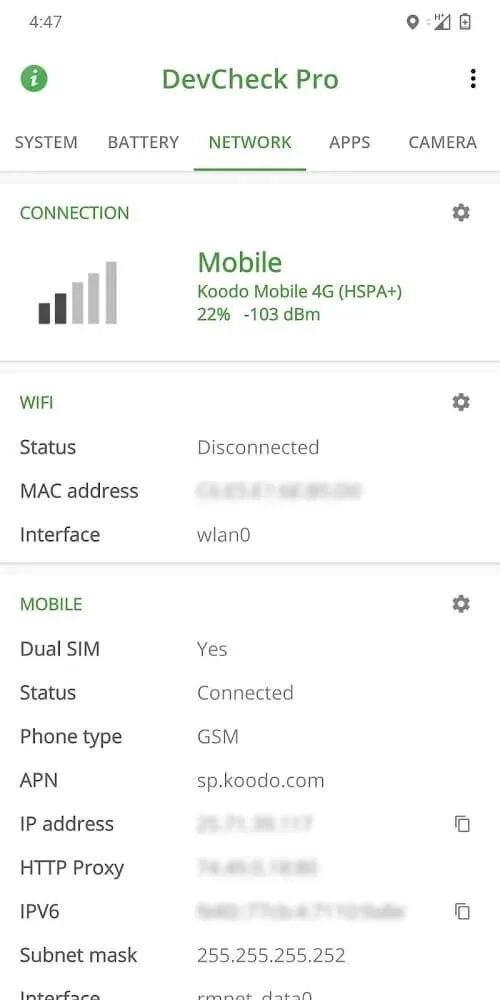
Pro Network & Wi-Fi Stats: View complete network information such as signal strength and data connection information. Though your Wi-Fi chipset information, such as manufacturer, might not always be apparent, DevCheck does display nearly everything else you might need to know about how your phone uses its wireless radio to talk to networks and other Wi-Fi hotspots nearby.
Detailed camera & Device information: Get on the hardware level and find out camera specifications of your phone that even official websites do not have. Whether it is camera sensor specs, or internal build up, DevCheck gives out the precise hardware specifications of your device—buyers, testers, and refurbishers can all make use of it.
Highlights:
Learn more about the available hardware on your system: In the Hardware menu, Android users will have the option to discover the in-depth details regarding the SOC (System-on-chip), CPU, GPU, RAM, system storage, Bluetooth, and many other available hardware on the system. Learn all the details that you wish to know about them, including model numbers, names, manufacturers, architectures, cores, and many other info with just a simple tap on the certain items. Check on the current status of each hardware no matter if they’re operating or not to fully discover their data, which can be quite useful in many cases.
Discover all system info relating your devices: For those of you who are interested, you can now freely discover all the information regarding your Android system, which can really come in handy. Learn about the codename, brand, manufacturer, bootloader, serial number, Android version, security patch levels, kernel models, and many other related system info. All of which will be available in the System menu for you to quickly look for.
Monitor and keep check of the battery: With the built-in battery info now available in DevCheck Hardware and System Info, Android users can enable real-time monitoring of their battery and power consumptions on the system. Learn about the current capacity of the battery, its temperature, current health, voltage, technology, and so on. With the collected information, you can further optimize your batteries and make settings to enable the best run time with each full charge.
Discover many useful network info: For Networking managements, you can now show the detailed info regarding your Wi-Fi and mobile cellular connection using DevCheck Hardware and System Info. Keep check of the current internet statuses on your devices, featuring both IPv4 and IPv6 connections, detailed connection info, service providers, phone number, network types, and many others. Feel free to keep checking this information if needed.
Learn more about your apps: At the same time, feel free to have full management over the different apps that are running on your Android devices, thanks to the in-depth information that the app provides. Discover all the current apps that are being installed on your Android devices. Keep check of their current stages to learn about active and in-active apps on the system. Check for the hardware consumption on each of your Android apps to learn more about their operations and study how you can optimize the system performances on your devices.
Functions:
Detailed Specs: The application can access deep and advanced technical parameters of the hardware in your phone, from CPU, GPU, memory, device memory, and more. All will be provided in a detailed and clear way for you to grasp.
Real-time Monitoring: The application will monitor your device’s memory every second and minute, and if there is a problem or error, the application will immediately notify you so that you can promptly resolve and handle it.
In-depth System Analysis: In addition to basic information, the application also provides in-depth information on each memory in the device for you. You do not need to go to professional stores to see advanced information anymore, but now you can see it right on this application.
Advanced Testing Tools: The application will also regularly test the hardware in your device, from internal memory to camera, to ensure that these parts are still working well and do not have any problems when you use it, giving you a perfect and meticulous user experience.
Useful Tips:
Customize Your Widgets: Add widgets to your home screen to make it even easier to see real-time data. You can track the CPU, GPU, or network usage right from your home screen.
Monitor Battery Health: Keep an eye on the battery section to track how well your phone’s battery is holding up over time.
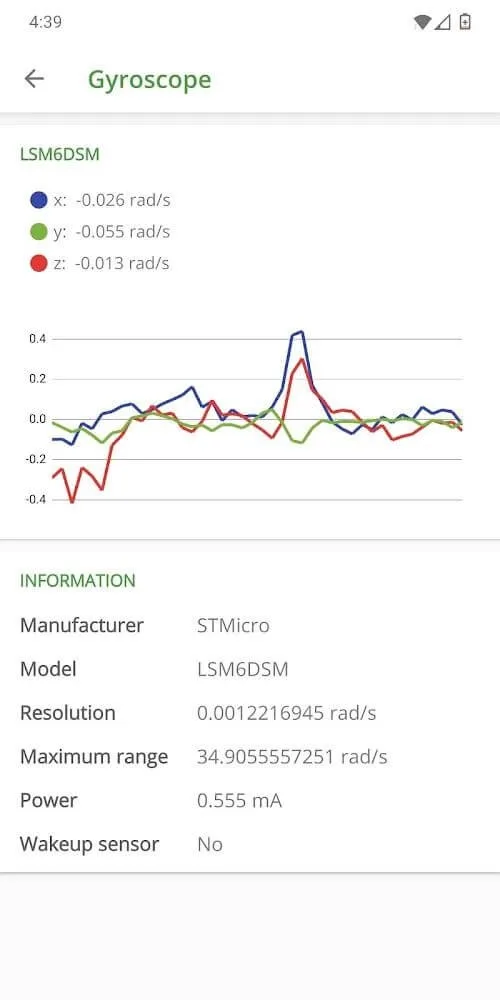
Check Your Sensors Regularly: DevCheck Pro shows live data from all your phone’s sensors. Use this to make sure everything is running right, from the GPS to the accelerometer.
Test Your Camera and Network: Use the app’s tools to check if your phone's camera and network are working properly.
Real-Time Data Alerts: The app keeps you updated on your phone’s performance. You can get alerts for anything that needs your attention, like battery drain or overheating.
Final Thoughts:
Because of the characteristics of mobile devices, it will be more difficult for users to find important parameters of the device they own. These parameters can be device information or hardware information to help users get a more general overview of their device. In addition, it also has the ability to identify potential risks in the machine or help us know which part of our machine is having problems, thereby providing a timely solution. In general, this application will act as a doctor to help users predict the condition of the device and also help users handle existing problems if required and if they can meet those requirements.








