

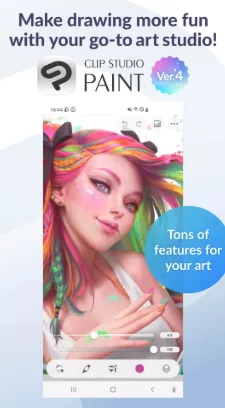
Clip Studio Paint is a powerful and expressive digital comic illustration tool. Download the Android app here and enjoy a rich selection of drawing tools and exceptional drawing techniques. Suitable for both professional artists and beginners, Clip Studio Paint's intuitive and user-friendly interface allows you to quickly learn how to draw comics and illustrations, and create stunning works of art. Clip Studio Paint includes pre-defined graphics, a vast library of resources, and detailed tutorials and tips, giving you ample creative flexibility. Experience Clip Studio Paint, a drawing software tailored to your needs, and experience it for you!
Click to load YouTube / 点击加载视频
YouTube ↗Surprising Performance
Get inspired with our powerful drawing tools
Download over 270,000 free and premium assets from other creators, including a variety of brush textures
Adjust lines with your finger or stylus, no undo required!
Quickly create ideas for layouts and perspectives using 3D primitives
Customize brush textures, shapes, dual brush settings, color blending, spray effects, and more to create your perfect brush
Clip Studio Paint's brush engine, rich assets, and useful features give you complete control over your art!
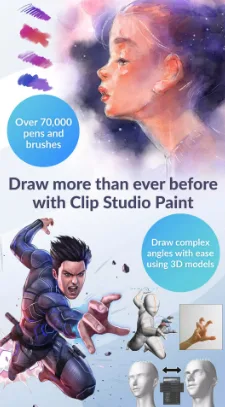
We've got the right brush for you! Access over 70,000 brushes (free and premium) from artists around the world in our exclusive Asset Store!
Enjoy the ability to paint in vector form and enlarge your artwork without losing quality
28 layers of effects to embellish your artwork
Perceptual color mixing lets you blend colors like real paint
Enjoy the traditional feel and create flawless drawings using vector graphics!
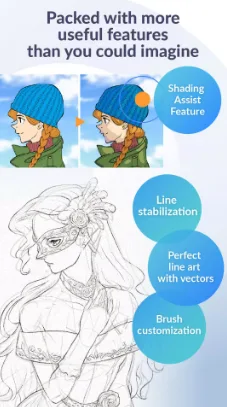
Draw smoother line drawings with the Line Stabilization feature.
Draw on vector layers and use control points to stabilize your lines.
Set flat colors with the Smart Fill tool.
Create stunning backgrounds by simply snapping your lines to guides for correct perspective.
Get the most out of CSP
We recommend the following device specifications to easily use advanced features like 3D tools and edit large files. If you're unsure, try the free trial or contact customer service.
Clip Studio Paint is also super easy to start drawing right away!
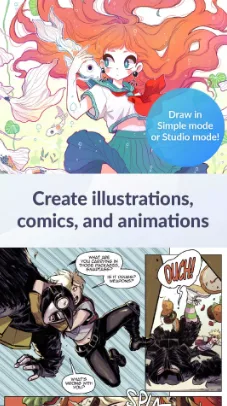
CSP has two drawing modes!
Start drawing quickly with Simple mode.
Use Studio mode and access all the features of Clip Studio Paint.
Free tutorials on the Clip Studio Paint website and YouTube channel help you hone your skills.
Thousands of user tips covering every imaginable topic.
Bring your comics, manga, or webtoons to life with the app loved by professional comics creators.
Instantly create dialogue, frames, and action lines.
Customize and save character faces and sketch figures.
Instantly add shading with Shading Assist.
Preview your webtoon on your smartphone.
Manage multiple pages in a single file (EX).
Become an animator, even on your current device!
Create anything from GIFs to full animations.
Add sounds, camera movements, and tweens.
Excellent Function
Create up to 10,000 layers for detailed artwork
Posing 3D models to create tricky angles
Liquify across multiple layers to instantly adjust line art and color
Use gradient maps for greater color control
Capture challenging gestures with live video for drawing reference
Adjust your drawings with Puppet Warp
Quickly place objects using the snap feature
Record time-lapses and share your creations on social media
Engaging Features
Before using Clip Studio Paint, you need to register for a user account. This process is simple and takes only a few minutes, but you do need a valid email account. After registering, you'll also receive up to three months of free subscription. The differences between subscription tiers are displayed on the app's Home tab.
Clip Studio Paint's interface will be familiar to users of design apps like Adobe Illustrator, Procreate, or Krita. It boasts hundreds of features and tools, giving you complete creative freedom. In fact, a major draw of the app is its user-generated content, with tens of thousands of brushes and various assets available for download completely free of charge.
Clip Studio Paint is one of the best design and drawing apps on Android. Due to its extensive features, it can be a bit intimidating for non-experts. But don't worry: anyone can master its capabilities in just a few days. You can also find dozens of diverse tutorials on its official YouTube channel.
User's Comments
I've never experienced a brush engine so smooth and buttery in my LIFE. I had been struggling with ibisPaint X's simplistic one for 5 years, but once I decided to take a shot at Clip Studio Paint, it was over for me. I bought the subscription (only $3.99/mo for me, which I'm fine with!) and never looked back. My art has leveled up and I am so incredibly pleased! Clip Studio is so worth it!!
It's an awesome app! I think 30 hours a month for free is reasonable. It's pretty easy to use, great brush variation too. There are no ads, either! Since I have used this app, I have not used Ibis Paint X is a while. I love both apps, don't get me wrong, but I absolutely LOVE Clip Studio. You can download a lot of brush sets, too. Also to import an image you hold the button that you use to add a layer. Overall, I LOVE this app! I very much recommend this app to people. Good experience on my end!
I honestly really like clip studio! I use the free version and thirty hours a month is fine for me. the most I've used in one month is 19. if you're more of a causal artist it'll be fine. there aren't any ads and I like that you can download brushes from people usually for free. the ui looks nice and clean and simple version is very easy to use. I also LOVE the pose models being added to simple mode because that's what I use. they are very fun and helpful. I highly reccomend this app!
Conclusion
All in all, Clip Studio Paint is a great choice if you're new to digital illustrator or comic book creation. It offers most of the tools and features you need to get started, and its one-time price is very affordable. If you can handle the lack of publishing tools and a somewhat cluttered interface, it's worth a try.








